
On Wednesday the account posted in a 40,000-member server without a problem. By Friday it is gone from the member list, and a fresh account signs in normally but cannot get into that one server. The password is right, the two-factor code works, the phone number never changed. None of that matters, because the block is not attached to any of them. It is attached to the address the connection arrived from.
That is what a Discord IP ban is, and it sits at a layer most people never look at. This piece covers what gets an address onto a block list, how to tell that apart from an ordinary account ban or a broken connection, which channel actually gets it removed, and why the same mechanism catches offenders and the office network next door.
What Triggers a Discord IP Ban?
Two parties can put an address on a block list, and they do not work from the same rules. Discord itself acts on platform policy. A server's own moderation team acts on that server's rules, and what they do has no standing anywhere else.
Platform-level action starts from the Terms of Service and the Community Guidelines, and it is often automated before a human ever looks at it. Server-level action starts from a moderator reading messages, sometimes from a bot flagging a pattern. Both can end up keyed to an address, but only the first one follows you across servers.
Common User Behaviors That Lead to a Discord IP Ban
The patterns moderators see most are not exotic. Message bursts that post the same link in a dozen channels within a minute. Bulk direct messages to members who never asked for them. Invite spam dropped into servers the account just joined. Several accounts signing in from one address within a few minutes of each other, each of them new.
Automation on a personal account belongs on that list, and so does a script that reacts to every message in a channel. None of it requires malice; a marketing tool left running overnight can produce the same pattern as a spam bot, and it gets read the same way.
Can a Discord Server IP Ban You?
Yes, but the scope is narrow enough that people regularly misread it. A server can block an account outright, and when the same address keeps reappearing with new accounts, the block can be attached to the address rather than the person. What that produces is a wall around one server. Your account still signs in, every other server still works, and the banned server treats the connection as if it came from nobody.
So can a Discord server IP ban you? Yes, inside that server and nowhere else. Two things follow from that. The first is that a server-level block is reversible by the people who applied it, so the request goes to that server's moderators. The second is that a server cannot touch your account standing elsewhere, even if it wanted to.
Server-Specific Rules That Can Get You an IP Ban
Every server writes its own rules, and they routinely go further than the platform guidelines. Some ban promotion of any kind. Some require an account to be a certain age before posting. Some treat a single unsolicited DM as grounds for removal.
Those rules live in the server's rules channel or its community page, and reading them after a ban is usually how people discover the clause they missed. A violation in one server carries no weight in another, which is why the same account can be locked out of one community and completely welcome in the next.
How Discord Detects Violations
Reports come first, because most enforcement starts with someone pressing the button. Around that sit signal patterns: how fast an account posts, how many servers it joined in the last hour, whether a group of accounts shares an address and an activity window, whether an invite link circulates through accounts that never talk to each other. Account age and verification status shift how much weight those signals carry.
The exact thresholds are not published, and guessing at them is wasted effort. What matters for anyone reading this is the shape of the thing: enforcement looks at behaviour over time and at relationships between accounts, not at a single message.
How to Confirm a Discord IP Ban
Before concluding that an address is blocked, rule out the two cheaper explanations. An account ban and a broken local connection both look like a wall from the inside, and both take less work to fix.
Signs That Indicate an IP Ban on Discord
The clearest test is a second account from the same network. If a new account signs in, loads other servers normally, and still cannot join the one server in question, the block is sitting on something the two accounts share. The address is the first candidate.
Cross-checking from a different network settles it. A phone on mobile data, a laptop tethered to it, a connection at a different site: if the same account joins from there without a problem, the account was never the target.
Error text is the weakest signal of the three. Discord's notices change wording, and the same restriction can surface as a generic "unable to join" message, a missing invite, or a server that simply does not appear. Treat the wording as a hint and the two tests above as the evidence.
Differentiating Between IP Ban and Network Issues
Three situations produce nearly the same symptom, and they need different responses.
| Account ban | Server-level address block | Local network problem | |
|---|---|---|---|
| Can sign in to Discord | No | Yes | Sometimes |
| Other servers load | No | Yes | No, or slowly |
| Same account on another network | Still blocked | Works | Works |
| New account from the same network | Blocked | Blocked | Often blocked too |
| Typical message | Account disabled notice | Cannot join this server | Connection or loading failure |
The row that separates the last column from the middle one is the third: a local fault follows the network, an address block follows the address. If both a new account and the original one fail from one network and succeed from another, you are looking at something on your side, not an enforcement action.
Tools to Verify Your Discord IP Status
Any page that prints your public address tells you what a server sees when you connect. Check it from the browser you use for Discord, then check it again from the second network, and compare the two. If they are identical, the second test was not a second test.
Location matters as much as the address itself. A lookup that places your connection in a city you have never been to usually means a shared exit, a carrier-grade NAT, or a VPN that is still running in the background. Knowing which one it is decides whether the block even makes sense.

Risks of Ignoring a Discord IP Ban
A Discord IP ban that is left alone does not quietly expire. It shapes what the account can do next, and it can reach further than the server where it started.
What an IP Ban on Discord Can Do to Your Account
Accounts that share an address and an activity window get reviewed together. That is not a claim about how any specific case will be decided; it is how the relationship between accounts gets read. An account with a clean history on the same network may still find itself restricted because of what another one did.
Creating a new account to get back into a server you were removed from is a separate violation on its own, and the Community Guidelines say so directly in item 19. It is treated as an aggravating factor rather than a workaround, which is the opposite of what most people assume when they try it.
How an IP Ban on Discord Affects Server Access
A server-level block costs you one community. You keep every other server, every DM, every call. Painful if that one community was where your work happened, but the damage is contained.
Platform-level action is the other scope entirely. It takes the account, and with it every server at once. The two situations are often confused because both present as "I cannot get in", which is why the tests in the previous section are worth running first. It is also why the question "can a Discord server IP ban you" gets two different answers depending on which layer the block sits on.
Long-Term Effects of an IP Ban on Your Discord Account
Enforcement history stays with the account, not the address. Changing networks does not clear it, waiting a month does not clear it, and a new account inherits none of the goodwill the old one had built up. Age, verification and clean history are the things that make an account look ordinary, and a replacement starts at zero on all three.
Steps to Resolve a Discord IP Ban
Resolving a Discord IP ban comes down to who applied the block, and picking the wrong route wastes the only attempt most people get.
Immediate Actions to Take After a Discord IP Ban
- Stop creating accounts from the same network. Every new one adds a data point against you.
- Save the exact notice, with a screenshot and the time it appeared.
- Identify the layer: one server only, or the whole account.
- Ask whether anyone else on the same network is affected. A shared block is a different conversation from a personal one.
- Write one appeal, with dates and specifics, and send it once to the right place.
How to Contact Discord Support to Appeal a Ban
Discord's Terms of Service state that any enforcement action can be appealed, including terminations and suspensions, through the support form or the options inside the app. That is the channel for platform-level action, and it is the only one.
A server ban is not a support ticket. It belongs to that server's moderators, who can be reached through another account, a friend, or the server's public contact if it has one. Sending a platform appeal for a server-level block gets a reply that says exactly that, a week later.

What to Avoid When Appealing an IP Ban
Do not open a second account to rejoin the server you were removed from. Item 19 of the Community Guidelines names this directly, and it converts a single-server problem into a platform one.
Do not file the same ticket repeatedly. Duplicates get merged or closed, and the queue position does not improve. Do not pay a third party that promises to remove a ban; nobody outside Discord can lift a platform action, and the ones who claim otherwise are selling nothing. Do not edit a screenshot to make the timeline cleaner. The timestamps are checkable.
How to Prevent Future Discord IP Bans
Most repeat cases come from setup mistakes rather than from bad intent, which makes them fixable.
Best Practices for Discord Account Safety
- Turn on two-factor authentication, and keep the recovery codes somewhere other than the same device.
- Use a password that exists nowhere else. Credential stuffing is still the cheapest way into an account.
- Never share login details, even with a moderator you trust.
- Keep automation off a personal account. A self-bot breaks the guidelines regardless of what it does.
- Give each account a single purpose and a stable address, so activity patterns stay readable.
- Review authorised applications once a season and remove anything you no longer use.
Understanding Discord's Community Guidelines
There are two layers of rules and most people only read one. The platform layer applies everywhere: the Terms of Service and the Community Guidelines, both public and short enough to skim in ten minutes. The server layer applies in one place and can be stricter in any direction.
Reading the platform layer answers questions about appeals and account standing. Reading a server's rules channel answers questions about that community. When a ban arrives and the reason is unclear, the answer is almost always in whichever of the two you skipped.
How to Keep a Positive Presence in a Discord Server
Join a few servers at a time rather than twenty in an evening. Read the rules before the first message, not after the first warning. Ask a question in the designated channel instead of DMing strangers, because an unsolicited DM is the single most common trigger in large communities.
When a warning arrives, respond to it. Moderators who see an account acknowledge and adjust usually stop there. The ones who see the same behaviour continue after a warning escalate, and that escalation is what turns a temporary mute into a removal.
Why an IP Ban on Discord Is a Blunt Tool
Everything above assumes the block landed on the right person. A good share of the time it does not, and that is a property of the tool rather than a failure of any particular moderator.
Shared Addresses Catch the Wrong People
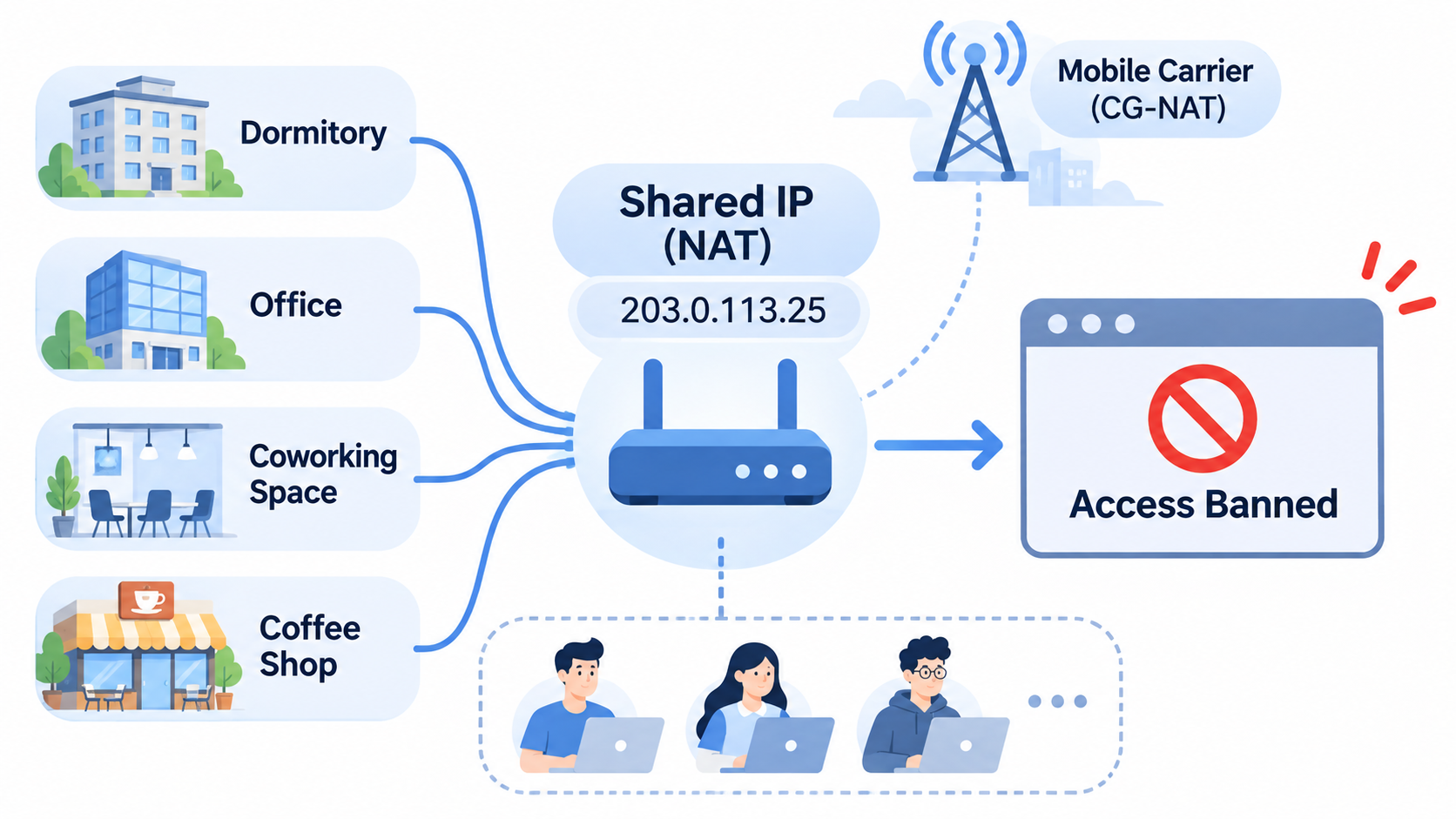
A dormitory, an office, a coworking space and a coffee shop all put many devices behind one public address. Mobile carriers go further and put thousands of subscribers behind a single carrier-grade NAT address at once. Block that address and everyone behind it loses access, including the people who never posted anything.
The person who gets caught is often the one who reports it, because they are the one with a working account and no idea what happened. From their side the ban is inexplicable; from the moderator's side it was one click on a shared exit.
When an Address Changes, the Block Stops Applying
Most home connections do not hold the same address indefinitely. A router reboot, a lease expiry, a switch between Wi-Fi and mobile data can all present a different address to the same server. When that happens the block stays on a record that no longer describes any live connection.
That gap is why an address block is a delay rather than a wall, and it is also why moderators cannot treat one as a solution. It buys time at the cost of accuracy, and the accuracy loss falls on bystanders.
What a Blunt IP Block Means for Server Moderators
An address block works best as a second layer. Ban the account first, because that is precise and reversible for the right person. Add the address only when the same pattern keeps returning from the same network, and log the reason so a later moderator can tell whether it still applies.
Reviewing those blocks on a schedule matters as much as applying them. An address block left in place for a year accumulates collateral, and the members it locks out have no way to discover why.
What Server Owners Can Do About Repeat Offenders
If a single address block is imprecise, the answer is not a bigger block. It is a record of behaviour that survives an address change.
Tools for Monitoring Member Activity in a Discord Server
The audit log records joins, leaves, bans, role changes and message deletions, and it is the first place to look when a pattern repeats. Member join timestamps clustered within a few minutes point to a batch. Message rate per channel shows a burst before it becomes a flood. A handful of moderation bots will flag accounts created within the last day, which is enough to route them to a manual check.
None of it needs to be automated to be useful. One moderator reviewing the audit log after a raid often finds the pattern that a filter missed.
How to Strengthen a Discord Server's Security Settings
Raise the verification level so a brand-new account cannot post immediately. Put a short gate in front of full access, a reaction role or a one-line introduction, and raids lose most of their value. Slow mode on the busiest channels costs nothing and makes a burst visible.
Layer the permissions: a role that can mention everyone is a role an attacker wants. Raid protection settings and a join-rate alert cover the case nobody is watching at three in the morning.
How to Teach a Discord Community the Rules
Pin the rules where a new member lands, not in a channel three clicks away. Repeat the two or three that get broken most in the welcome message, in plain language. Apply them the same way to a long-standing member and a new one, because visible inconsistency is what turns a rule into a grievance.
When a removal happens, say what rule it broke without publishing personal details. The rest of the server reads that as evidence that the rules are real, which does more for retention than any announcement.
How PuraRoute Keeps Separate Accounts on Separate Addresses
One piece of the picture is still missing. Everything so far describes a block landing on an address; the other half is keeping addresses from being shared in the first place, which is a configuration question long before it is anything else. A community manager running three accounts for three projects from one office connection is building the exact pattern that gets reviewed, whatever those accounts post. Two settings decide whether that pattern repeats: how long a session keeps one address, and where that address sits.
Session Policy for Discord Accounts That Stay Logged In
An account that is logged in all day needs an address that does not move. Rotating mid-session trips the same signals as a stolen cookie: the login is valid, the network changed, and the platform has to decide which of those to believe. PuraRoute keeps a dedicated static residential IP for the length of the subscription, with no traffic cap, and renewing keeps the same address rather than handing back a new one.
Rotation and Targeting for Discord Accounts That Move
The other half of the job is reach and location. An account that has to appear in a specific market needs an exit there, and a sequence of short tasks benefits from an address that changes between them rather than mid-session. Residential proxy exits run across 195+ countries and regions, with country, state and city targeting, and a session that rotates per request or holds sticky for a set window — the split covered in static vs rotating proxies.
What none of this changes is the account itself. A proxy moves where the connection exits; it does not alter account standing, device environment or how a platform reads a session. Using a different address to return to a server that removed you is still a violation under the Community Guidelines, and no configuration changes that.
Frequently Asked Questions About Discord IP Ban
How Long Does a Discord IP Ban Last?
Discord does not publish fixed terms for platform-level enforcement, so any number quoted as standard is invented. Server-level blocks last as long as the moderators leave them in place, which can be indefinitely or until someone reviews the list. In practice an address often changes before either expires, which is a detail about home connections rather than about the ban.
Can You Appeal a Discord IP Ban?
Yes, and the Terms of Service say so explicitly: any enforcement action can be appealed through the support form or in-app options. The appeal works better with dates, the exact notice and a plain account of what happened. A server-level block is not appealable to Discord, because Discord did not apply it; that conversation belongs to the server's moderators.
Does Changing Your IP Address Help With an IP Ban on Discord?
It changes what the server sees, and that is the whole of what it does. The account remains banned, the enforcement history remains attached to it, and rejoining a server you were removed from with a new account is named as a violation in item 19 of the Community Guidelines. Whatever address the connection uses, the account is still the thing that was removed.
What Happens If You Get Banned Again on Discord?
Repeat violations are treated more seriously than the first one, and the review widens to accounts that share an address or an activity pattern. A second removal from the same server usually ends the conversation there rather than reopening it. The practical consequence is that a first appeal is the one worth getting right.
Are There Legal Implications to an IP Ban on Discord?
Most of what happens on Discord stays inside the platform: account removal, server bans, appeals, and nothing further. Server rules are not law, and a moderator's decision is not a legal finding. Anything beyond that depends on what was actually done and where, which is a question for a lawyer rather than for a blog post.
Conclusion
The question that settles everything is whether the block is on the account or on the address. An account ban travels with the login and needs an appeal. A Discord IP ban works the other way: the account stays intact, the block sits on the connection, and it belongs to whoever applied it. Get that wrong and every later step is aimed at the wrong target.
Teams that skip the test tend to start with a new account, then a new address, then a support ticket written in frustration, and by the time the actual cause surfaces the case has three more violations attached to it. Run the two tests first, send one appeal to the right place, and fix the setup that produced the pattern. That order costs a day. The other one costs the account.
