

Anyone comparing proxy options faces one big question: what actually changes when you pick a forward proxy vs reverse proxy? Getting this call wrong can break entire workflows, traffic won’t route as needed, access controls may fail, or your network may open itself up to avoidable risk. Too often, people treat these terms as interchangeable, only to find out too late that the distinction is not just technical but critical for how requests move between clients and servers.
The catch is, both types of proxies sit between users and resources, but they serve opposite sides of the connection. Miss that detail, and you’ll waste time testing the wrong setup or expose sensitive assets without realizing it. The difference between forward and reverse proxy isn’t just about direction, it’s about who controls the proxy, who initiates the connection, and whose identity gets masked.
So before you start configuring access, you need to know which proxy fits your real use case. Are you trying to give users controlled internet access, or are you shielding your servers from direct exposure? The right answer shapes every technical choice down the line, from authentication to logging to compliance.
Let’s break down how each type works, where the boundaries really fall, and how to avoid the usual mistakes.
What Changes When You Use a Forward Proxy Instead of a Reverse Proxy?
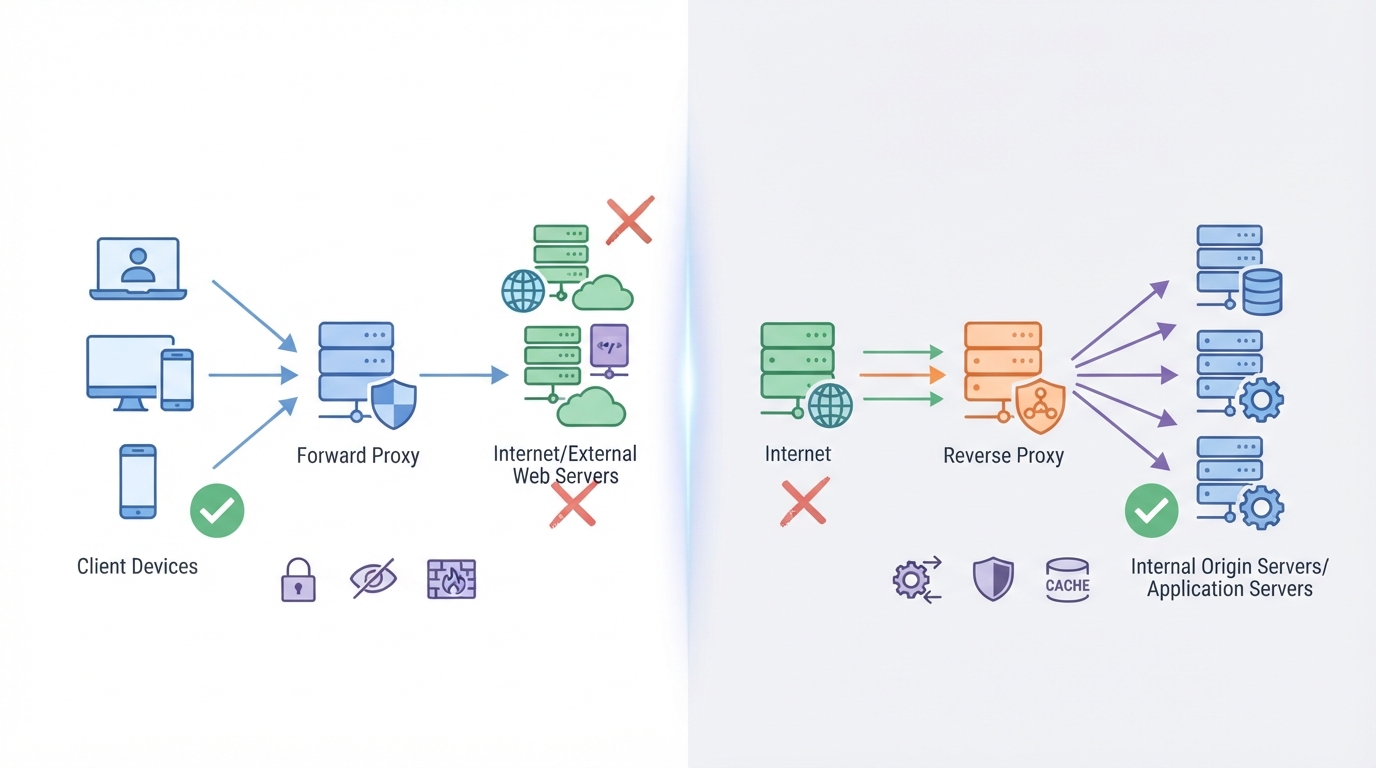
The big switch between forward and reverse proxies isn’t just the traffic direction, it’s who’s in charge and who’s hidden. Mix them up, and you’ll route traffic wrong or break your security model. Here’s how the setup and impact actually change.
How Does a Forward Proxy Work for Outbound Connections?
A forward proxy sits between users (clients) and the internet. When a user makes a request, it goes to the proxy first. The proxy then sends that request out to the web, gets the response, and hands it back to the user. This setup is used to control, filter, or mask outbound traffic.
| Aspect | Forward Proxy | Reverse Proxy |
|---|---|---|
| Sits between | Client and Internet | Internet and Internal Server |
| Hides | Client identity (from outside world) | Server identity (from outside world) |
| Typical use cases | Internet access control, anonymity, content filtering | Load balancing, SSL termination, app firewall |
If you use a forward proxy, you’re masking users and controlling their outbound access, not protecting servers from inbound traffic.
How Does a Reverse Proxy Work for Inbound Connections?
A reverse proxy sits in front of your servers, handling requests that come in from the internet. It can split traffic across multiple servers, block attacks, or manage SSL. All the outside world sees is the proxy, not the actual servers.
Reverse proxies are about defending and optimizing your infrastructure, not hiding users.
What Are the Key Differences in Control, Security, and Visibility?
A forward proxy is controlled by the user’s network and hides users from the web. A reverse proxy is run by the service provider and protects servers from direct exposure. Pick the wrong type, and you’ll either lose visibility into user actions or leave your backend wide open.
The main takeaway: forward proxies manage outbound access and user privacy, while reverse proxies secure and distribute inbound traffic to servers. Get the roles straight before you start configuring, or you’ll build the wrong controls.
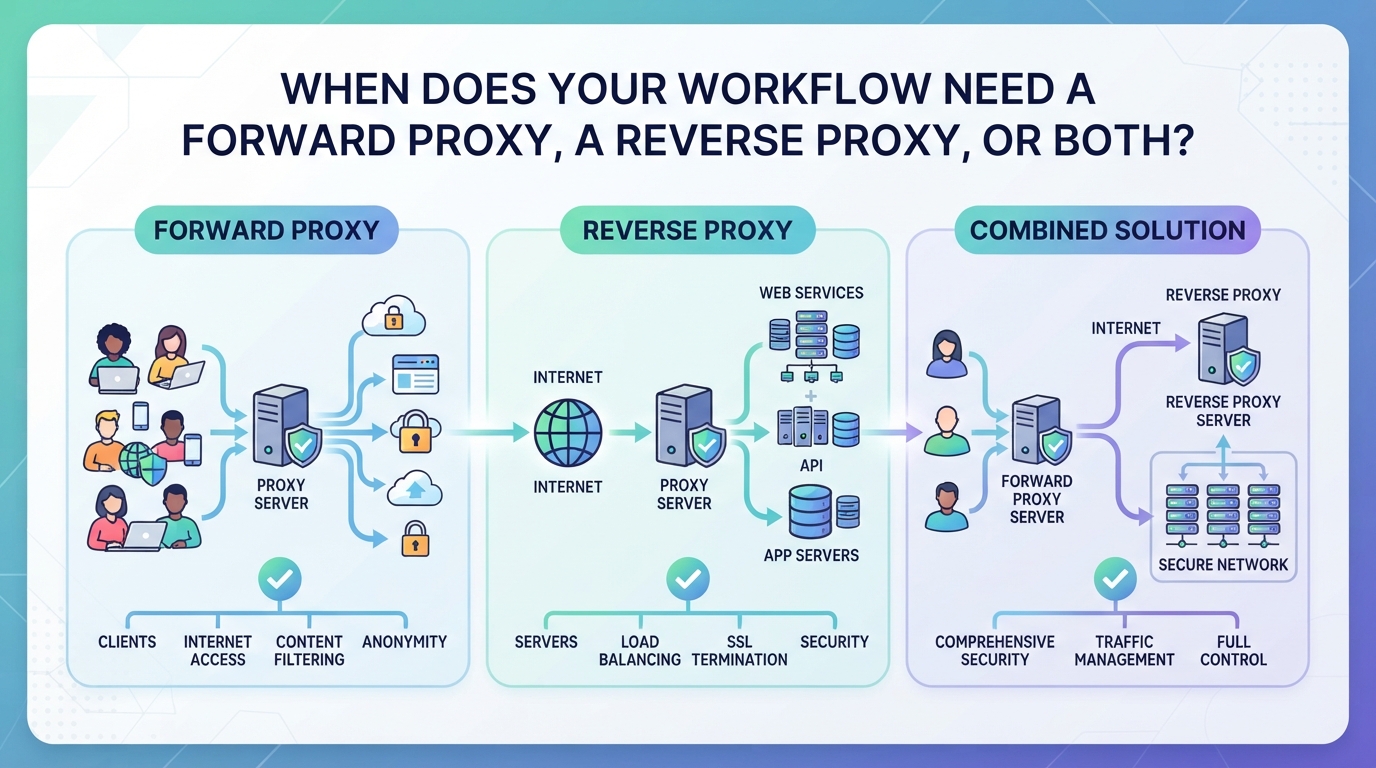
When Does Your Workflow Need a Forward Proxy, a Reverse Proxy, or Both?
Which Tasks Rely on Forward Proxies for Outbound Access?
Any time you need to control or mask outbound connections, like web scraping, automation, or managing user access to external resources, a forward proxy is what you set up. These are also used to bypass geo-blocks or log outbound traffic, not to protect your servers.
Which Scenarios Require a Reverse Proxy for Inbound Traffic?
Reverse proxies sit in front of servers to handle incoming requests. They’re the go-to for load balancing, hiding backend systems, or enforcing SSL and centralized logins. If you skip a reverse proxy when exposing web servers, you risk leaking real server IPs, making you an easy target for direct attacks or DDoS. For example, a retail site might run a reverse proxy to split traffic across several app servers, if the proxy fails, all requests could hit a single machine, crushing performance or even knocking the site offline. But reverse proxies won’t help you browse anonymously or control outbound user access; that’s not their job.
When Do Organizations Use Both Forward and Reverse Proxies?
- When both secure outbound user access and protect public-facing apps at the same time
- To keep user browsing activity separate from server-side traffic management
- For regulatory compliance that requires layered monitoring and access controls
If you mix up these roles, you’ll either leave a gap in coverage or waste hours troubleshooting why the wrong proxy type isn’t solving your problem.
The real test is mapping your workflow: outbound connections to external sites need a forward proxy; inbound protection and traffic distribution call for a reverse proxy. In large organizations, both often run side by side, but each serves its own purpose.
How Can a Proxy Service Platform Support Outbound Forward Proxy Needs?
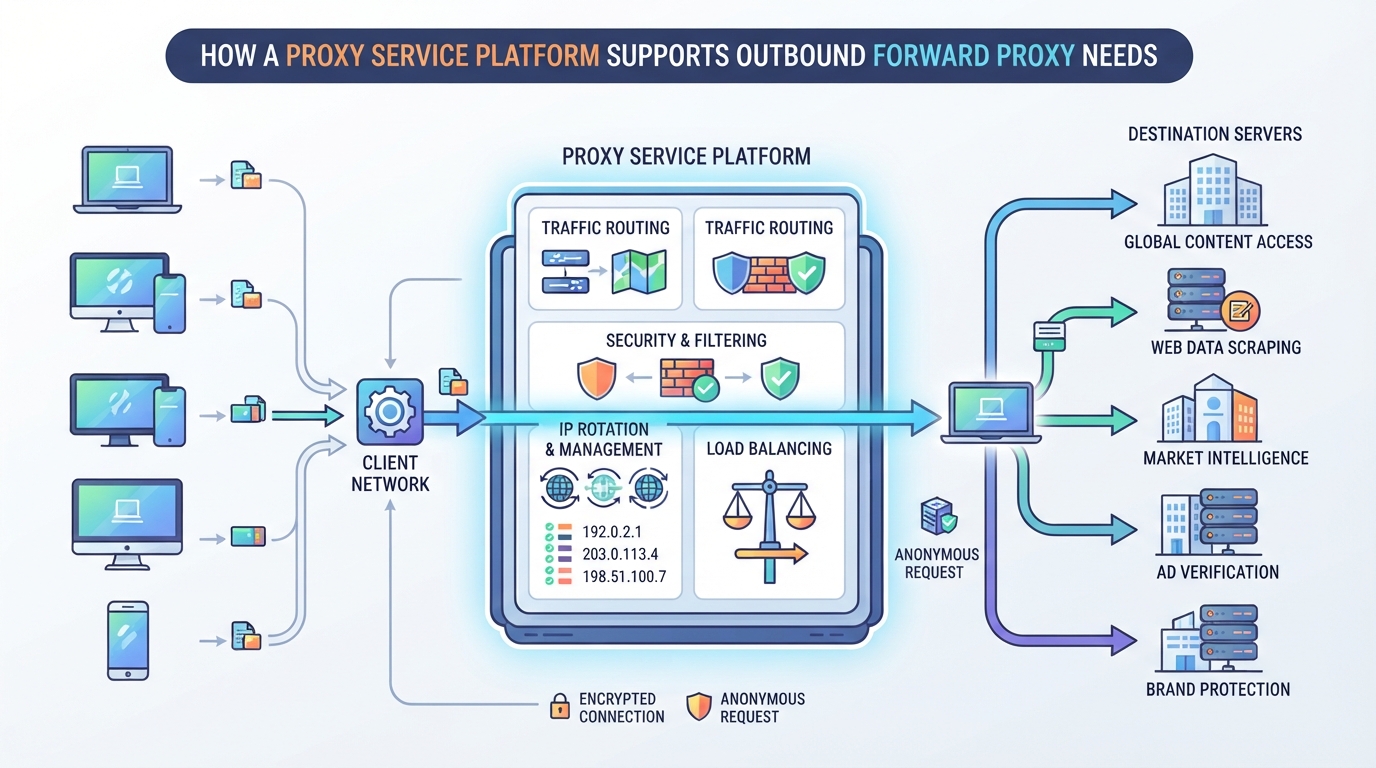
When teams run outbound tasks, like web automation, multi-region testing, or data collection, the real problem isn’t just finding a proxy, but matching the session, location, and IP behavior to the exact workflow. The difference between forward proxy vs reverse proxy comes down to who’s controlling the connection: here, you need a tool that lets your client devices access the outside internet with the right level of IP rotation, stability, and targeting.
Which PuraRoute Proxy Types Act as Forward Proxies?
PuraRoute provides three proxy types for outbound scenarios: rotating residential proxies for high-volume or frequently changing IPs, sticky residential sessions for temporary exit-IP consistency, and static residential or static native proxies for fixed IPs during the subscription period. All these products act as forward proxies, not reverse proxies, so they’re built for client-initiated connections to external sites.
How Does Location and Session Control Work for Outbound Tasks?
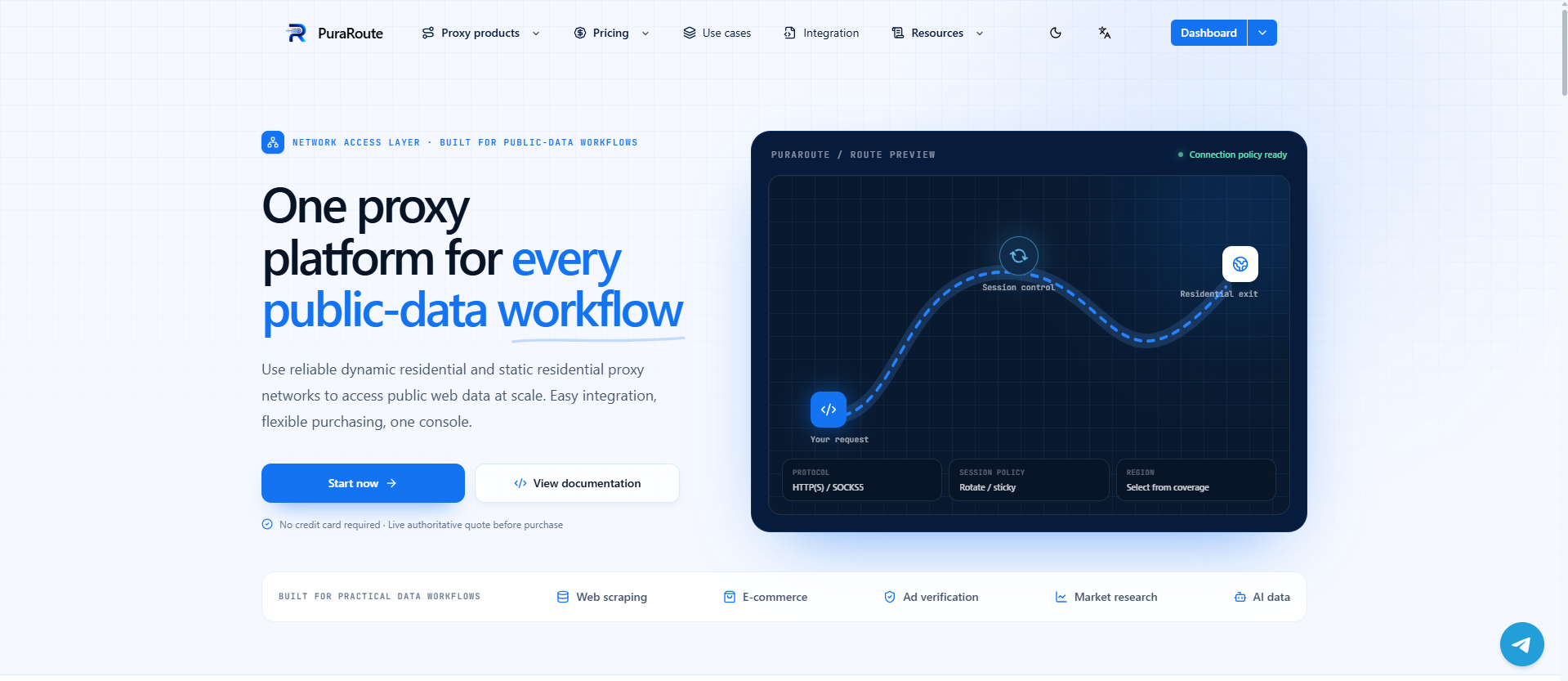
With PuraRoute’s rotating residential proxies, users can target more than 195 countries and regions, even down to state or city level. You choose between rotating mode (changing the exit IP on each request) or sticky mode (holding the same residential IP during a configured session window). For static IPs, you confirm inventory and location before purchase. This setup means you can match your outbound connection’s origin to each task, whether you need a different city for every request or a stable exit IP for an extended workflow.
What Protocols and Management Tools Are Supported?
Every PuraRoute proxy product supports HTTP(S) and SOCKS5 protocols. Connection credentials are delivered in a standard Host, Port, Username, and Password format, so you can plug them directly into browsers, scripts, or automation tools. For large teams, both the web console and documented Open API are available for real-time resource management.
Where Does a Forward Proxy Service Not Replace a Reverse Proxy?
PuraRoute’s proxies are only for outbound, client-to-internet use. They don’t handle inbound connections, load balancing, or server protection, the core jobs of a reverse proxy. If your workflow involves exposing a web service to the public or balancing traffic to backend servers, a reverse proxy is still required for those tasks.
Next, you’ll want to check for risks or limits before deploying a proxy in production.
What Risks or Limitations Should You Check Before Deploying a Proxy?
Even if you’ve picked the right proxy type, a single misstep in setup can open doors you never meant to unlock. The biggest risks usually come from missing a detail in configuration, not from the proxy software itself.
What Are the Security Risks of Forward Proxies?
When you put a forward proxy in front of your users, you’re giving them a way to reach out to the internet with a shared or masked identity. If you don’t lock down who can use it and what sites they can reach, it’s easy for someone inside to bypass network rules, leak sensitive data, or abuse the connection for unauthorized access. Misconfigured access controls or allowing unrestricted outbound traffic can quickly turn your proxy into a liability.
What Are the Security Risks of Reverse Proxies?
Reverse proxies sit between the public internet and your internal servers, so they become a natural target for attacks. If your reverse proxy goes down or gets compromised, your whole service can suddenly become unreachable, or worse, exposed. SSL/TLS termination and authentication settings often get overlooked, especially when trying to balance performance and security. One botched config and you might accidentally serve traffic over plain HTTP, or allow attackers to sidestep authentication entirely. It’s not enough to just put a reverse proxy in front, you need to test its failover, ensure SSL is enforced, and audit every rule for gaps. An example: leaving open paths for admin tools by mistake can expose the backend to the internet, even if you think the proxy is protecting everything.
What Common Mistakes Lead to Proxy Failure?
- Picking the wrong type, confusing the difference between forward and reverse proxies leads to wasted engineering hours and wide-open security holes.
- Skipping location, protocol, or session checks, misaligned settings can break workflows or leak information.
- Failing to track usage, without monitoring, you won’t spot abuse, overages, or the warning signs of a compromised proxy.
Always validate your setup in a real-world test before going live. Even small oversights can cause big problems down the line.
How to Test and Validate Your Proxy Setup Before Going Live
Misconfiguring your proxy isn’t just a time sink, it can expose your network or break access without warning. Before any deployment, run through these validation steps to catch the edge cases that turn up in real-world use.
How to Confirm the Proxy Type and Placement
Check the network diagram to see where the proxy sits. If your proxy handles outbound requests from users or scripts to the internet, you’re working with a forward proxy. If it sits in front of your servers and routes inbound traffic from clients, that’s a reverse proxy. Make sure the proxy’s placement matches your intended security and access design.
How to Test Protocol and Session Handling
Run connection tests using both HTTP(S) and SOCKS5, if your tools support both. Not every client handles both protocols the same way, some automation tools only support HTTP(S), while certain browsers or legacy apps might require SOCKS5. Try connecting through your proxy credentials, then run a multi-step process: for rotating proxies, confirm the exit IP changes as expected; for sticky or static proxies, check that the session holds the same IP for the intended duration. If your session drops or the IP changes too soon, that usually means your session settings or credentials are misconfigured. Watch out for silent failures, sometimes a client will fall back to a direct connection if the proxy test fails, which can expose your real IP without warning. Always confirm proxy use by checking your public IP from the test environment after each adjustment.
How to Validate Location and Resource Assignment
- Run a public IP check to confirm your outbound location matches your selection (country, state, or city as needed)
- For sticky or static sessions, verify the same IP persists across multiple requests within the expected time window
- On reverse proxy setups, route a test request to a known backend and confirm the response reaches the right service
Miss one of these checks, and you risk deploying a proxy that breaks location-based workflows or leaves resources exposed. Up next: what to compare when you’re choosing a provider, not just the proxy type.
What to Compare When Choosing a Proxy Solution or Provider
Picking between proxy solutions isn’t just about price or brand names. The real difference comes down to how each option handles sessions, IP behavior, location targeting, protocol support, and management. If you miss these details, you’ll end up with a setup that either breaks your workflow or leaves you blind when issues hit. Session control, location flexibility, and monitoring tools are the three areas where mistakes cost the most time and money.
Which Session and IP Behavior Fits Your Workflow?
Before you commit, check how the provider handles session and IP rotation. Does it let you pick between constantly changing IPs (rotating), short-term sticky sessions, or true static IPs? You need to match session duration to your workflow, short-lived scraping tasks may need IPs that change every request, while account management tools often need the same IP for hours or days.
How Important Is Location and Protocol Flexibility?
- Can you target specific countries, states, or even cities, or is it just broad regions?
- Does the provider support both HTTP(S) and SOCKS5, or only one protocol?
- Are there limits or penalties when switching locations frequently?
What Management and Monitoring Tools Are Provided?
A good proxy setup should come with the right controls, otherwise you’ll be stuck guessing when things break or usage spikes.
- Is there a web dashboard or API for real-time monitoring and credential management?
- Can you easily see current usage, resource status, and receive alerts for limits or failures?
- Are sub-accounts or usage per team member visible, or do you have to dig through logs?
When you compare your shortlist, focus on these features in action. If a proxy service makes it hard to switch session types, pin a location, or see where your traffic is going, you’ll end up fighting the tool instead of solving your real problem. If none of the options fit, it might be time to consider alternatives to proxies for your use case.
When a Proxy Is Not the Right Solution, and What to Consider Instead
Sometimes even the best proxy setup isn’t the answer. If you keep hitting dead ends with access, security, or compliance, step back and check if you’re asking a proxy to do more than it’s built for. The core difference between forward and reverse proxy isn’t a catch-all; you’ll run into cases where neither fits.
When a proxy or Direct Connection Is a Better Fit
If your goal is to encrypt all traffic between endpoints, or you need every device on a network to appear as part of the same private environment, a proxy or direct link beats any proxy. Proxies reroute requests but don’t tunnel whole network stacks, if you need full-device privacy and not just browser-level masking, skip proxies here.
When Application-Level Gateways or Firewalls Are Needed
Deep packet inspection, strict application controls, or meeting industry audits calls for more than a proxy. Firewalls and gateways can analyze data at every layer, block specific threats, and log access for compliance. For example, if you have PCI DSS or HIPAA requirements, proxies alone won’t cut it; you need controls that see into the payload, not just the headers.
When Direct Cloud or CDN Integration Is Preferable
- You want to serve content to users worldwide with low latency
- Scaling up static asset delivery is a bigger concern than hiding server IPs
- Reducing maintenance by letting a provider handle caching, SSL, and failover
Cloud and CDN services move content closer to users, often making proxy layers redundant for speed or reliability.
Frequently Asked Questions About forward proxy vs reverse proxy
Can a single proxy server act as both a forward and reverse proxy?
Technically, a proxy server can be set up to handle both forward and reverse proxy functions, but this isn’t common. Most setups keep these roles separate because each handles different traffic directions and has unique security needs. In practice, servers are usually configured for one role at a time to avoid confusion and risks.
How do I know if I need a forward proxy or a reverse proxy for my project?
It depends on your direction of traffic control. If you want to manage how your users connect to the internet, like hiding their IPs or accessing region-locked sites, a forward proxy fits. For protecting and routing incoming traffic to your web servers, a reverse proxy is used. Each solves a different problem.
Are forward proxies and proxys the same thing?
No, they’re not the same. A forward proxy only routes specific application traffic, such as web browser requests. A proxy tunnels all network traffic from your device, making your whole connection appear from another location. The privacy models and how much data gets routed are very different.
What protocols do forward and reverse proxies typically support?
Forward proxies often support HTTP, HTTPS, and SOCKS5, letting you work with different kinds of client requests. Reverse proxies usually handle HTTP, HTTPS, and sometimes TCP, focusing on incoming server traffic. Protocol support can vary depending on the proxy’s configuration and purpose.
Can I use PuraRoute as a reverse proxy for my web servers?
PuraRoute is designed for outbound proxy use, meaning it works as a forward proxy to route client-to-internet traffic. It does not function as a reverse proxy for inbound connections to your web servers, so it won’t cover server-side routing or protection tasks for incoming visitors.
The next step is to match your proxy setup to the type of access or traffic control your workflow actually needs. Make sure you’re clear about whether your requirement is to manage outbound client connections, protect internal services, or both, before investing time or resources in a specific configuration.
