

Trying to run an ip address lookup often seems simple: type in an IP, get a location, maybe a city or even a street. But the results can be full of gaps, or worse, completely misleading. Sometimes an IP geolocation check puts you in the right country, but the city is off by hundreds of miles. Other times, an ip lookup tool can’t tie an IP to any real-world place at all.
That disconnect isn’t a bug, it’s baked into how the internet works. IP addresses are handed out and rerouted by ISPs, mobile carriers, and proxy networks, each with their own data policies. If you’re expecting an ip location lookup to give you the physical address of a device, you’re likely to run into dead ends. Even the best databases are only as good as their sources, which are patchy and slow to update.
What you can actually learn from an ip address lookup comes down to the kind of IP involved (residential, datacenter, or mobile), how that address is being used, and what the lookup database knows about current assignments. If you’re troubleshooting a connection, trying to block a region, or tracking down suspicious activity, it pays to know these limits before you act. The distinction between residential and datacenter proxies is also useful when interpreting an IP’s network type.
Here’s what an ip address lookup really reveals, and what you should never expect it to tell you.
What Information Does an IP Address Lookup Actually Reveal?
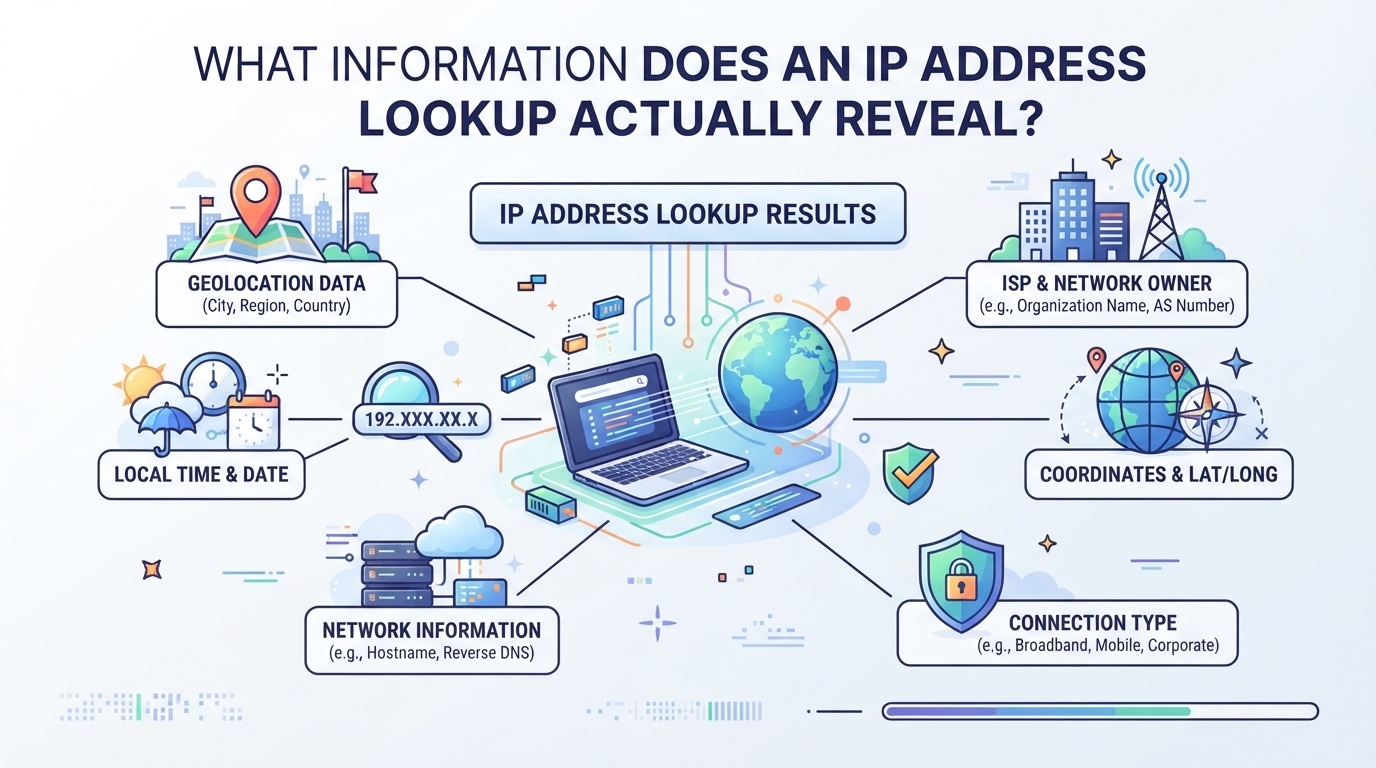
When you run an ip address lookup, you’re mostly getting a rough map, never a street address. The real output is only as detailed as the public data tied to that IP, and a lot can get lost or scrambled depending on how the address is assigned or routed.
What Are the Limits of IP Geolocation Accuracy?
Most lookups top out at city or region, pinpointing a device’s exact spot isn’t possible with public data. Results can be off by hundreds of kilometers, especially if the IP is tied to mobile carriers, proxies, or an ISP that reuses addresses across a wide area. Databases are often outdated; even if you check today, the IP’s real location might have changed yesterday.
Which Details Are Typically Returned by an IP Lookup?
The typical info returned includes:
| Field | What You Get | How Reliable? |
|---|---|---|
| Country | Usually accurate | Rarely wrong, but can be spoofed |
| City/Region | Often approximate | May lag behind actual location |
| ISP/Organization | Usually current | Can be misleading with proxies |
| Network Type | Basic category (residential, business, mobile) | May mislabel proxies or business IPs |
For example, if you check a residential IP, you’ll likely see the right country and a close guess at the city. But try the same lookup on a mobile IP and you might get the location of the carrier’s office, not the device. Proxies add another layer: if the IP is part of a proxy pool, the city and ISP may reflect the proxy provider’s assignment, not the original device. This is one reason it helps to understand how a proxy server works before interpreting a lookup.
Can an IP Lookup Reveal a Person’s Identity or Home Address?
- Lookup tools never show names, phone numbers, or exact street addresses.
- Only ISPs can match IPs to subscribers, and only with a legal request.
- Any site or service claiming to reveal personal identity from an IP is overselling or outright lying.
The bottom line: ip address lookup tools are built for broad network context, not for tracking down real people. For the inner workings and why these results can vary, the next section breaks down how lookup tools actually pull their data.
How Does an IP Address Lookup Tool Work Behind the Scenes?
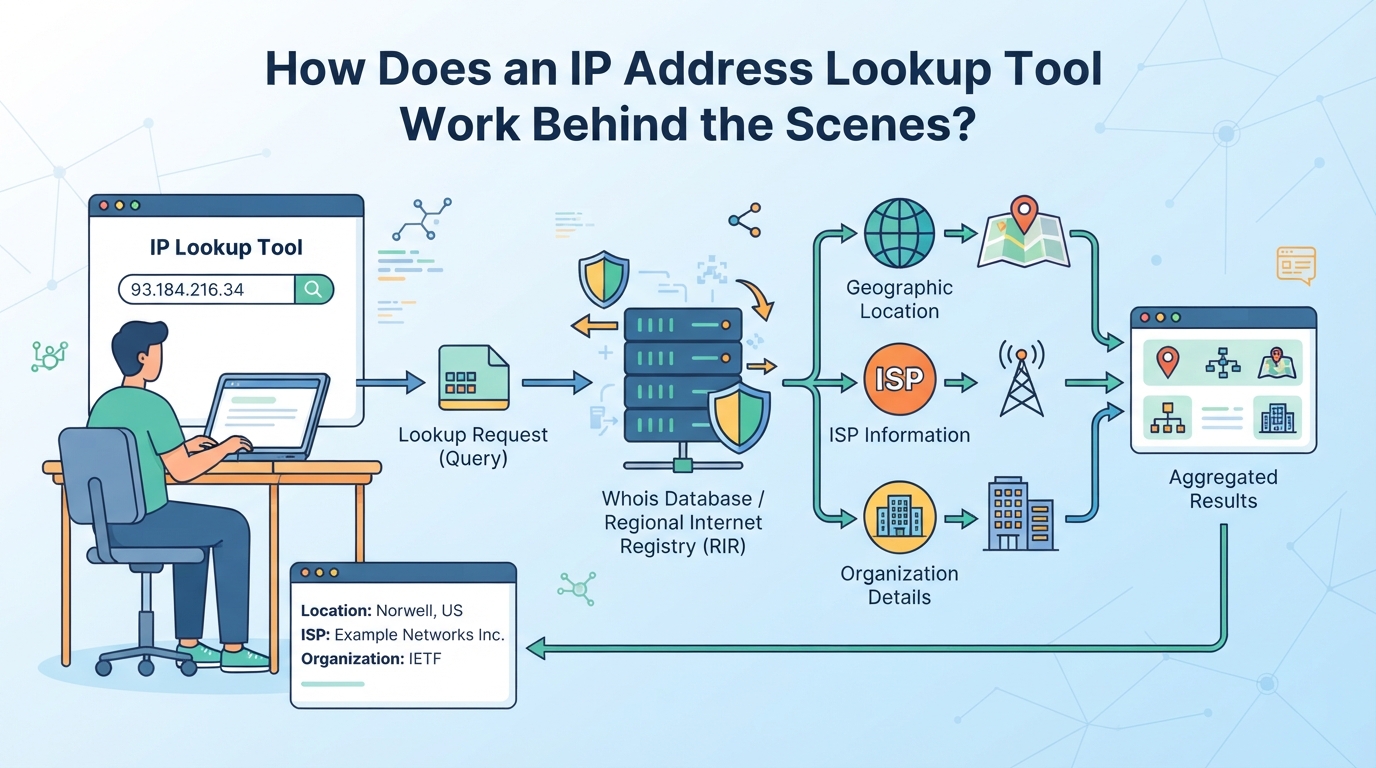
Every ip address lookup starts simple, type in an IP, hit search, but what happens next is a chain of checks, queries, and a few places where things can go sideways. Understanding this process helps you spot where errors creep in and why two tools might disagree on location.
What Happens When You Enter an IP Address?
The tool first checks if you’ve entered a valid IP, IPv4 (like 203.0.113.7) or IPv6 (like 2001:db8::1). It cleans up the format, strips spaces, and rejects anything that doesn’t match a real address. Some tools handle one version better than the other, but both go through similar cleaning.
How Do Lookup Tools Match IPs to Locations?
Once the IP is validated, the lookup tool queries a geolocation database, either commercial (like MaxMind or IP2Location) or open-source (like db-ip). These databases pull info from regional internet registries, ISPs, and sometimes user-submitted data. They track which provider owns each IP block, what country or city it’s assigned to, and sometimes the network type. But the data isn’t live; ISPs may reassign blocks faster than databases update, so the match is only as good as the last refresh. For example, if an ISP moves a block from New York to Chicago but the database is two weeks behind, lookups will still show New York.
Why Do Lookup Results Sometimes Differ Between Tools?
Different lookup tools use different databases and update schedules. One tool might pull daily data from a premium source, while another updates monthly or mixes in crowd-sourced corrections. That’s why plugging the same IP into two sites can show different cities, or even different countries.
What Are the Main Causes of Lookup Errors or Delays?
- IPs reassigned by ISPs but not yet updated in public databases.
- Proxy servers or carrier NATs masking true device locations.
- Mobile IPs that change regions as users travel, but lag in geolocation updates.
How Can You Control the Location Shown by an IP Lookup?
You can influence what an ip address lookup reveals about your location, but not always as much, nor as easily, as people expect. The method you choose, from letting your ISP decide to using a proxy, will shape the results and the side effects.
When Does Your IP Location Change Automatically?
Most home internet users get assigned a new IP by their ISP every time the modem reconnects, or after a set period. On mobile, your IP can switch as you roam or change networks. These changes are automatic, you have no direct control over what city or region you get.
How Do proxys and Proxies Affect IP Lookup Results?
When you use a proxy or proxy, lookup tools see the exit server’s IP, not your real one. That means your apparent location matches where the service’s server is, whether it’s set to Paris, New York, or anywhere else in their inventory. For example, if you connect through a proxy server in Berlin, every ip location lookup will show Berlin, regardless of your actual spot. But there’s a catch: if the proxy rotates its IPs, your visible location could jump mid-session. Some tools cache IP-to-location data, so even after switching, you might appear in the old location until the database updates.
| Connection Type | Lookup Location Shown | User Control | Reliability |
|---|---|---|---|
| Direct (ISP) | Your ISP’s region | None | Often accurate |
| proxy | proxy server location | High | Varies by provider |
| Proxy | Proxy exit location | High | Changes with proxy |
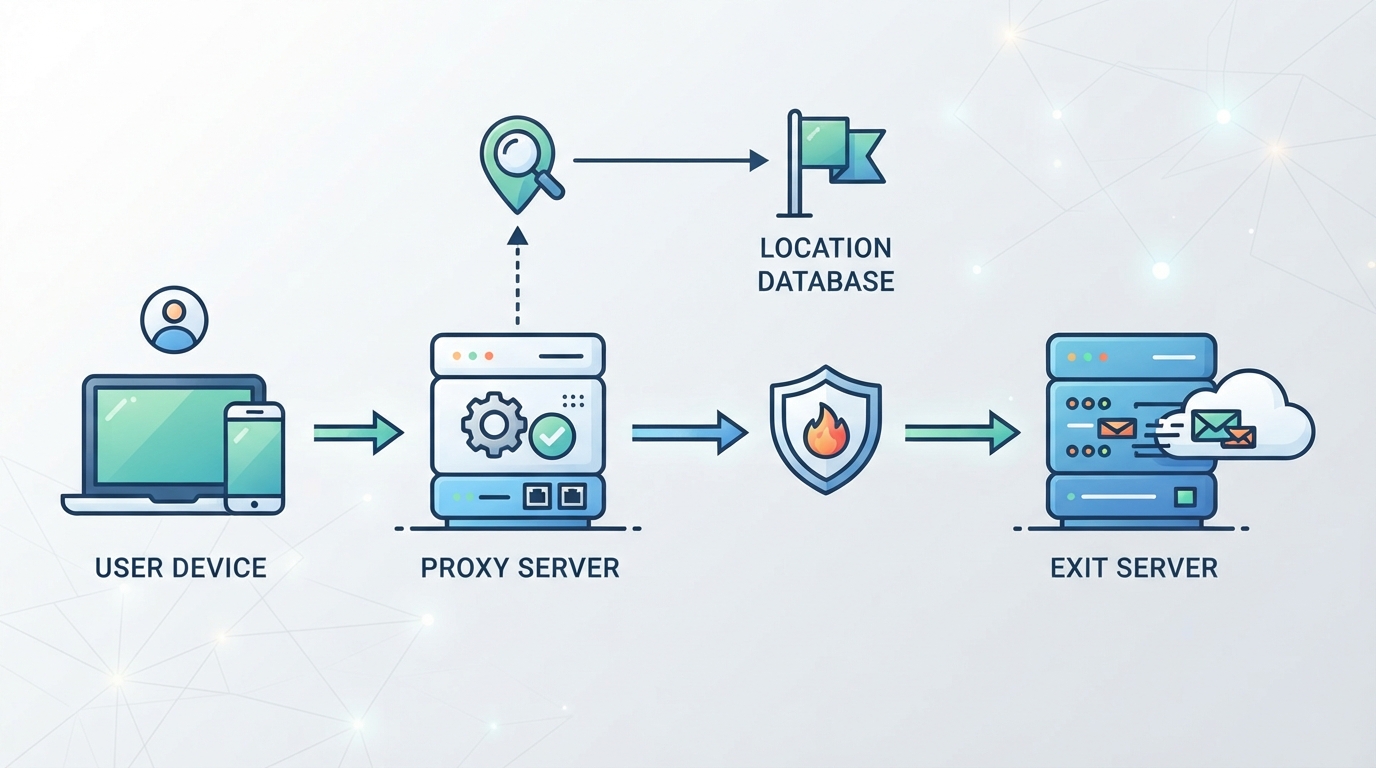
For workflows that need selectable exit regions, residential proxies with geographic targeting provide another option, subject to current coverage and availability.
What Are the Limits of Location Control with Standard Tools?
- You’re limited by the provider’s pool, if they don’t have an IP in your target city, you can’t appear there.
- Session length matters: rotating proxies may change your IP (and thus location) mid-task.
- If a service spots too many users from the same proxy IP, you risk bans or mismatch errors.
The next step is to look at how advanced proxy services offer finer-grained control, if your use case demands it.
How Advanced Proxy Services Like PuraRoute Enable Precise IP Location Management
Plenty of teams outgrow basic ip address lookup tricks fast, especially when they need to test how a site or API reacts to traffic from different regions, or when they’re collecting data that has to look like it’s coming from a real user in a specific city. Standard tools and consumer proxys hit a wall here: they rarely offer the exact city-level targeting, session flexibility, or protocol options that business workflows demand. That’s where advanced proxy platforms like PuraRoute come in, letting operators manage exit IP location, session type, and network protocol to match the test or automation need, not just what’s convenient for the proxy provider.
How Does PuraRoute Let You Choose Your Exit IP Location?
PuraRoute gives users control over where their traffic exits by letting them select from 195+ countries with rotating residential proxies, and down to the state or city level when needed. For jobs that require a fixed exit point, static residential and static native proxies offer fixed IPs in over 100 locations, as long as inventory is available. The real benefit here is being able to match the IP’s apparent location to the exact region the business cares about, even when the lookup tool or target website is picky about geography.
Teams choosing between long-lived and changing IPs can start with this dynamic versus static residential proxy comparison.
What’s the Difference Between Rotating, Sticky, and Static IP Sessions?
Not every location use case needs the same connection behavior. Rotating sessions change the exit IP on each request or session, which helps avoid blocks but won’t keep you at the same address for long. Sticky sessions allow you to hold the same residential IP for a configurable window, useful for short, multi-step flows, but you can’t assume it’ll never change. Only static proxies keep the same IP for the full plan duration, which is essential for tasks that require real continuity, like long-running tests. For that use case, PuraRoute static residential proxies provide dedicated fixed IPs during the active resource period. If you treat sticky sessions as permanent, you’ll get tripped up by mid-process IP swaps.
How Can PuraRoute Be Used for Automated IP Location Testing or Data Collection?
Automation needs standard connection methods. PuraRoute provides proxy credentials (Host, Port, Username, Password) for use in browsers, scripts, or testing tools. The PuraRoute proxy connection overview explains the supported connection and session choices. You can monitor usage, manage sessions, and check static resource status through the web console or Open API. This lets you run and adjust automated ip location checks or scraping flows at scale, without manual reconfiguration each time.
What Are the Operational Limits and Best Practices?
Static proxy location is subject to live inventory, so you can’t always get the exact city or ISP on demand. Sticky sessions offer only temporary IP consistency; they are not a substitute for a true static IP. Always double-check protocol and location settings before launch, wrong choices here lead to failed tests or mismatched ip geolocation results.
What Are the Common Pitfalls and Misconceptions About IP Address Lookup?
People run into trouble when they treat ip address lookup results as hard facts. Even the best tools have blind spots, and the raw output can be misleading if you don’t know the caveats. Here are the main traps and how to dodge them.
Why IP Location Is Sometimes Wrong or Outdated
GeoIP databases lag behind real-world changes. ISPs regularly move IP blocks between cities or even countries, but lookup tools may not update for weeks. Mobile carriers use carrier-grade NAT, so thousands share one address, location is a rough guess at best.
What Happens When You Rely on Lookup Data for Security or Compliance
Trusting a lookup tool for blocking, logging, or user checks can backfire. For example, a company might block all IPs labeled as “Russia,” but if the database is out of date, they could end up blocking legitimate users in another country who just got reassigned the same addresses. False positives mean lost access; false negatives let threats in. IP geolocation is a hint, not proof, never use it as your only filter for security or compliance.
When Changing Your IP Doesn’t Change Your Apparent Location
- Some IP ranges are registered for use in multiple regions, lookup tools may still show your old area.
- Public proxies and shared exit nodes can cluster traffic, so a new IP might map to a hotspot city, not your target.
- If your proxy provider or ISP hasn’t updated their records with the registries, tools may keep reporting the previous assignment.
Before you trust any result, test from multiple lookup tools and check the region matches your actual goal.
How to Test and Verify Your IP Location for Different Use Cases
Knowing your real network location is about more than just running a lookup tool once. Whether you’re checking your own setup, troubleshooting a proxy, or verifying that a location switch works as planned, the method, and the mistakes, aren’t the same for every job.
How to Check Your Current IP and Location
The quickest way to see your current IP and its reported location is to use an online lookup tool like ipinfo.io or whatismyip.com. For better accuracy, cross-check at least two sites; mismatches can flag out-of-date data or CDN quirks.
How to Verify a Proxy or proxy Setup Is Working as Intended
When you set up a proxy or proxy, don’t assume the reported location matches your setting, test it. The proxy IP address setup guide walks through configuration and checking the visible exit IP. Start by running an ip lookup tool before and after you connect. The IP should change, and the location should match your chosen country or city. If it doesn’t, you might have a misconfigured proxy, an expired static IP, or you’re hitting an inventory gap in your provider’s pool.
That’s not the only trap. Some browsers leak your real location through DNS or WebRTC, even if the IP changes. Use a DNS leak test and a WebRTC leak check to confirm you’re not leaking your original network details. If your lookup tool shows the right IP but a test site still knows your real location, you’re seeing a privacy leak in action. Always double-check both IP and DNS/WebRTC leaks after any change, this step catches problems most users miss.
What to Do If the Reported Location Is Incorrect
- Clear your browser cache and cookies; cached data can stick you to an old IP or region.
- Contact your proxy or proxy provider if your assigned IP isn’t matching your requested location.
- Check for IP exhaustion, some providers may run out of available IPs in a specific region, forcing a fallback or misassignment.
If you’ve run all these steps and still see the wrong location, it’s time to review your provider’s documentation or try a different network.
When Should You Use an IP Lookup Tool Versus Advanced Proxy Solutions?
Sometimes an ip lookup tool is all you need, other times, only advanced proxy management gets the job done. The difference comes down to how much control you need over location, IP consistency, and workflow automation.
When Do You Need Advanced Proxy Location Control?
If you’re running business data collection, ad verification, regional QA, or managing long-running automation, you need more than a quick ip geolocation check. The residential proxy use cases guide outlines how location checks and session continuity fit different public-data workflows. These jobs depend on controlling which IP shows up to websites, picking exact locations, and sometimes keeping the same exit IP across sessions. Anything less, and your results get skewed or blocked.
When Is a Basic Lookup Tool Enough?
A standard ip address lookup works for one-off privacy checks or quick troubleshooting. For example, if you just want to see if your browser is leaking your real city, or you’re checking if your device is on the right network after a reset, these tools give a snapshot of what the outside world sees. The caveat: they show what’s visible to the lookup service, not always what websites or apps see, so if you’re debugging why some platforms still flag your region (even after switching networks), a basic lookup can miss hidden routing issues. In these cases, only a full test from the target website’s perspective will show the real story.
How to Decide Between Rotating, Sticky, and Static IP Solutions
- Need frequent location changes or to avoid bans? Go with rotating IPs.
- Want to hold the same exit IP for a short workflow? Try sticky sessions, just don’t expect them to act like true static IPs.
- Need one fixed IP for ongoing logins or whitelisting? Static solutions fit best, but check inventory and supported regions first.
Frequently Asked Questions About ip address lookup
Can an IP address lookup show my exact physical address?
An ip address lookup can usually show your city or region, but it won’t reveal your exact street address or who you are. Lookup tools match IPs to locations based on public records and network data, so the closest they usually get is your general area, not your home or personal details.
Why do different IP lookup tools show different locations for the same IP?
Different ip lookup tools rely on separate geolocation databases. These databases may update at different times or use unique methods to match IPs to locations. As a result, the same IP address might show up in different cities or even countries depending on which tool you use.
Does using a proxy or proxy always change my IP location in lookup tools?
Most of the time, using a proxy or proxy will make lookup tools show the IP address and location of the server you’re connected to, not your real location. But if the proxy’s inventory changes or your session settings rotate the IP, the displayed location can vary or switch during use.
How can I check if my proxy or proxy is leaking my real location?
After connecting your proxy or proxy, use several ip geolocation and DNS leak test tools to check your public IP and other network info. Also, run a WebRTC leak test in your browser. If any tool shows your real city or provider, you may have a leak and should double-check your setup.
What should I do if my static proxy’s location does not match what I purchased?
First, check your provider’s resource dashboard and confirm the protocol you’re using matches their setup. If the assigned IP’s location does not match your order, contact support and provide the IP and your intended region. They can verify and help reassign or troubleshoot your resource.
Once you've checked the IP details you need, the next step is to think about whether your workflow requires frequent IP changes, specific location targeting, or a stable connection for longer use. If you find yourself needing to manage different IP behaviors or automate location-based routing, exploring advanced proxy options could make your process much smoother.
