

You buy a residential proxy, and the provider sends an IPinfo screenshot: the location matches, the network provider looks familiar, and several labels seem reassuring. How much does that establish? What more would you gain by creating your own IPinfo account—or paying for a plan?
Those are the questions that matter when evaluating IPinfo. It is an IP data provider, with website lookups as one entry point. Its public pages, free API, and paid data do not all provide the same capabilities.
My assessment is that IPinfo is worth keeping as a regular tool for proxy procurement and troubleshooting, particularly for checking network attribution, location, and the background of multiple resources. But individuals checking only a few proxies usually do not need to start with a paid plan. Its stronger reasons to pay are more detailed data and ongoing management capabilities, rather than a more complete-looking report.
This review analyzes official public pages and documentation to assess features and costs. It includes no hands-on tests of proxy connections, speed, or accuracy. Sources are provided for the page examples and data cited.
Where the Public Lookup Works Well: Following an Address Back to Its Network and Organizations
IPinfo’s search supports IP addresses, ASNs, and countries. For proxy buyers, the most direct use is to look up the actual exit IP, then move from Summary into location, ASN, Company, and other sections. An ASN is an autonomous system number: an identifier for a network that independently manages addresses and routing.
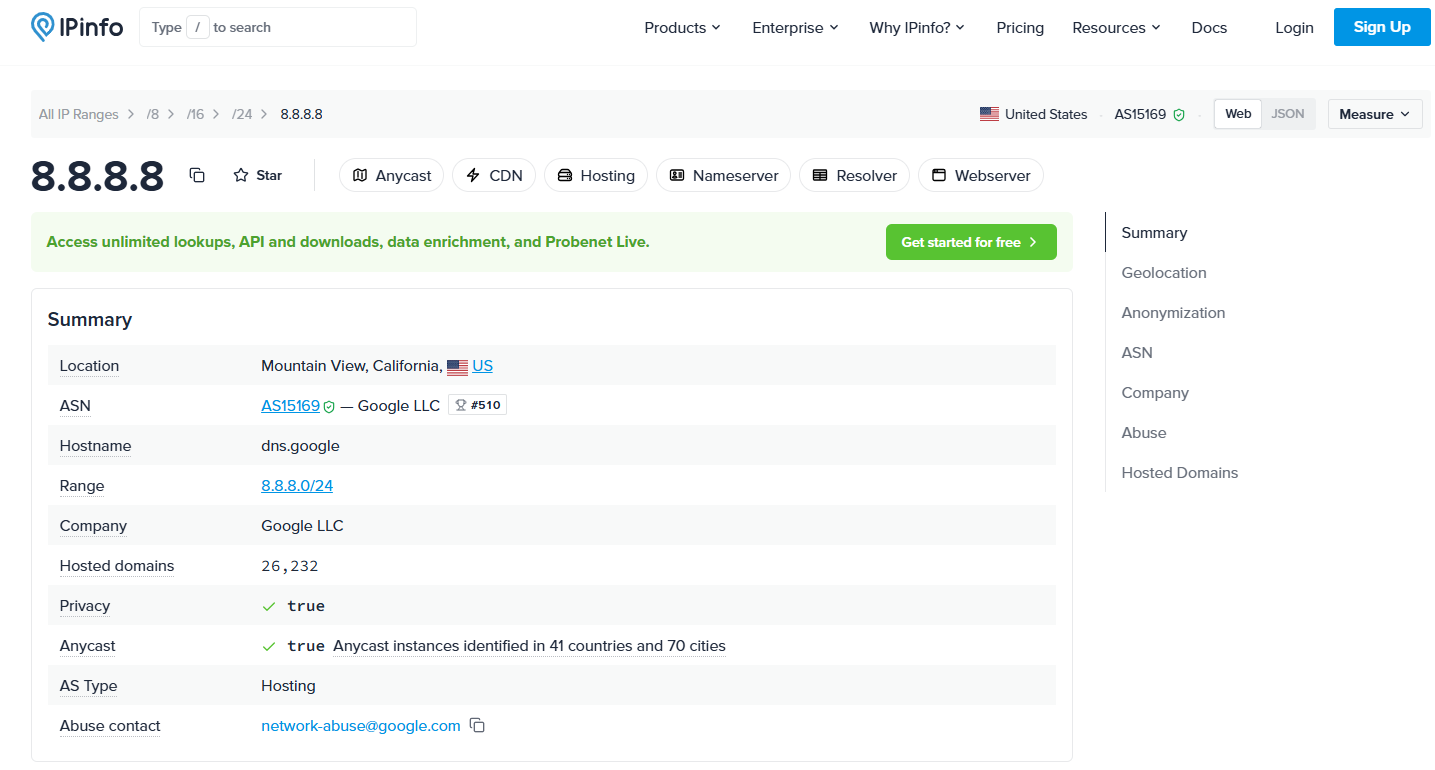
On IPinfo’s public 8.8.8.8 lookup page, Summary shows Google LLC, AS15169, Hosting, and Anycast. Below it are IP Geolocation, Anonymization, ASN, Company, Abuse, and Hosted Domains. This public DNS address illustrates how the lookup organizes information; it is not a residential proxy test sample.
I see two practical advantages in this design.
First, the summary helps surface discrepancies, while the detailed sections support further investigation. Hosting need not be the end of the inquiry: associated organizations, routing ranges, and usage information add context. Compared with a page offering only a risk score, these details make it easier to ask a supplier a specific question, such as why a group of addresses belongs to that network, rather than simply asking why an IP has a poor reputation.
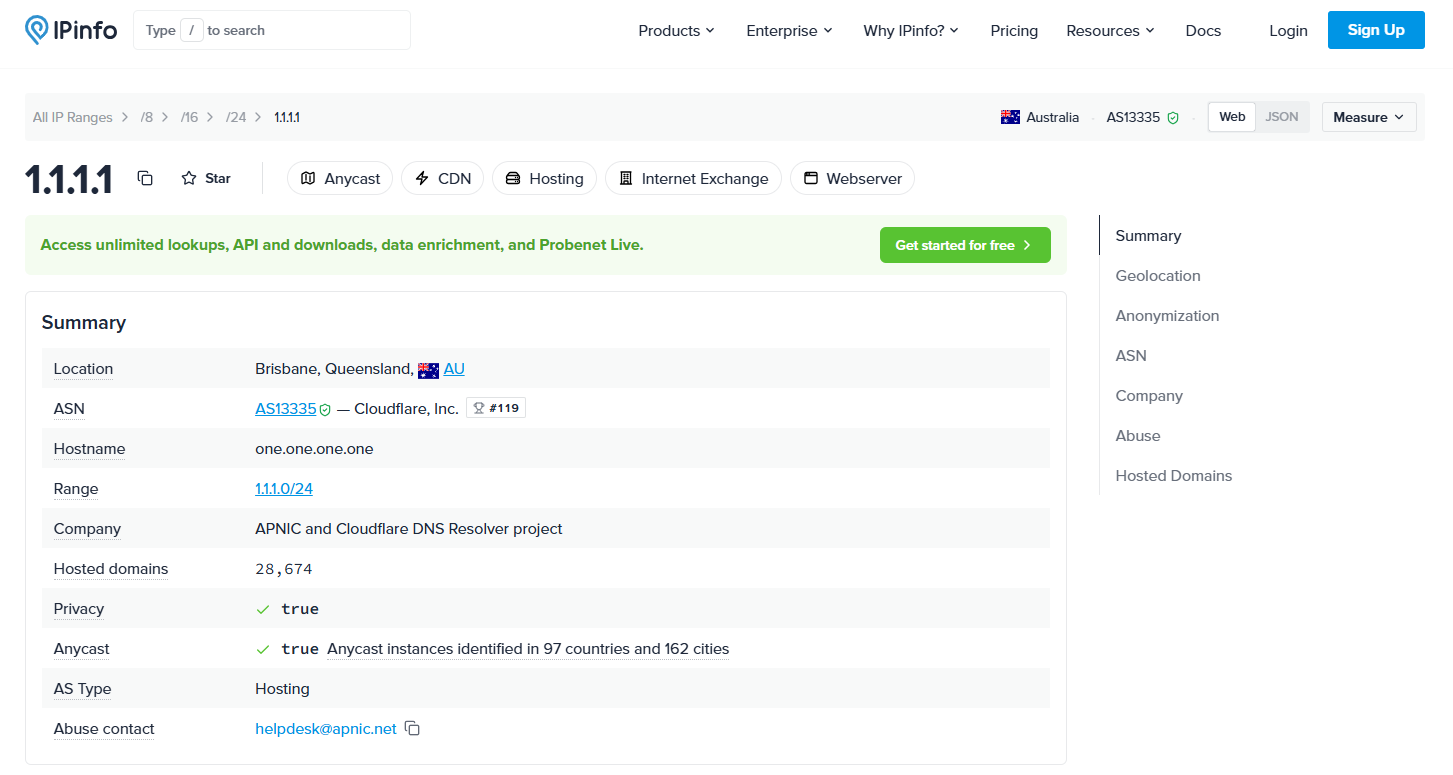
Second, network and company information can be examined separately, helping explain more complex resource relationships. On IPinfo’s public 1.1.1.1 lookup page, for example, the ASN is Cloudflare, while Company identifies the APNIC and Cloudflare DNS Resolver project. Different names do not constitute a data error. For leased, hosted, or jointly operated resources, this separation explains more than one combined provider name would.
The information organization also has drawbacks. The page uses many specialist terms without interpreting them for an ordinary buyer. Abuse provides complaint contact details, not abuse records. Anycast means an address may serve traffic from several locations, so an adjacent city label cannot establish a single exit location. The Privacy summary also needs to be read alongside the Anonymization details; it is not simply an answer to whether an IP is dangerous.
My verdict on the lookup page is therefore: useful detail for tracing network information, but beginners need help interpreting it. It offers more than a simple label page when investigating a specific question. Someone wanting an immediate buy-or-reject answer will still need an explanation.
Can It Verify a Residential Proxy? Separate Network Classification From Actual Access
The IPinfo Core API documentation describes network information such as ASN types, while the Company API documentation covers company data. These help investigate organizations associated with an address. They do not directly establish that a proxy originates from a household.
AS Type classifies the network organization's background; it cannot directly establish whether a particular exit connects through a household, business, or server environment. A provider may offer several services. ISP ownership does not mean every address is used for home broadband.
| Classification shown | What it supports | What it does not establish |
|---|---|---|
| ASN type: ISP | The network has an internet access provider background | The address necessarily originates from a private home |
| Company type: ISP | The associated company has access-provider characteristics | A second independent verification of the actual access environment |
| Hosting | A hosting or datacenter-related classification signal | Proof, on this field alone, of falsely described residential delivery |
The shorthand “dual ISP classification” usually means that both network and company types show ISP characteristics. These are organizational details at two levels, not two independent confirmations of household access.
Meanwhile, Ping0's definition of residential broadband also includes business, campus, and other non-IDC access. Different sites may be answering questions at different levels. Matching their category names and taking a vote cannot establish which is correct.
This defines both IPinfo's value and its limit. Organization data supports specific questions for a supplier, but the page does not complete residential-origin verification. I would use it to identify delivery concerns, not accept or reject an order on AS Type alone. If an order explicitly promises residential access, a Hosting result calls for an explanation checked against delivery information and the actual connection.
How Accurate Is Its Geolocation? Independent Research Offers More Than a Map
IPinfo does more than read registration addresses. It describes network measurement using its distributed ProbeNet probes. The website also offers ProbeNet Live, with Ping or Trace, region, and TCP port options for investigating connections from different vantage points.
I regard this as a useful product distinction. A location dispute can be investigated beyond a city name. For example, registration in the UK alongside a US geolocation result can be examined using network evidence, rather than treating the registration address as the server location.
Providing a measurement method does not establish that every city result is accurate, though.
The May 2026 preprint Lost in the Prefix compared four geolocation providers, including IPinfo commercial data obtained under a research license. It used location references from RIPE Atlas and UNICEF Giga, with 37,302 observations across 175 countries. The IPinfo data snapshot was dated March 25, 2026.
| IPinfo samples in the study | Median geolocation error |
|---|---|
| Fixed networks | 8 km |
| Mobile networks | 179 km |
A median describes the middle of the sample, not the maximum error. The preprint also has limitations in its location references and sample representativeness. It cannot directly represent every current IPinfo plan or a particular commercial proxy.
It still offers useful evidence: IPinfo’s city geolocation can inform a purchase, but network type substantially affects precision. A country requirement and a city requirement need different acceptance criteria. A city label for a mobile-network address, in particular, does not establish the physical location of a device.
ProbeNet Live also needs to be interpreted in the direction it measures. It observes paths from global probes to a target address, not the speed of a computer accessing an ecommerce dashboard through a proxy. I recommend it for additional evidence in location disputes, not for judging all proxy workflows from probe latency.
Is Free Access Enough? Separate Website Lookups From the Free API
IPinfo’s free offering is easily summarized as “unlimited lookups,” but that shorthand can lead to the wrong product choice.
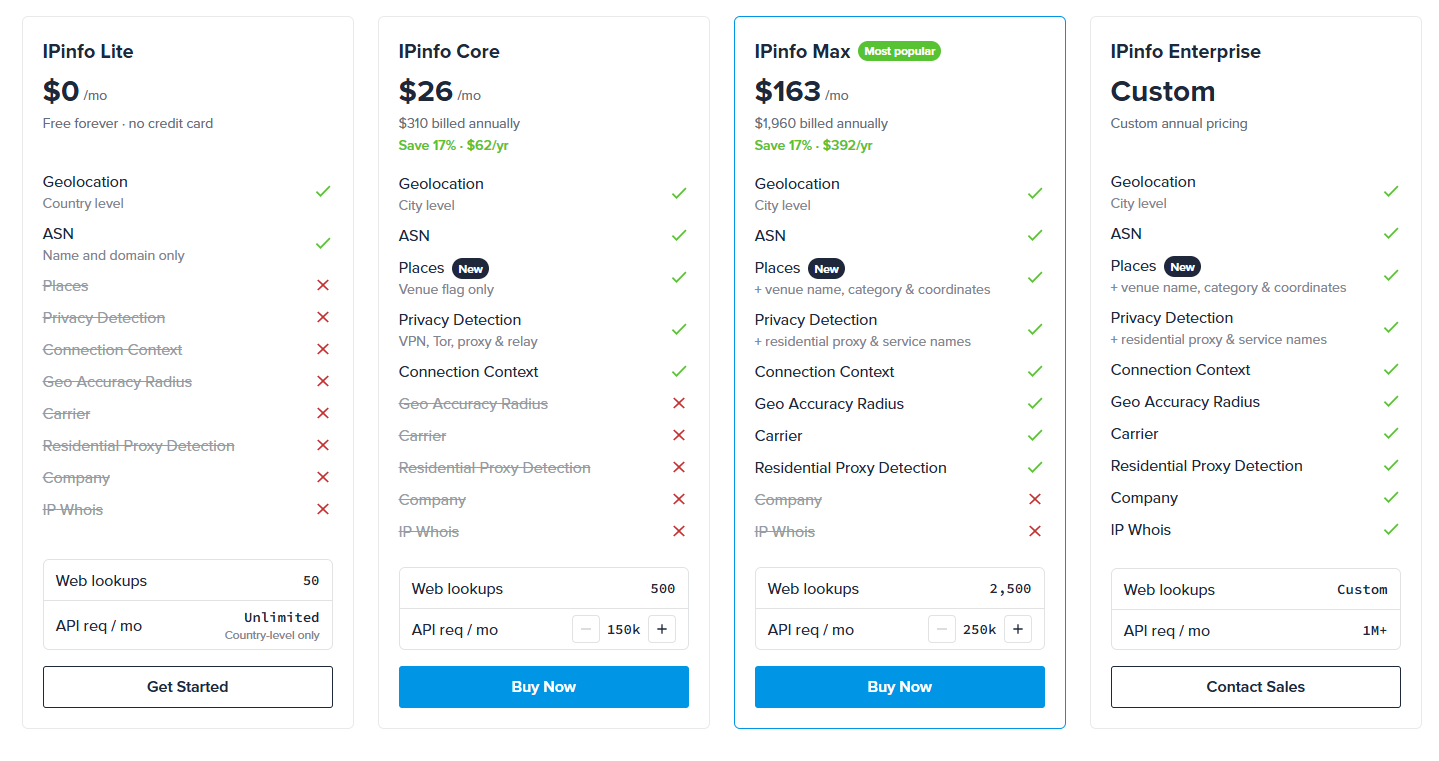
As of October 21, 2026, the pricing page lists web lookups separately from API requests. The Lite card shows 50 Web lookups. The token-authenticated Lite API offers unlimited calls, primarily for country, continent, and basic ASN information. A token is an access credential used by software calling the API.
That means the free API can support automated checks of countries and basic network information, but it is not an unlimited supply of complete website reports. A field visible on a public page is not necessarily available through the free API.
I would choose according to the use case:
- Occasionally checking a few proxies: start with the website to verify the actual exit, country, and network background, without rushing into a subscription.
- Regularly checking countries and basic ASNs for a group of exits: the Lite API offers practical value by reducing manual lookups.
- Needing structured city, network-type, or proxy-detection results: examine paid data coverage next. An unlimited allowance is of little use if the resulting workflow lacks the required fields.
My assessment of the free offering is that its basic API access is attractive, but differences between entry points add complexity. The choice depends on whether the task uses the website or API and which fields are missing.
Where Paid Plans Add Value: Bulk Work Saves Time, but Complete Data Can Cost More
The current pricing page presents the following base tiers on annual billing. These are yearly charges and the allowances shown for each tier. An equivalent monthly figure is not the same as a price available on a month-to-month subscription; current purchase options still need checking.
| Plan | Current annual price | Web lookups listed | Monthly API requests |
|---|---|---|---|
| Lite | Free | 50 | Unlimited, within Lite data coverage |
| Core | $310/year | 500 | 150,000 |
| Max | $1,960/year | 2,500 | 250,000 |
| Enterprise | Custom | Custom | Custom |
Core Fills Basic Data Gaps, Rather Than Unlocking Every Website Section
Core provides city-level geolocation, ASN types, and network signals covering anonymity, hosting, mobile, satellite, and Anycast. For teams regularly checking resources and recording results, it makes comparison easier than manual screenshots.
However, the current pricing comparison places Company and some other data within Enterprise. Buying the entry-level paid plan to check dual ISP classification may therefore leave some expected company classifications unavailable. This is a particularly important distinction before purchase: the free website, Core API, and full company data do not share one field set merely because they share a brand.
Max Adds Detailed Proxy Intelligence That Occasional Individual Lookups May Not Justify
Max adds residential proxy detection, service names, and recent-activity information. Compared with an isolated proxy/non-proxy label, timing and frequency information are better suited to ongoing background analysis.
Its annual cost is substantially higher than Core’s, though. Those details may not justify the cost for someone buying a few residential proxies occasionally. Teams managing many exits and tracking detection changes have a clearer opportunity for ongoing value. I would not recommend Max merely to complete a screenshot.
Bulk Tools Make Access Easier, With Important Usage Limits
IPinfo’s Enrich IP tool accepts pasted addresses or CSV, TXT, and XLSX uploads, processing up to 1,000 addresses at once. Results can be downloaded or copied. Operations teams can enrich addresses in bulk without writing API code.
This is a useful feature. For a hypothetical set of 200 exits, bulk results make country and network differences easier to filter and are simpler to archive than scattered screenshots.
The official guidance also specifies three limits: returned fields follow the current plan; each IP consumes one API request; and results are not retained for later retrieval, so they need downloading before leaving the page. Bulk lookups reduce manual steps without granting access to data outside the subscription.
My advice on paying: establish which fields are missing, then calculate the time saved by regular queries. For a few addresses, free entry points combined with specialized tools are often enough. For weekly work on large sets of resources, structured data and bulk exports provide a stronger reason to pay.
Where Does IPinfo Fit Among Other Checking Sites?
For common proxy-buying tasks, I would use the tools as follows:
| Current question | My first choice | Why |
|---|---|---|
| Network attribution, address background, and organizing many resources | IPinfo | Organizations, ASNs, and data tools are well connected |
| Broadband classification, risk, and history in Chinese | Ping0 | Its presentation is closer to Chinese-speaking proxy users’ screening habits |
| Specific abuse reports and reporting times | AbuseIPDB | It provides activity descriptions and report records |
| Browser paths such as DNS and WebRTC | BrowserLeaks, IPLeak | They observe the actual environment and request paths |
This is a choice by function, not an accuracy ranking. IPinfo’s strengths center on network information and its management. Its main lookup report does not provide sustained proxy connection success rates or upload stability, and it does not complete logins or dashboard operations for users.
I would use IPinfo early in purchasing checks, rather than start every diagnosis there. Connection timeouts call for checking access first. Abuse questions call for reports. ASN and origin differences lead back to IPinfo. That gives its strengths a clearer role.
When Buying a Proxy, How Should Lookup Results Inform Delivery Checks?
Someone maintaining access to the same store or social media dashboard over time usually needs more than “US, ISP.” A consistent exit and clear resource allocation also matter. IPinfo adds location and network information; fixed and exclusive allocation come from the proxy product itself.
For example, PuraRoute’s static residential proxies address this longer-term fixed-exit need. They are purchased by IP and provide a fixed, exclusively allocated address during the active service period. The resource page lists Exit IP, Location, and expiry time, making it easier to match the order, actual exit, and lookup results.
After delivery, I recommend a complete check of the same exit: connect first and confirm the public address used by the current request; compare its country, network attribution, and type against the purchase in IPinfo; then open the actual dashboard and check whether operations can be completed consistently. This ties the findings to the resource received rather than a report supplied by the seller.
If type or location raises questions, PuraRoute’s published process for checking detection differences calls for the order, actual exit, timestamped records with field names, and details of any connection failure. Support can then investigate against the delivery commitments. The process does not promise all-green results or automatic refunds or replacements, but offers a more useful route to resolving a dispute than simply asking the buyer to use another checker.
I would rather pay for a defined location, a clear term for a fixed exit, exclusive use, and verifiable delivery. IPinfo helps verify the network information within those requirements; it does not replace the product commitments.
My Final Assessment: Worth Keeping Handy; Payment Depends on Scale and Data Gaps
IPinfo’s strengths are focused: detailed network-background lookups, methods for investigating location, and APIs and bulk tools for ongoing management. Its limitations are equally specific. Specialist classifications are not immediately accessible to beginners; web, free API, and paid fields are easy to confuse; fuller intelligence requires more spending and still does not replace actual proxy connection tests.
For checking a few proxies, I recommend starting with the free website as a regular attribution and location tool. For ongoing work on large groups of exits, choose an API or paid plan according to the fields needed. IPinfo may not be the simplest option for someone seeking one overall IP reputation score. It is more valuable for someone investigating why a resource is classified as it is.
FAQ about IPinfo
Do IPinfo’s Free Website and Lite API Return the Same Data?
No. The public website, Lite API, and paid APIs need to be considered separately. Lite’s unlimited calls mainly cover its country-level location and basic ASN data. They do not extend to complete city, company, and proxy intelligence.
Should I Buy Core Just to Check Dual ISP Classification?
I would not buy it for that purpose alone. The current pricing table includes ASN types in Core but places Company within Enterprise. Confirm which product provides each of the two classifications needed.
Does Hosting Prove a Residential Proxy Is Fake?
It is an origin concern worth investigating, particularly when the order explicitly promises residential attributes. A single network classification cannot establish the specific access environment, though. Consider the provider’s explanation, other information, and purchase commitments; one label cannot settle every case.
If IPinfo and Another Website Disagree on Location, Which Is More Accurate?
A disagreement alone does not establish which database is correct. Confirm the same exit and address family, then distinguish country differences from city differences. City-specific orders also need network evidence, the target’s location assessment, and the supplier’s explanation.
Does Enriching 1,000 IPs Mean 1,000 Proxies Have Been Tested?
No. The bulk tool retrieves address information. It does not verify authentication, connections, bandwidth, or target tasks for each proxy. Record resource background separately from actual connection results.
Should I Immediately Change an IP Identified as a Residential Proxy?
Not on that finding alone. Residential origin and proxy use can coexist. If the resource meets the order and operations are stable, detection as a proxy is not itself a fault. If the purchase explicitly specifies detection criteria, assess it against those terms.
