
Two setups run the same price-monitoring script against the same target. One routes through a single proxy and finishes the list. The other routes through three and comes back with empty product pages on roughly a third of the URLs. Same code, same headers, different path.
That gap is what this article is about. Proxy chaining is easy to describe and easy to misconfigure, and the failures tend to surface in three places: how the hops are connected, where DNS gets resolved, and which hop the target actually sees.
Understanding Proxy Chaining
Start with the term, because it gets applied to two things that behave differently.
What is Proxy Chaining?
Proxy chaining is a client-side arrangement in which a request is handed to a first proxy, which forwards it to a second, and so on until the last proxy opens the connection to the target. The target sees the address of that last proxy and nothing in front of it.
What separates a chain from a pool is direction. A pool offers many addresses to choose from, one per request. A chain fixes a sequence, and every request walks the same sequence in the same order.
How Proxy Chains Operate
Each hop is an independent connection with its own handshake and its own credentials. Proxy A is asked to reach proxy B, not the target site, so the first hop can relay traffic without ever learning the destination. Proxy B is where the target hostname first appears, and it decides how that name gets resolved. Proxy C is the one that actually touches the site.
That layering is the whole point, and it is also why debugging is unpleasant: an error surfaced at hop C is often caused by a setting at hop A.
Key Components of a Proxy Chain
Four things have to be defined before anything works. The client that holds the hop list. The endpoints themselves, each with host, port, protocol and credentials. The point at which hostnames are resolved. And the exit address, which is the only part the target will ever record.
Most broken chains are one of those four left undefined. In practice it is nearly always the third.
The Mechanics of Proxy Traffic Flow
With the parts named, a single request can be followed end to end.
Step-by-Step Traffic Movement
Take a request for a product page over HTTPS, routed through three hops:
- The client opens a TCP connection to hop A and asks it to reach hop B.
- Hop A resolves hop B, connects, and relays the request.
- Hop B receives the request for the target hostname and opens its own connection to hop C.
- Hop C resolves the target and completes the TCP handshake with the site.
- The TLS handshake runs between the client and the site. Hop C relays encrypted bytes and cannot read them.
- The response travels back along the same path.
One detail in that list matters more than the rest. The TLS handshake terminates at the client and the site, not at any hop along the way, so a plain HTTP proxy in the middle moves ciphertext. It can see which host a connection was opened to and how much data moved. It cannot see the content.

Protocols That Carry a Chain
Two protocols do the work in proxy chaining, and they are not interchangeable.
HTTP and HTTPS proxies rely on the CONNECT method: the client names a host and a port, the proxy opens a TCP tunnel, and from then on it moves bytes. CONNECT carries TCP only, so traffic that switches to UDP or QUIC does not travel through it. Many HTTP proxies also refuse CONNECT on ports other than 80 and 443, which is the usual reason a chain that handles web pages fails on everything else.
SOCKS5 sits lower. It carries TCP, and with UDP ASSOCIATE it carries UDP as well, and it has its own username and password authentication. When hops use different protocols, the middle hop has to be able to relay to the next one, and not every HTTP proxy will open a tunnel to another proxy's port.
Technical Requirements for Setup
Four settings decide whether a chain behaves: a timeout per hop, a hop limit, separate credentials per hop, and a defined DNS resolution point. A 30-second timeout on a three-hop chain can turn into 90 seconds of waiting before the client gives up, and the error message will usually name the first hop even when the failure happened at the third.
Reasons to Use Proxy Chaining
The mechanics set the cost. These three cases explain when the cost is worth paying.
The Exit Address Is the Only One the Site Sees
An access log records the address that completed the TCP connection, which is the last hop. Earlier hops do not appear in it, and neither does the original client. If an intermediate proxy adds a forwarding header, that header may reach the application, but a proxy that terminates nothing has no reason to add one.
That is a statement about addresses, not about being invisible. A site can still group requests by behaviour, timing and account, and no number of hops changes that.
When the Exit Has to Sit in the Target Market
Currency, interface language, stock messages and delivery estimates are usually decided from the address that made the request, and often from its city rather than its country. A request arranged so it leaves from a local address in the target market sees what a local visitor sees, including the prices that only appear there.
A chain is one way to arrange that, and only the last hop has to be in the right place. The hops before it can sit anywhere, which is why so many chains are built backwards: three carefully chosen hops, and then an exit in the wrong city.
Credential Control Across Hops
Each hop authenticates separately, and that is the part people underestimate. Separate credentials per hop mean a leaked password exposes one link rather than the whole path, and a hop can be swapped without touching the rest.
The cost is bookkeeping. Three hops means three credential sets to store, rotate and keep out of logs. Put them in the client configuration or a secret store, never in a script that gets committed to a repository.
Comparing Proxy Chaining with Other Technologies
Both alternatives below are cheaper than a chain, which makes them the fair test.
| Single proxy | Three-hop chain | Tor | |
|---|---|---|---|
| Who picks the exit | you | you, per hop | the network |
| Added latency | one extra connection | one per hop | circuit setup, shared bandwidth |
| Failure surface | one endpoint | every hop | the circuit |
| Credentials | one set | one set per hop | none |
| City-level choice | yes | yes | no |
One Proxy or Several Hops?
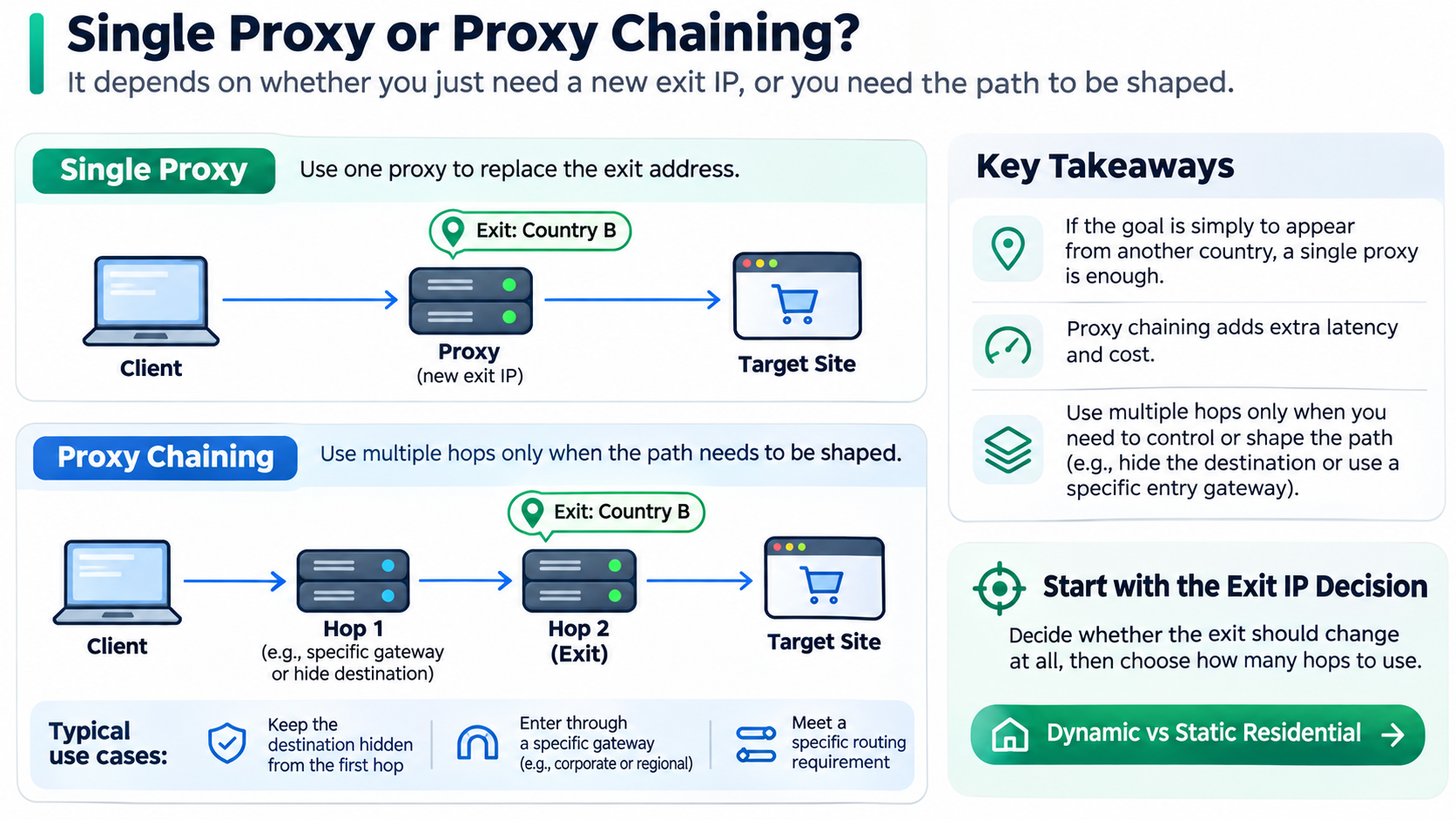
A single proxy replaces the exit address in one step. Proxy chaining only earns its extra latency when the path itself has to be shaped, for instance when a first hop must not learn the destination, or when traffic has to enter through a specific gateway before reaching the exit. If the goal is simply to appear from another country, the second hop adds cost and nothing else.
Deciding whether the exit should change at all comes before deciding how many hops to use; dynamic vs static residential covers that trade in detail.
Proxy Chaining vs Tor Network
Tor is a fixed three-hop circuit through volunteer-run relays: entry, middle, exit. You do not choose the exit node's country or city, bandwidth is shared with everyone else on the network, and the exit list is public. A self-built chain is the opposite trade. You choose every hop, you pay for every hop, and you own the misconfiguration.
A VPN is the other comparison that comes up, and it differs in scope rather than depth. It moves the whole device's traffic, usually lets you choose a country but not a city, and gives you no say in what sits between you and the exit.
Setting Up a Proxy Chain
Configuration is where most chains fail, and usually at the first field.
Configuring Proxy Chains in Browsers
Browsers accept one upstream proxy. An extension that sets a proxy sets one proxy. Neither can build a chain on its own, so the chain has to live below the application, in a system-wide tunnel or a per-process launcher that intercepts connections and walks the hop list.
That difference also explains a common confusion: a chain that works from the command line fails in the browser because the browser never saw the chain.
Tools That Do the Chaining
Two families do the work. The first is a launcher that wraps any program and forces its connections through a hop list. The second is the client library, where you open a socket to hop A, negotiate through A to hop B, then through B to hop C, and hand the resulting stream to an HTTP client.
Both need the same four inputs, and both fail the same way when one hop's protocol does not match the next.
Best Practices for Reliable Chains
- Keep the hop count to what the task requires. Two hops that work beat four that time out.
- Give every hop its own credentials and its own timeout.
- Resolve DNS at the exit unless there is a specific reason not to.
- Run the request through one hop first, record the timing, then add hops one at a time.
- Log which hop failed, not just which request failed.
Troubleshooting Common Issues
A chain that passes its first request still tends to break in three places later.
Addressing Slow Performance
Every hop adds at least one TCP round trip before payload moves, so latency grows with the number of hops rather than with the size of the response. The TLS handshake does not repeat per hop, which is why a well-built three-hop chain is often slower by a fraction of a second rather than by three times.
When the slowdown is larger than that, time each hop separately. The slow one is usually a hop with a saturated uplink, not a distant exit.
Solving DNS Leaks and Authentication Problems
If the client resolves hostnames locally, the query leaves from the client's own network even though the traffic does not. Remote resolution, where the hostname goes to the proxy and is resolved there, closes that gap.
On the authentication side, a 407 from a proxy means the credentials did not arrive. Check whether the password contains characters that need encoding inside a URL, and whether the second hop received any credentials at all, since some clients apply them only to the first.
Ensuring Application Compatibility
Applications that ignore system proxy settings will ignore the chain. Anything that prefers QUIC or raw UDP will usually fall back to TCP when the tunnel refuses UDP, but some clients do not fall back and simply fail.
For those, the options are a TUN interface that captures traffic at the IP layer, or a proxy configured inside the application itself. Neither is a chain feature; both are ways of getting traffic to the chain in the first place.

How PuraRoute Fits Into a Proxy Chain
Once you know which hop needs a changing address and which one has to stay fixed, the remaining question is where the endpoints come from.
Residential proxies for the hops that need to rotate
The entry and middle hops rarely need a permanent address. They need volume, spread and a session policy. Residential proxy pricing at PuraRoute is billed by traffic: 2GB at $2.99 per GB, 10GB at $1.59, 50GB at $1.33, and 100GB at $1.19, with purchased traffic valid for 30 days. Coverage runs to 195+ countries and regions, HTTP(S) and SOCKS5 are both supported, and state, city and ASN targeting is available for the hop that has to land somewhere specific.
Sessions can rotate per request or stay sticky for a set window, and that setting decides whether a multi-step flow survives the second request. It is the same trade covered in static vs rotating proxies, applied one level down.
Static residential IPs for an exit that has to stay fixed
When the last hop is the identity an account is tied to, rotation becomes the problem rather than the feature. Static residential pricing is quoted by IP count and term rather than by traffic, in 7-day and 30-day plans. One IP for 7 days comes to a reference total of $2.25 on the default configuration, the 30-day price appears in the console before checkout, traffic is unlimited, and the address is dedicated rather than shared. Stock can be checked before ordering.
The main markets are the US, UK, Germany, Spain, Japan and Brazil. Where an order needs a country outside that list, the console shows current inventory rather than a promise.
Matching proxy type to the task before you add a second hop
Two tiers sit above that for stricter targets. Static native keeps an IP whose registration location matches where it actually sits, in 30-day and 90-day terms. Carrier native runs on US carrier networks in 7, 30 and 90-day terms, from a $9.00 reference total on the 7-day default configuration.
Pairing them is straightforward. Traffic-billed rotating endpoints for the hops that only need to move traffic, a fixed dedicated address for the hop the target remembers, and a cleaner tier when the platform is strict about where an address comes from.
What a proxy cannot do is decide how an account behaves, keep a device fingerprint consistent, or change how a platform scores a session. Those sit outside the exit address entirely.
Conclusion
Most proxy chaining decisions get made on hop count, and that is the wrong variable. The question that settles the design is how many independent addresses the task genuinely needs. If the answer is one, a single proxy does the job and the extra hops only add latency and failure points. Chains earn their keep when the path itself has to be shaped, with a first hop that must not see the destination or an exit pinned to one city while traffic enters elsewhere.
Teams that get the order backwards add hops first and look for a reason afterwards, then spend a week debugging timeouts that one well-chosen exit would never have produced.
Frequently Asked Questions About Proxy Chaining
What is the primary purpose of proxy chaining?
To put more than one machine between the client and the target, so the site records only the last address and the path can be shaped hop by hop. It changes where traffic exits, not what the traffic contains.
Can proxy chaining be used for legal purposes?
Yes, and it usually is: regional price checks, ad verification, localization testing, reaching your own infrastructure through a fixed gateway. Legality depends on what you do through the chain and on the terms of the site you reach.
How does proxy chaining affect internet speed?
Each hop adds a TCP round trip before data moves, so expect a fraction of a second per hop rather than a multiple of the base time. Larger slowdowns come from a congested hop or a distant exit, not from the count.
Is proxy chaining compatible with all devices?
No. Devices that expose a single proxy field cannot build a chain, and applications that ignore system proxy settings bypass it. In practice the chain lives on a router, a per-process launcher or a TUN interface.
What are the risks associated with proxy chaining?
Each hop can see which host a connection targets and how much data moves, even when TLS protects the content, so an untrusted hop is a real exposure. Hops also fail, log and rate-limit independently, and a misconfigured chain can send DNS queries around the tunnel without anyone noticing.
