
A phone on the classroom Wi-Fi opens TikTok to a grey screen and a retry button. The same phone, signed into the same account, walks out of the building, switches to mobile data, and the feed loads in two seconds. Nothing about the account changed during that walk. The network did.
The symptom usually names the layer. If the page fails instantly with a retry button, the name never resolved and the resolver answered first. A feed that connects and then sits at zero percent is losing video over UDP, so the firewall is dropping QUIC and the fallback is not finishing. When the feed plays for a minute and then stalls, nothing was blocked at all, because the connection is being metered. Reading the failure before changing anything saves you from paying for a fix aimed at the wrong layer.
The difference between those two situations is the subject of this page. Unblocked TikTok at school is rarely about beating one filter, because most campuses run three at once and each one breaks a different method. The six approaches below are ordered from the smallest change to the most official, and each one says where it stops working.
What Unblocked TikTok Traffic Hits on a School Network
School networks seldom rely on a single control. A filter that answers DNS queries, a firewall that inspects connections, and a device policy that removes the settings menu are usually all in place, and the symptom you see tells you which one you hit.
How School Firewalls and DNS Filters Block TikTok
The resolver is the first stop. Many schools point their DNS at a filtering service that answers for tiktok.com and its delivery hostnames with a sinkhole address, a block page, or a synthetic failure. The name never resolves, so the request dies before a single byte of video is fetched. That failure is instant and looks the same on every device.
A firewall rule is the second. It can match the hostname, the TLS server name in the handshake, or a published IP range for TikTok's delivery network. Name matching produces a connection reset. Range blocking produces a timeout that reads to a student as bad Wi-Fi.
The third variant catches people off guard. TikTok's players prefer QUIC over UDP port 443, and many school gateways drop UDP 443 while leaving TCP alone. The app falls back to TCP, which sometimes carries the video and sometimes leaves it stuck at zero percent.

Why Bandwidth Rules and Managed Devices Also Block TikTok
Not every block is a blocklist. Schools that issue Chromebooks push network profiles through device management, and a managed profile outranks anything typed into the settings screen. The proxy field is often greyed out, extensions come from a school-approved list, and the whole category of browser add-ons is closed before a student touches it.
Bandwidth policy is the quieter version. A per-device cap on streaming means TikTok loads for a minute and then stalls, which reads as a broken app rather than a rule. The tell is that text posts and comments still arrive while video stops.
How to Tell Which Layer Is Blocking TikTok Before You Change Anything
Three observations separate the layers above, and none of them needs a tool.
Load the same account over mobile data. If the feed appears, the block sits on the campus network and the account is fine. If the feed fails there too, the problem travels with the account or the device, and no amount of network work will repair it.
Try a second device the school does not manage. A personal phone on the same Wi-Fi that loads the feed points at a device profile rather than a network rule, and on the issued machine no proxy or DNS change will get around it.
Anyone with a terminal can settle it. Running nslookup against tiktok.com on the school network returns either a sinkhole address such as 0.0.0.0 or a private range, which confirms the resolver answered, or a normal public address, which points at a firewall rule when the connection then times out. School Chromebooks do not expose a terminal, so the first two observations carry the weight there.
Is Unblocked TikTok at School Legal and Allowed
The layers above explain why the page fails. Whether you are allowed to do anything about it is a separate question, and your school has a written answer that is worth reading before you configure anything.
What a School Acceptable Use Policy Usually Covers
Most acceptable use policies say three things in some form:
- the network exists for teaching and school business
- filtering may not be circumvented
- devices and traffic can be audited
That second clause is the one that turns a technical workaround into a disciplinary matter, and a policy written this way treats unblocked TikTok at school as a conduct question rather than a network question.
School rules are not the only document. TikTok's own Terms of Service set age and regional conditions on the account itself, so an account created below the minimum age is a separate problem from a blocked network. Read your school's policy for the network question and the platform's terms for the account question, and do not assume one covers the other.
What Consequences Follow When a Student Is Caught
In most schools the ladder is administrative rather than legal. A first instance usually ends with a conversation and a note to a parent or form tutor. A repeat can mean the account or the device is restricted, and a serious case goes through the school's discipline process. A handful of jurisdictions have specific rules about school network use, and the exact wording lives in local policy rather than in a general guide.
What is not on that ladder is anything worth the risk of hiding it. Deleting history, borrowing a classmate's login or using someone else's device turns a network question into a conduct question, which is a worse place to be.
What a New Connection Does Not Fix on Its Own
Permission is one gate. The other is technical, because a connection that clears the filter can still land on yesterday's videos or a spinner that never finishes. At that point the network layer is no longer the problem, and the next two things to check are the ones people skip.
How Cached Region Data Keeps the Old Feed
An installed app keeps a local profile: the last region it fetched content for, the session token from the last login, a cache of thumbnails and feed order. Connect from a new address and the app may serve that stored feed before it re-queries anything, which looks like the change did nothing.
The fix is unglamorous. Clear the app cache, sign out, and sign back in while connected through whichever route you are testing. Turn off precise location for the app, because a device reporting one country while the request arrives from another is a mismatch the platform can see.

How Slow Speeds and Failed Video Loads Point at the Exit
Video needs sustained throughput, not a fast ping. A proxy that answers a test page in 200 milliseconds can still fail on a feed, because the feed pulls several streams at once and the exit is shared with other users. Watch where it stops: thumbnails arriving but video never starting points at throughput, while everything stalls at the handshake points at a filtered port.
Run that comparison before paying for a route, because it separates two failures that look identical in the app. Load the same video through the school connection and through the route you are testing, and note whether unblocked TikTok at school is losing throughput or losing reachability. They need different fixes, and mixing them up is how people end up paying for bandwidth they did not need.
6 Ways to Get Unblocked TikTok at School
With permission settled and the two failures above ruled out, the three layers from the first section each need a different answer. The list below is ordered by what you actually change: the connection, the resolver, the app, or the school's own rules.
| Method | Works when | Usually breaks at |
|---|---|---|
| Mobile data | The block lives on the campus network | No signal indoors, metered plan runs out |
| Proxy server | Filtering is DNS or IP based and a port is open | Only 80 and 443 allowed, exit in the wrong country |
| DNS change | Filtering is pure resolver-level | Port 53 hijacked, DoH blocked, managed device |
| Desktop browser | The app is restricted but the web is not | The same name rule catches the browser |
| Mirror site | Public videos are all you need | No login, no comments, source disappears |
| School whitelist | A teacher can justify the access | Takes days and needs IT sign-off |
Switching to Mobile Data Skips the School Filter
Of the six routes to unblocked TikTok at school, this one changes the least, because the phone stays the same and only the connection moves. A cellular link does not pass through the campus gateway, so the DNS answer and the firewall rule you were hitting are simply not there. Turn Wi-Fi off, wait for the LTE or 5G indicator, then reopen the app. If the feed loads, the block was local and the rest of this list is unnecessary.
The breakpoints are physical and financial. Signal inside a brick building is often poor, and an hour of video on a metered plan is real money. Some schools also push a device profile that disables cellular data on issued tablets, which closes this route entirely.
Routing Requests Through a Proxy Server
A proxy changes one thing: the address your request leaves from. Point the app or browser at an HTTP(S) or SOCKS5 endpoint and TikTok sees the proxy's address instead of the school's. This is the only method on the list that can also change which country the request appears to come from, which matters when the problem is content availability rather than campus filtering.
The first breakpoint is the port. School firewalls commonly allow only 80 and 443 outbound, so an endpoint listening on 3128 or 1080 never gets a packet through. Ask for a proxy that accepts connections over 443 before buying anything. The second is the exit country: an endpoint in a country where TikTok is restricted reproduces the problem you were trying to escape. A residential proxy network solves the second one by letting you pick the country, state and city the request appears to come from. An account that stays signed in for weeks wants the opposite of a rotating pool: one address held for the whole term, which is what static ISP proxies are for.
The third breakpoint is not about the network at all. A proxy carries the connection; the browser still sends its own TLS fingerprint, the account still carries its history, and a managed device still reports what it installed. Expecting a proxy to change those is where most students get disappointed.
Changing the DNS Resolver on Your Device
This works only against the first layer. Where the filter is purely resolver-level, unblocked TikTok at school comes down to one field in the network settings, and that field is worth knowing even if it fails here. Point the device at a public resolver and the filtered answer is skipped. The sequence is short:
- Open the network settings for the Wi-Fi network you are on.
- Switch the DNS field from automatic to manual.
- Enter 1.1.1.1 and 8.8.8.8, or turn on the system's encrypted DNS option if it has one.
- Forget the network and reconnect, then reopen TikTok in a browser first.
It fails in three ways. Networks that intercept port 53 answer the query themselves no matter which resolver you name. Networks that block encrypted DNS over port 443 close the workaround. And on a managed Chromebook the field is not editable, so step two never happens. Encrypted DNS is standardised in RFC 8484, if you want to read what the setting actually does.
Opening TikTok in a Desktop Browser
The web version carries the feed, comments and a good part of the upload flow, and it does not care whether the app is installed. On a school laptop where the store is locked down, the browser is often the only door left open.
It breaks at the same place the app does. A hostname rule catches browsers just as easily, and a TLS name filter does not distinguish an app from a tab. What the browser buys you is freedom from the app store, not freedom from the filter. It also inherits the login problem: a fresh browser session on a new address is a good moment for a verification prompt.
The web version is not the app in a bigger window. Recording and the editing tools sit in the mobile app, direct messages do not appear on the web at all, and a sign-in from a browser on an unfamiliar address is exactly when a code gets sent to the phone on the account. Private browsing changes none of that, because the address and the device stay where they were.
Using a Mirror Site for Public Videos
Mirror sites pull public clips and republish them for people who cannot reach the source. For watching a trending video with no account involved, this sometimes works when nothing else does.
It is the weakest option on the list. There is no login, no commenting, no following, and the operators are unknown, which means ad redirects and pages that change hands without notice. Treat it as a way to see one clip, not as access to TikTok.
Telling a mirror from a phishing page takes about ten seconds. A page that asks for your TikTok credentials is not a mirror, because no viewer needs a login to play a public clip. One that insists you disable an ad blocker before the video starts is monetising the redirect, and the redirect is the product. Cached libraries also run short and recent, leaning on the clips that already travel well, since whoever runs the site is scraping whatever is popular.
Asking the School to Whitelist a Teaching Account
Teachers request exceptions for classroom work regularly: a media class studying short-form video, a language class following creators in another country. The request goes to whoever runs the network, gets logged, and comes back as an approved domain or a separate SSID.
The breakpoint is time and paperwork. It takes days, it needs a teacher willing to sponsor it, and it fails outright if the block was a district-level decision rather than a campus one. But it is the only method that survives the next policy update.
How the request is written decides most of these outcomes. Send it to the network administrator or the IT service desk rather than to a teacher, name the course and the assignment, and list the hostnames the work needs, because the site and its video delivery network are approved separately and a name that resolves still fails if the media hosts stay blocked. Ask for a term-length exception on one SSID or one group of hostnames rather than asking for TikTok to be unblocked. A request that reads as an objection to the filter gets refused on policy, while one that reads as a lesson plan gets signed.
How PuraRoute Supplies the Exit for TikTok Access
Of the six methods, only the proxy route lets you choose which country an unblocked TikTok session appears to come from, so the rest of this section is about what that choice involves.
Residential Exits Across 195+ Countries and Regions
The exit address decides what TikTok thinks it is serving. A residential address comes from a consumer connection rather than a hosting range, and coverage is what makes it usable for this job: 195+ countries and regions, with targeting down to the state, city and ASN. That granularity matters when the goal is one specific market's feed rather than any working connection.
PuraRoute sells that network by volume, so a short test costs a fraction of a subscription, and credentials are generated in the console for HTTP(S) or SOCKS5 clients. The console also splits consumption by subaccount, which keeps a class group and a personal test from drawing on one unlabelled pool. Purchased traffic stays valid for 30 days, closer to the length of a term assignment than to a subscription year.
Rotating Sessions or an Exit Held for a Window
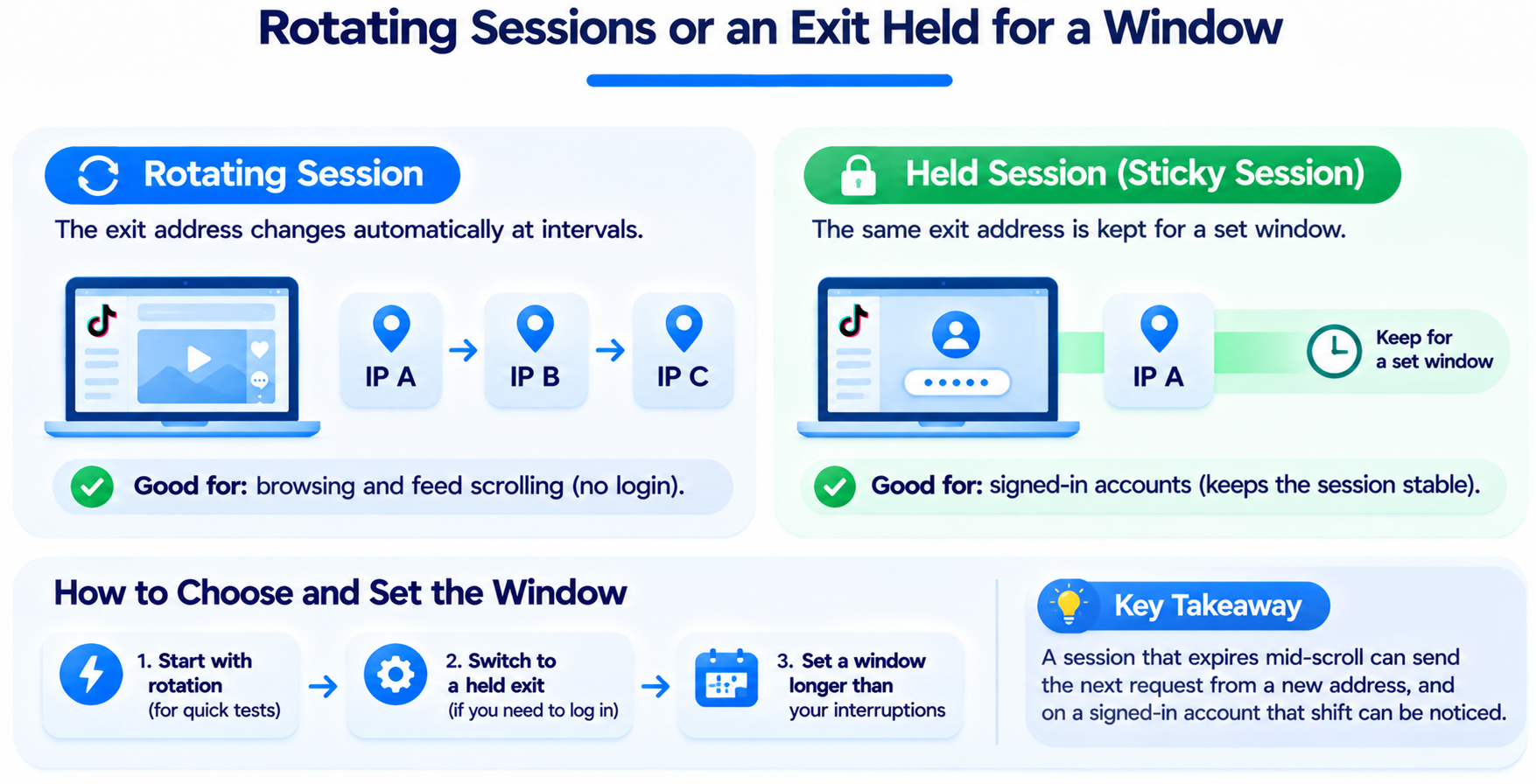
The second decision is how long one address should last. A feed scroll with no login survives on automatic rotation, because nothing in the session needs to persist. A signed-in account is the opposite case: it wants one exit held for a defined window, so the address does not change underneath a session that is already open.
Both session modes sit on the same endpoint, so a test can start with rotation and move to a held exit without buying twice.
The window is fixed when the session is created, so the first thing worth answering is how long one sitting actually lasts on a network that drops connections. A session that expires mid-scroll sends the next request from a new address, and on a signed-in account that shift is the one the platform notices. Set the window longer than the interruptions and the address holds through them.
Frequently Asked Questions About Unblocked TikTok
Choosing an exit does not settle everything, and four questions come up after that choice, each one a case where the method looked right and the result did not.
Is There a Free Unblocked TikTok App That Works
Rarely in the way the name suggests. Free apps that advertise themselves as unlockers are usually ad shells, and a few ask for permissions that have nothing to do with video. The free routes that genuinely work are the ones already on this page: a browser tab, a mobile hotspot, or a school whitelist.
The ones that are not pure ad shells share a structural problem. An app that reroutes traffic has to reach its own server first, and that server's hostname is as easy for a school filter to block as TikTok's. One name rule closes the app and the site together, which is why nothing installable is the answer on a filtered campus.
Can a School See That I Used a Proxy
On a managed device, assume yes. The school can see what was installed and which networks the device joined, and its filtering service logs the names that were requested. A personal phone on mobile data is a different situation, because the campus network is not in the path at all.
What none of that hands over is the content of a page. HTTPS hides what was on screen, so a proxy moves the destination name and the source address while leaving the fact of a connection on the record. Over mobile data nothing reaches the campus network, though the carrier keeps its own account of where the traffic went.
Why Does TikTok Show a Region Error After Connecting a Proxy
Usually because two location signals disagree. The request arrives from one country while the account was registered in another and the device still reports a third through its region setting or GPS. Pick an exit in the country the account belongs to, clear the app cache, and sign in again rather than opening a new account.
The account's region is attached at signup and does not follow the exit address, which is why moving the connection alone leaves the error in place. Clearing the cache matters for the same reason: the stored feed was fetched from the old region and survives a network change. Opening a second account from the new address does not repair the first one, and it leaves two accounts that disagree about where they are.
Does Unblocked TikTok Work on a School Chromebook
The web version does, as long as the name is not filtered and the browser is allowed. What does not work is installing an extension, changing the DNS field, or editing the proxy setting, because the device profile owns those. On a locked-down Chromebook the realistic options are the browser, a hotspot, and asking for a whitelist.
Two things people try on these machines do not survive contact with the policy. Developer mode and the Linux container are switched off by the same profile that greys out the DNS field, and a device that reports its installed components to the admin console leaves no quiet place to run a client. What remains is a tab in the browser or a phone acting as a hotspot, plus the request to the school described above.
Conclusion
If the page fails instantly, the resolver answered with a block and changing DNS or switching networks is the right first move. If it hangs and then times out, a name or range rule is in the path and a proxy on port 443 is the only technical route left. If the settings you need are greyed out, no configuration will help, and the remaining choices are a hotspot or a request to the school.
Most people do this in the opposite order. They buy an exit in the wrong country, discover the port is filtered, then read the policy and find the whole exercise was against the rules anyway. Checking which of the three layers is in front of you takes a minute, and it decides everything after it.
