

Most teams hit a wall when traffic demands, security, or scaling force them to rethink how web requests reach their servers. You can patch things with more hardware or quick fixes, but sooner or later, the question lands: what is a reverse proxy, and could it actually solve the bottleneck or shield your backend from direct exposure?
It’s easy to mix up a reverse proxy server with a forward proxy or to assume you don’t need another layer between users and your application. But skip this step, and you risk running into all kinds of problems: uneven load, direct IP leaks, or even downtime from unfiltered junk traffic. The real headache isn’t just technical, it's operational. Teams want reliability and control, not more complexity.
So, how does a reverse proxy work in practice? It sits in front of your web servers, intercepts incoming requests, and decides how to route them. On paper, it looks like a middleman. In practice, it can handle load balancing, SSL offload, caching, and even basic filtering. But if you treat it as a magic bullet, you’ll likely miss key differences, especially when comparing reverse proxy vs forward proxy setups or trying to match features to actual use cases.
Knowing where a reverse proxy fits, what it actually changes, and when to use one is the real difference between a smooth deployment and a mess of avoidable issues. Here’s what actually matters when you’re making this call.
What Does a Reverse Proxy Actually Do?
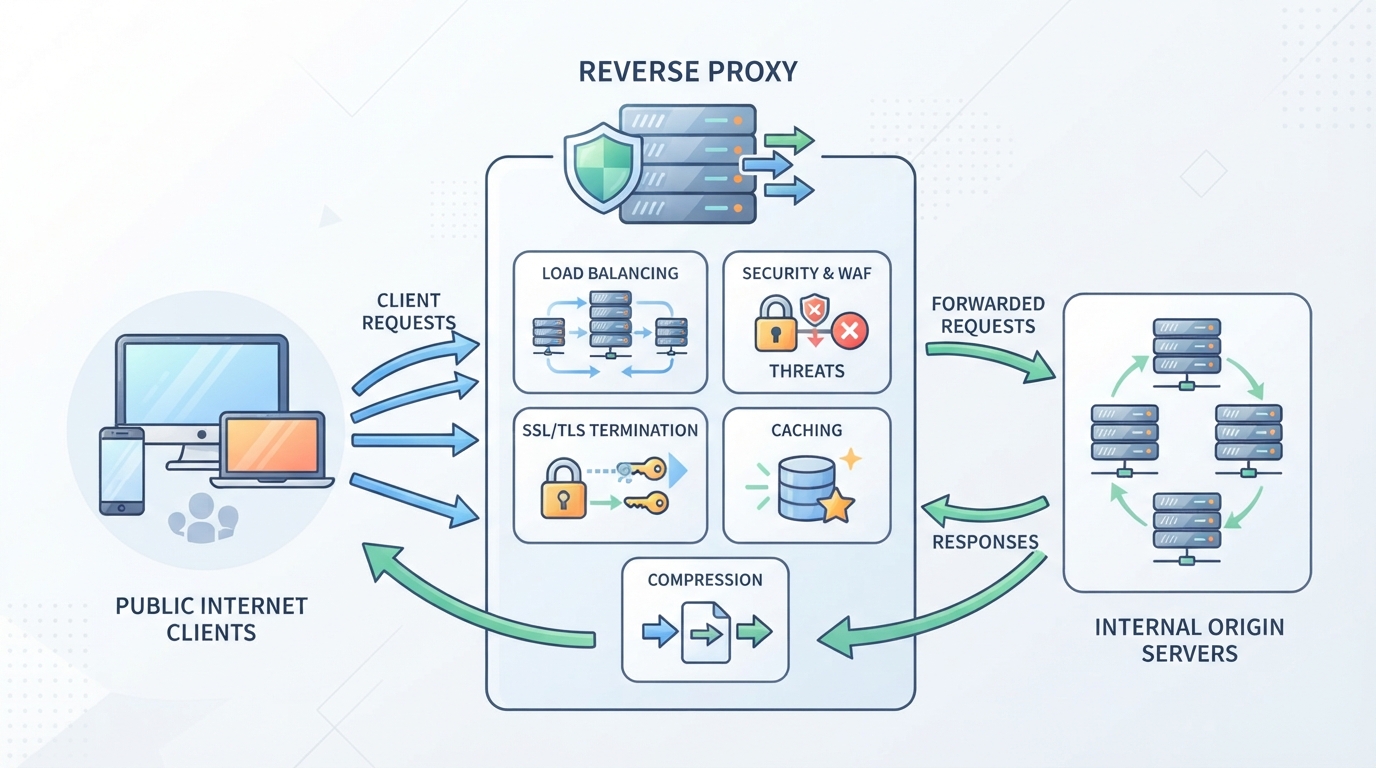
A reverse proxy is a gatekeeper for your backend servers. It takes incoming traffic, directs each request to the right internal server, and keeps your actual server details hidden from outside eyes. That’s the textbook answer, but what does this separation really deliver, and what can go wrong if you skip it?
How a Reverse Proxy Sits Between Clients and Servers
- Receives all inbound web requests before they reach your servers
- Forwards each request to the correct backend server based on rules or load
- Keeps internal server IPs and structure hidden from direct public access
What Problems Does a Reverse Proxy Solve?
Reverse proxy servers centralize who gets in and what they see, which means you can set up one main security gate instead of repeating the same rules on every backend. This also makes it much easier to swap or scale backend servers, users still hit the same public endpoint, but the proxy quietly reroutes traffic behind the scenes. Want SSL offload or caching? The reverse proxy absorbs those jobs, so backend servers only handle core application logic. But there’s a tradeoff: if the proxy fails, everything behind it goes dark, so you need to plan for redundancy. Reverse proxies solve a lot of pain points, but they can become a single point of failure if you don’t build in backup.
Next, it’s time to get clear on where reverse and forward proxies actually differ, so you don’t mix up their roles in your network.
Reverse Proxy vs Forward Proxy: What’s the Real Difference?
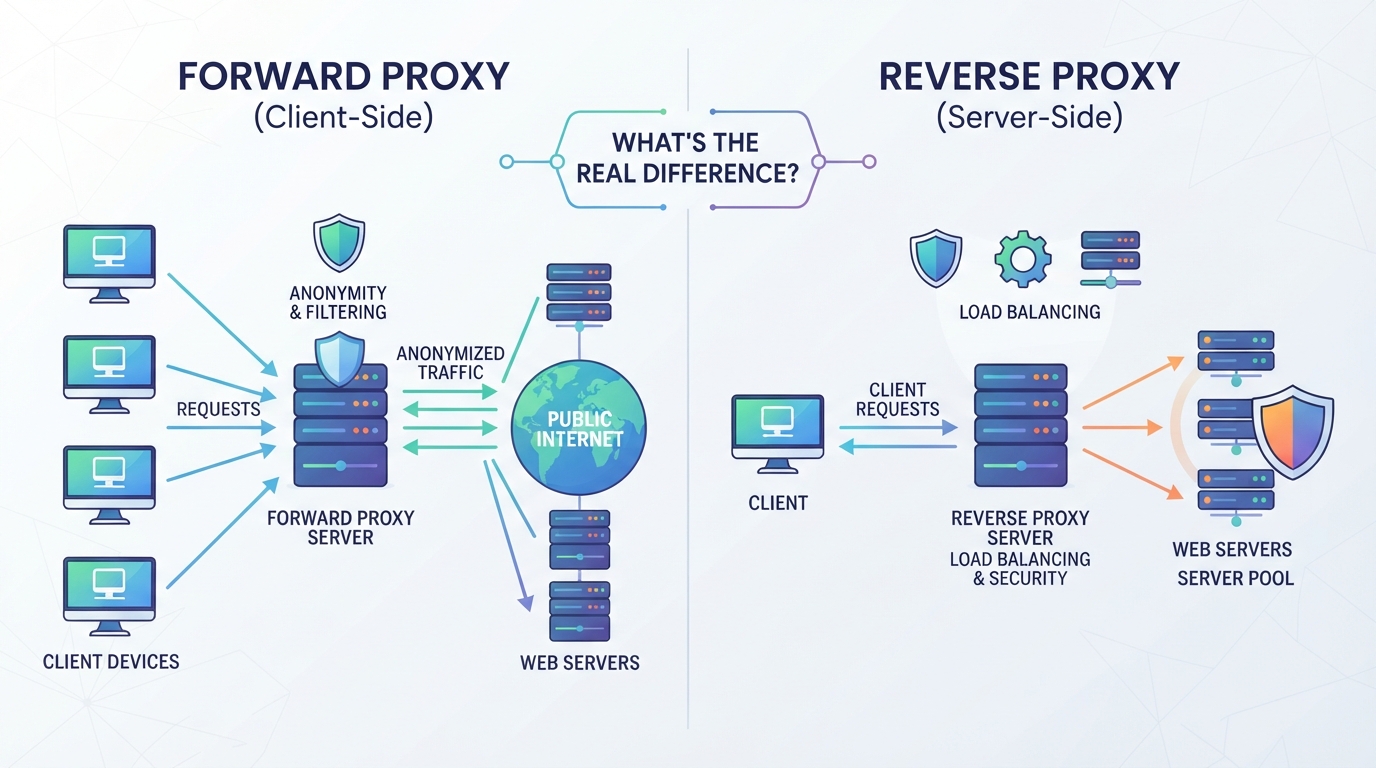
The question isn’t just "what is a reverse proxy", it’s how that role compares to a forward proxy in real network setups. Mixing them up can wreck your architecture or break compliance, so here’s the practical split.
How Does a Forward Proxy Work?
A forward proxy sits between your internal users and the outside internet. When a user makes a web request, the forward proxy intercepts it, replaces the user’s IP with its own, and sends the request out. This hides the user’s identity from external sites, lets admins filter outbound traffic, and can enforce network policies.
| Feature | Forward Proxy | Reverse Proxy |
|---|---|---|
| Traffic Direction | Outbound (client → internet) | Inbound (internet → server) |
| Main Actor Managed | Client/user | Server/service |
| Primary Use | User privacy, outbound control, filtering | Load balancing, security, caching |
| Who Sees the Proxy? | Internal users | External clients |
| Example Use Case | Controlling staff web access | Distributing web traffic to servers |
The practical takeaway: forward proxies help businesses control what users can reach, while reverse proxies help organizations control what users can access on their servers.
Key Differences in Direction, Use Case, and Control
A reverse proxy protects and manages servers by controlling inbound traffic, it keeps backend details hidden and can balance loads or block bad requests. A forward proxy, on the other hand, manages outbound requests from users, giving admins power over what leaves the network.
If you confuse the two, you risk putting your controls in the wrong place, clients and servers need different guardrails.
From here, if you need to manage outbound connections for web scraping or automation, you'll want to see how client-side proxy access changes your setup.
How to Handle Outbound Proxy Access for Data Collection and Automation Tasks
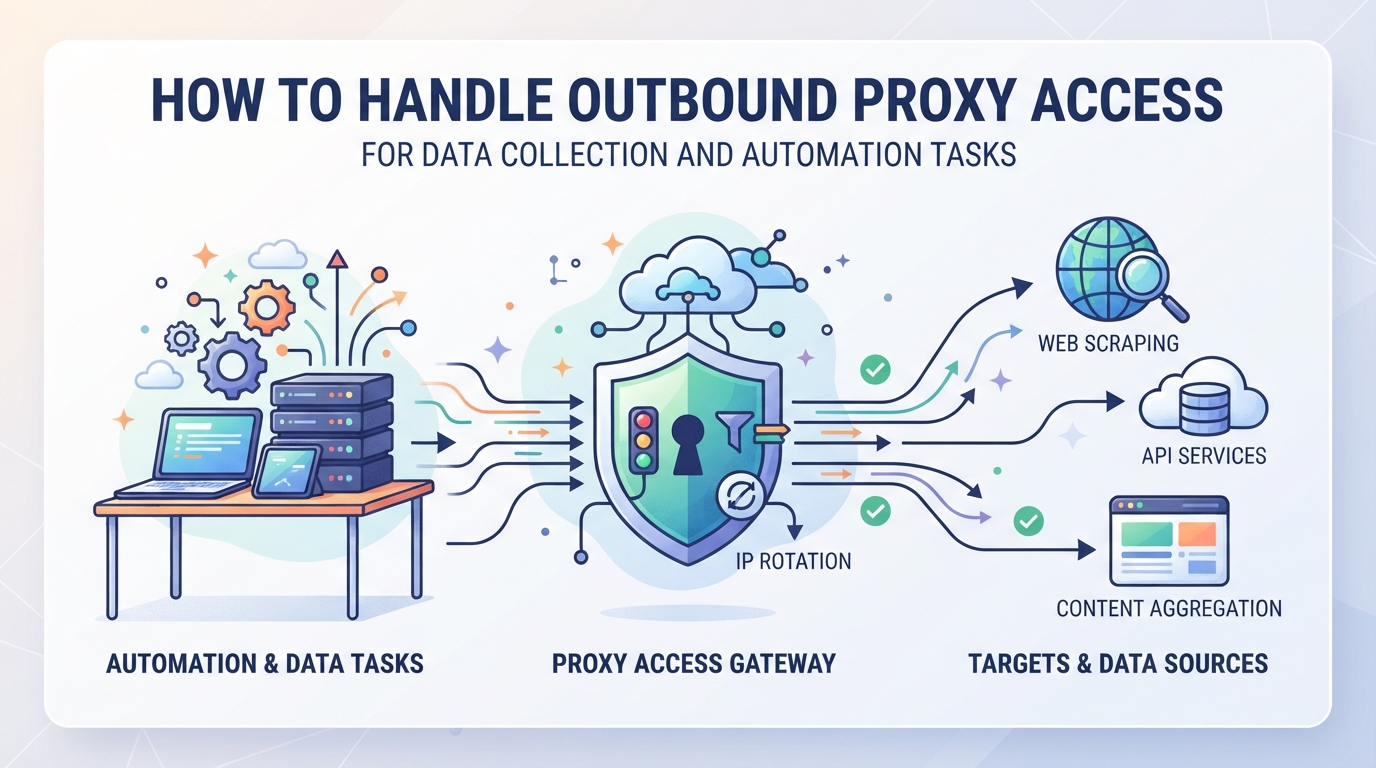
Reverse proxies manage inbound traffic to servers. But for data collection, automation, or scraping, you need the opposite: a way to control outbound internet access from your scripts or tools. That’s where a forward proxy comes in, letting you mask your origin, route requests from different locations, and avoid IP-based blocks.
Rotating Residential Proxies for Large-Scale Outbound Tasks
If you’re sending high volumes of outbound requests, think web scraping, price monitoring, or ad verification, rotating residential proxies let you access over 100 million residential IPs worldwide. You can rotate IPs on each request or keep a sticky session for up to 120 minutes when you need session consistency.
Static Residential and Native Proxies for Persistent Outbound Connections
When your workflow needs to keep the same IP for days or weeks, like testing region-locked services or running long-term monitoring, static residential and static native proxies are a better fit. PuraRoute assigns a fixed IP for the full plan period, and you get unlimited traffic on that resource. The main tradeoff is availability: you’ll need to pick from the current inventory and plan durations, so you can’t always get a specific city or ISP on demand. If your IP gets blocked, you’ll have to swap to a new one, which isn’t instant. That’s the catch with any persistent IP setup, once burned, the exit can’t be rotated in seconds like with residential pools.
HTTP(S) and SOCKS5 Protocol Support for Broad Compatibility
- Works with standard browsers, antidetect browsers, scripts, and automation tools
- Get proxy credentials: host, port, username, and password
- Choose between HTTP(S) and SOCKS5 based on your integration needs
For outbound proxy access that fits real-world data tasks, PuraRoute gives you control over IP rotation, session persistence, and protocol, just remember, it’s a forward proxy solution, not a reverse proxy.
When Should You Use a Reverse Proxy Instead of a Forward Proxy?
The difference isn’t just technical, it’s about which direction you need to control. You use a reverse proxy when you own the servers and need to manage incoming connections, not just hide who’s making requests. If you’re asking “what is a reverse proxy” and wondering if it fits your problem, here’s when it makes sense.
Typical Scenarios for Reverse Proxy Deployment
- Load balancing: Split incoming traffic across several backend servers to avoid overload or downtime.
- SSL/TLS termination: Handle encryption at the edge so your internal servers don’t have to manage certificates or ciphers.
- Web application firewall: Inspect and filter inbound requests before they ever reach your real web servers.
When a Forward Proxy Is the Right Tool
Reverse proxies shape how outsiders reach your servers, but sometimes the real need is controlling how your users or internal apps reach the outside world. Forward proxies step in here, think outbound data scraping, geo-testing, or restricting which sites employees can access. For example, a team pulling price data from multiple regions would use a forward proxy to rotate IPs and avoid getting blocked. If you try to use a reverse proxy for outbound tasks, you’ll hit a wall: it won’t mask your requests or help with regional restrictions. The main risk is picking the wrong tool and wasting days troubleshooting a flow that never works the way you want, so map your traffic direction before you start.
Next: before you set up a reverse proxy, it pays to understand not just the benefits, but also the tradeoffs and drawbacks. That’s where mistakes often happen.
What Are the Main Benefits and Drawbacks of Using a Reverse Proxy?
Reverse proxies can solve real problems for teams running public-facing sites, security, traffic spikes, and performance tuning. But adding a reverse proxy is never just about more features. It’s about trading simplicity for control, and that comes with risks you can’t ignore.
Key Advantages: Security, Load Balancing, and Caching
| Feature | What It Delivers | What to Watch For |
|---|---|---|
| Security | Hides backend IPs, blocks direct attacks | Needs regular updates |
| Load Balancing | Spreads traffic across servers for uptime | Misconfig = dropped requests |
| Caching | Shortens load times, cuts backend load | Can serve stale content |
A reverse proxy keeps your backend off the front line and can soak up spikes or simple attacks before they hit your real servers. Teams often use it to shift SSL work off their app servers, or to let several servers act as one. Caching popular content at the proxy layer can make sites feel much snappier and reduce backend strain, especially when traffic surges. But these features only help if you actually set up and maintain the proxy well, ignore updates or tuning, and you’ll open new problems.
Potential Drawbacks and Challenges
Relying on a reverse proxy means more pieces to set up, more configs to check, and a bigger blast radius if it goes down. If you don’t build in redundancy, your “helpful” proxy can turn into a single point of failure, taking out your whole site if it crashes or loses network. Sloppy configs can also add lag or break sessions in ways that are hard to debug.
When you’re planning a deployment, weigh these trade-offs carefully. The next step is to see what’s actually happening behind the scenes, how each request moves through a reverse proxy, and where the handoffs happen.
How Does a Reverse Proxy Work: Step-by-Step Request Flow
A reverse proxy acts as a gatekeeper between users on the internet and your backend servers. It inspects each incoming request, decides what to do based on set rules, and only then passes it along. This workflow isn't just about hiding your servers, it's about controlling who gets through, how they're handled, and what gets sent back out.
Request Handling: From Client to Backend and Back
When a client (like a web browser or app) sends a request, it doesn’t go straight to your server. The request lands at the reverse proxy, which could be running on a separate machine or as software on the same network. Right away, the proxy checks for threats: is the request coming from a known bad IP, or does it trigger any rate limits? It might also handle SSL, so the backend servers never see unencrypted traffic. If the request passes these checks, the proxy decides which backend (out of possibly several) should handle it. This is where load balancing or routing logic kicks in. The proxy then forwards the request to the chosen backend, waits for a response, and may cache that response or filter headers before returning it to the client.
But here’s where real-world issues creep in: if the backend times out, the proxy can return a generic error, making troubleshooting harder. Or, if caching isn’t set up right, users might see old content even after an update. Load balancing can also backfire when sticky sessions aren’t managed and users get logged out at random.
Done right, this setup hides your backend, manages high traffic, and filters out unwanted users. But every extra rule or plugin is another place where requests can get dropped, misrouted, or delayed. That’s why understanding the request flow matters before you put a reverse proxy in front of anything critical.
Common Mistakes and Misconceptions About Reverse Proxies
Confusing reverse proxies with outbound proxies is a costly error, especially if you expect one to do the job of the other. It’s easy to miss the risks until a real outage or a data leak proves the setup was wrong from the start.
Misusing a Reverse Proxy for Outbound Anonymity
- A reverse proxy only handles inbound traffic to your servers; it doesn’t hide the identity of users making outbound requests.
- Trying to use it for outbound anonymity won’t work, clients’ original IP addresses still reach outside sites.
- For outbound access control or IP masking, you need a forward proxy or a dedicated outbound proxy solution.
Overlooking Single Point of Failure Risks
It’s tempting to drop a reverse proxy in front of your servers and call it a day. But treat it as a single gateway without backup or monitoring, and the whole web app hangs on that one box. A reverse proxy without redundancy becomes your weakest link, if it crashes or the service fails, every inbound connection is dead in the water until you manually fix it. No amount of backend scaling helps if the front gate slams shut. Even a minor misconfiguration or expired SSL certificate at the proxy layer can block all user access, with error logs pointing to the proxy, not the real source. To avoid this, build in failover: run at least two proxy instances, use load balancers, and set up health checks that alert you before users notice downtime. Skipping these steps means accepting downtime risk that grows with your traffic.
Next up: how to actually match proxy types and network tools to your real-world needs, so you don’t end up fixing the same mistakes twice.
How to Decide Between Reverse Proxy, Forward Proxy, and Other Network Tools
Proxy choice comes down to traffic direction and control. If you’re debating, the fastest way to avoid costly mistakes is to map your needs to the right proxy role, don’t just buy the first tool with “proxy” in the name. Here’s how to sort it out.
Key Questions to Guide Your Proxy Selection
- Are you trying to protect or hide your servers (inbound) or control user activity (outbound)?
- Does your workflow need to anonymize client identities or shield backend infrastructure?
- Will you be managing requests from users to the internet, or from the internet to your own apps and APIs?
When to Consider Alternatives Like proxys or Application Gateways
Some scenarios call for more than just picking between reverse and forward proxies. If you want all user traffic, every app, every protocol, routed through a secure tunnel for privacy, a proxy is built for that job. But if you only need to route or secure specific application requests (like APIs or microservices), an API gateway is purpose-built for fine-grained traffic management and authentication. Choosing the wrong tool leads to fragile setups that break under real traffic or introduce hard-to-trace failures. When in doubt, check where your traffic starts and ends, then match the tool to that flow, shortcuts here often mean more work later.
Frequently Asked Questions About what is a reverse proxy
Can a reverse proxy be used to hide my own browsing activity?
No, a reverse proxy does not hide your personal browsing. It’s meant to handle incoming traffic to servers, not outgoing requests from users. If you want to hide your own internet activity or change your IP address when browsing, you need a forward proxy or an outbound proxy service instead.
What are common use cases for reverse proxies?
Reverse proxies are often used to balance traffic across multiple servers, making websites faster and more reliable. They can also handle SSL encryption, act as a web application firewall to filter out bad traffic, and help manage who can access certain web resources from outside.
How is a reverse proxy different from a load balancer?
A load balancer is a special kind of reverse proxy that mainly spreads traffic across several servers so no single server gets overloaded. While all load balancers are reverse proxies, not all reverse proxies focus only on balancing traffic, they may offer other features like security, caching, or centralized control.
Do I need a reverse proxy for web scraping or data collection?
No, reverse proxies do not help with web scraping or making outbound requests. For collecting data from websites or hiding your identity while browsing, you need a forward proxy. Reverse proxies only manage traffic coming into a server, not what leaves your device.
Can I use both reverse and forward proxies in the same network?
Yes, you can use both. A forward proxy helps control and anonymize outbound traffic from users, while a reverse proxy manages inbound connections to your servers. Using both lets you manage who can access your web services and how your own devices connect out to the internet.
If you need to control how connections are routed or manage access based on IP behavior, the next step is to clarify whether your workflow actually requires the functions of a reverse proxy or if you mainly need flexible proxy access and location targeting. Once you’re clear on your technical requirements, you can match the right type of proxy service or infrastructure for the job.
