

You’re running a workflow when you hit a wall: proxy blocked. Maybe you see “proxy access denied” in your logs or your script fails because the proxy server’s been blocked by the target site. Sometimes the block is obvious, a hard refusal or a captcha you can’t bypass. Other times, the site just loads wrong or gives you stale data, making it tricky to pinpoint if the proxy is the problem or something else is broken.
It’s easy to assume switching proxies will fix it, but that’s not always true. Blocks can come from session leaks, bad configuration, reused IPs, or even using the wrong protocol for the task. If you don’t figure out how and why your proxy was blocked, you’ll waste time swapping providers or chasing false fixes, only to hit the same wall again.
What most people miss is that diagnosing proxy failures means checking more than just whether the IP shows up in a blacklist. You have to look at session duration, region targeting, credential setup, and how your tool handles authentication. Even the difference between a rotating residential proxy and a static residential IP can change what triggers a block or makes a site suspicious. Some platforms are more forgiving if you rotate properly; others flag you for every change.
If your proxy not working is slowing you down, here’s what to check before you make another move.
What Causes a Proxy to Get Blocked, and How Can You Tell?
Most proxy blocks aren’t random. Sites use a mix of detection methods, and it’s usually a pattern, like a flagged IP, weird request behavior, or a protocol mismatch, that gets you shut out. If you don’t know what actually triggered the block, you’ll waste time switching tools or providers and still get nowhere.
How Do Websites Detect and Block Proxies?
Sites layer detection. Some rely on public IP reputation lists, some watch for odd traffic patterns, and others dissect protocol details looking for fingerprints of automated use. Here’s a breakdown:
| Detection Method | What It Looks For | Typical Result When Triggered |
|---|---|---|
| IP Reputation / Blacklists | Known proxy IPs, abused ranges | Block page, challenge, or silent drop |
| Behavioral Patterns | Rapid requests, identical actions, scraping | Rate limit, CAPTCHA, or block |
| Protocol/Header Fingerprinting | Non-browser headers, SOCKS5, missing tokens | Connection reset or silent fail |
If you keep getting blocked, it’s usually one of these triggers, fixing the wrong thing won’t help.
What Are the Signs That a Proxy Is Blocked?
When a proxy is blocked, the symptoms are rarely subtle. You might see “Access Denied” messages, infinite CAPTCHA loops, or connections that reset without warning. Sometimes, pages won’t load at all, or you’ll get redirected to generic error codes. If you only see these issues when the proxy is active, that’s your first clue.
How Can You Pinpoint the Block's Root Cause?
Swap out variables one at a time, change the IP, protocol, or location, and watch for different errors. Check your logs for HTTP status codes like 403 or 429, or for block messages in the response body. Connecting directly (no proxy) and comparing results can reveal if the site is flagging your proxy or blocking everyone. That’s how you narrow down the real cause and avoid chasing your tail.
The patterns that get you blocked tend to show up fast, so the next step is to look at your proxy behavior and see what’s setting off the alarms.
Which Proxy Behaviors Make Blocking More Likely?
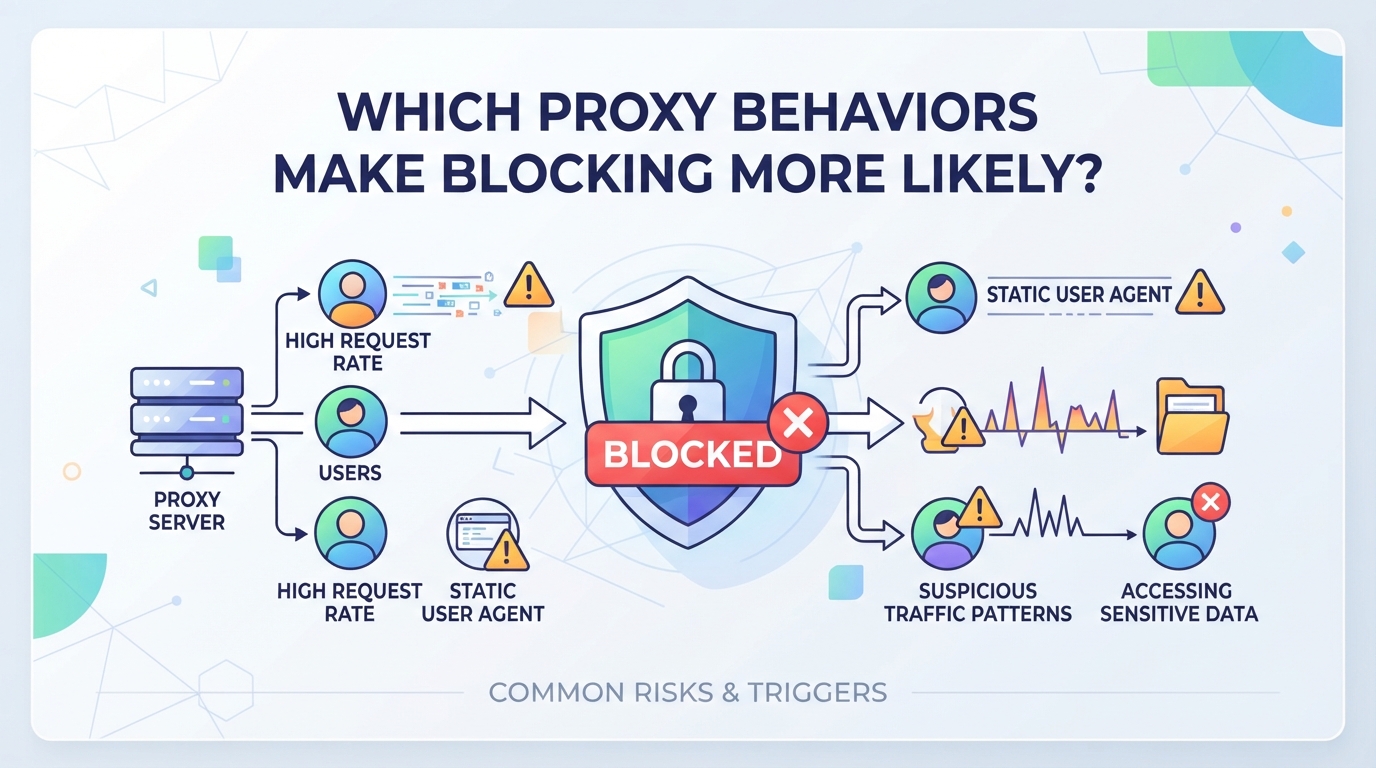
It’s not just about which proxy you use, how you use it can decide whether you get through or get blocked. The way you rotate IPs, manage sessions, and pick your proxy type all play into how quickly you hit a wall or slip under the radar.
When Does IP Rotation Help, or Hurt, Your Access?
Rotating IPs can dodge basic blocklists, but switching too fast, or bouncing between far-apart regions in a single session, often makes anti-bot systems sit up and take notice. If your tool changes IP for every request, some sites will flag you instantly. On the other hand, using sticky sessions lets you keep the same IP just long enough for multi-step tasks, without looking like a bot running amok.
How Do Session Length and Consistency Affect Blocking?
Session length is where most people get tripped up, too short, and you look like a bot; too long, and if your IP gets flagged, every ongoing action from that address is at risk. For example, logging in with one IP and then checking out with another is a classic trigger for "proxy not working" errors, especially on banking or ticketing sites that expect the same IP for a whole workflow. But keeping one IP for hours can backfire if your volume is high, sites may start throttling or blocking you outright. The sweet spot depends on the task: short sticky sessions work best for multi-step actions that finish quickly, while static IPs are safer for long, low-volume jobs. If you’re running scripts that hammer the same endpoint, even a sticky session can get you blocked if you don’t throttle requests.
Why Does Proxy Type (Residential, Data Center, Mobile) Matter?
- Residential IPs are assigned to home users and blend in better on most sites; they’re less likely to trigger bulk bans.
- Data center IPs stand out, many sites block whole ranges simply for being from known server farms.
- Mobile IPs, routed through carrier networks, sometimes bypass regional blocks but can be scarce or more expensive.
If you see a pattern where every new proxy gets blocked fast, you’re probably using the wrong IP type for your target site. Matching your proxy behavior, rotation, session, and type, to the site’s risk profile is the real way to reduce blocks.
How Can Flexible Proxy Types and Session Control Reduce Blocking? (with PuraRoute Example)
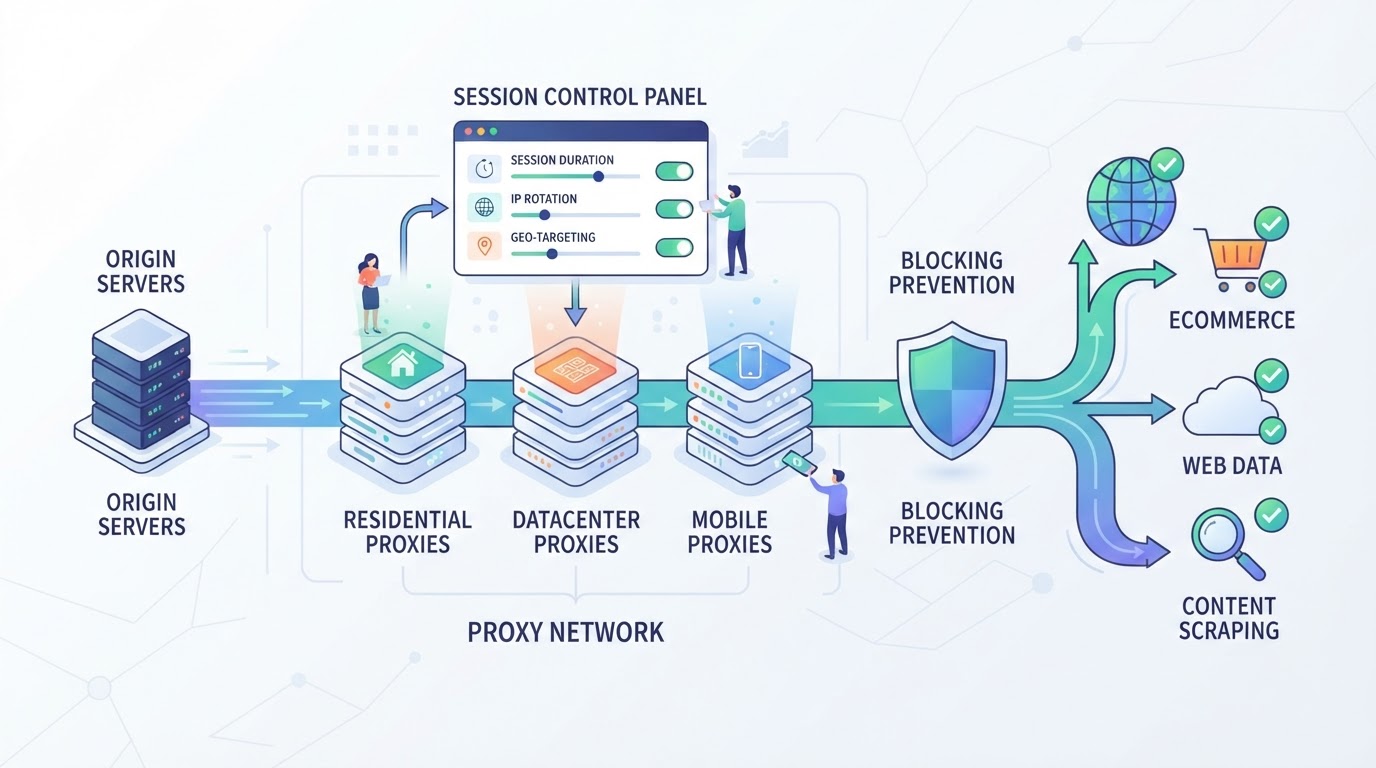
Getting a proxy blocked usually means your connection pattern, how long you stick with one IP, how fast you switch, or which locations you use, doesn’t match normal user behavior for the site you’re targeting. Fixing this isn’t just about swapping to a new provider or fresh IP. The key is picking a proxy type and session mode that fits your workflow length and risk, not just the headline pool size. PuraRoute lets you set these controls directly, so you can avoid triggering bans that come from the wrong session or IP setup.
How Do Sticky Sessions and Fixed IPs Help With Multi-Step Tasks?
If your task needs to keep the same IP, like registering accounts, running checkout flows, or accessing a persistent dashboard, a sticky session holds a residential IP for up to 120 minutes. This works for multi-step processes that wrap up in under two hours. For anything longer, static residential or static native proxies give you a fixed IP for days or months. Trying to stretch sticky sessions past their limit is a classic mistake, once they expire, forced IP rotation can get your proxy blocked all over again. Always match session duration to your actual process.
When Does a Rotating Residential Proxy Prevent Blocks?
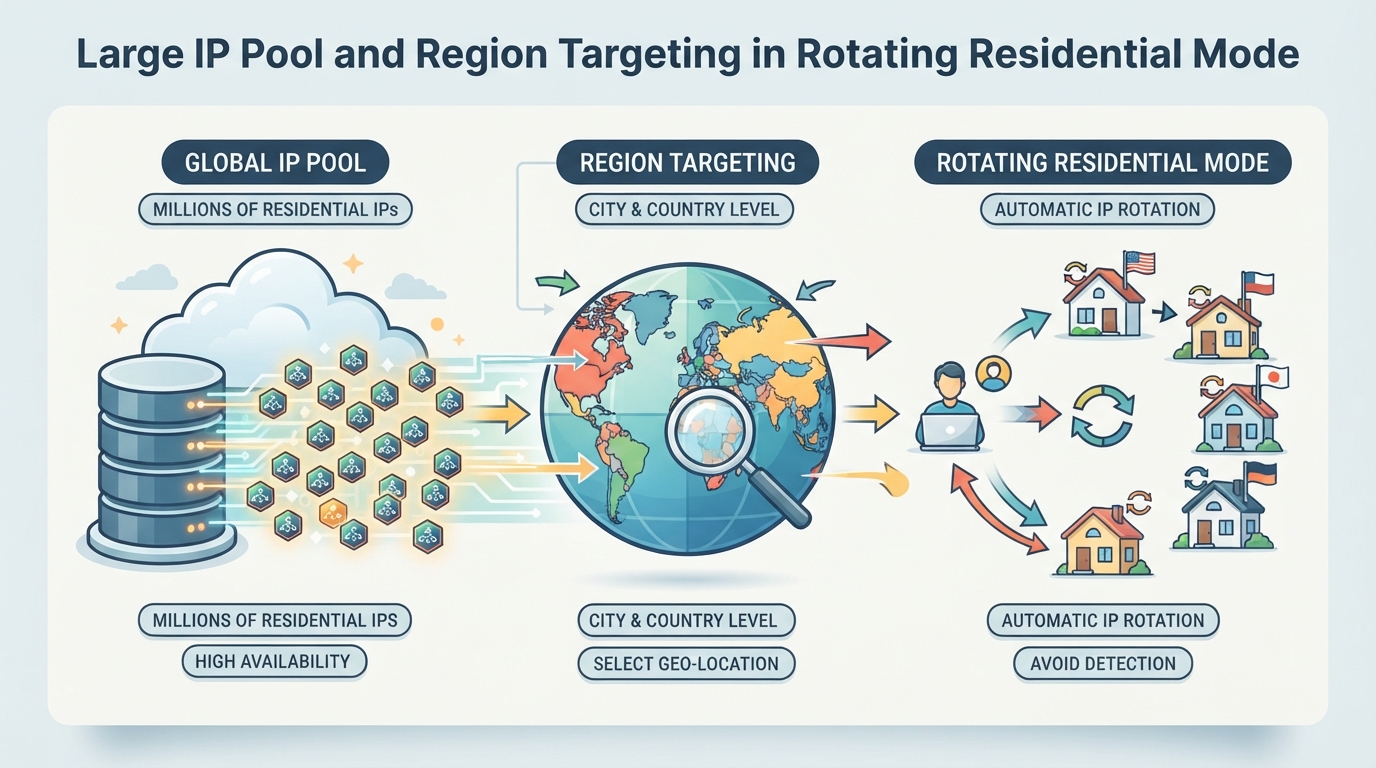
Rotating residential proxies help when you need to spread requests across many IPs, like scraping public data, checking regional content, or avoiding rate limits. With access to 100M+ residential IPs and country, state, or city targeting, you can route traffic where it looks most natural. Just remember: unlimited concurrency helps scale, but rapid switching or mismatched locations can still get flagged.
What Protocol and Location Controls Matter Most?
You pick HTTP(S) or SOCKS5 depending on what your target allows. For rotating residential proxies, city-level targeting gives fine control, while static proxies require you to confirm inventory and available regions before purchase. If the right location isn’t in stock, you can’t force an assignment, plan ahead if region matters.
How to Monitor and Adjust Proxy Usage for Reliability
Inside the console, you can check live traffic use, session lengths, and see when static resources are near expiration. If you start seeing access denied or reliability drops, switch modes or update regions, don’t just keep retrying the same setup. Keeping an eye on these details can help you avoid repeat proxy not working headaches.
Dialing in these settings is what keeps access steady; next, you’ll need to know what to do the moment a site blocks your proxy.
What Steps Can You Take Immediately When a Proxy Is Blocked?
When your proxy gets blocked, the fastest fixes usually come from adjusting your connection or credentials, not just waiting or switching providers. Small tweaks like changing the IP, double-checking location settings, or swapping protocols can get you back online without repeating the same mistake.
How to Switch IPs or Sessions Safely
Most blocks hit a specific IP or session. Try rotating to a new residential IP if your platform supports it. If you’re running a multi-step task, switch to a sticky session so your IP stays consistent for just long enough. Jumping between locations too quickly can trigger more blocks, so stick with one region per workflow.
When to Change Protocols or Tools
If you still can’t get through, check whether the block is tied to your proxy protocol. Some sites target HTTP(S) or SOCKS5 traffic differently. Quick test: switch your client to the other protocol and retry the connection. This often reveals if you’re facing a protocol-specific block. If you’re using browser automation, try a standard browser for one attempt; some sites only block traffic from known bot frameworks, not regular browsers.
What to Check in Proxy Credentials and Location Settings
- Confirm you’re using the right Host, Port, Username, and Password, typos here mean your proxy never connects.
- Make sure your selected country, state, or city matches what the site expects; picking the wrong location can get your access denied outright.
- If you’re on a static IP plan, check the IP’s expiration or inventory status, sometimes the proxy looks “blocked” because the assigned resource is no longer valid.
These checks usually resolve blocks faster than chasing new providers. Next, consider how location coverage or resource availability could limit your proxy access.
How Do Location and Inventory Limits Affect Proxy Access?
When a proxy is blocked or not working, the reason often comes down to where the IP comes from, plus whether the provider actually has the resource you need in stock. Before blaming your setup, check if your target location or protocol is even available, and if the static IP you want can actually be assigned right now.
Why Country and City Targeting Matters
- Some sites will only open up if your IP matches their approved region, down to the city or even a specific network block.
- Rotating residential proxies usually cover more countries and cities, letting you switch locations quickly if access fails.
- Static proxies depend on what’s available at the moment, if inventory for a city dries up, you can’t force a match.
How to Check Inventory Before Buying a Static IP
You can’t just assume a static residential or native IP is available in every city or network. Proxy providers show live inventory in their console or API, and options can shift by the hour. Here’s the catch: if you buy before confirming, you risk paying for an IP that isn’t actually assignable or doesn’t support the protocol your workflow needs (like SOCKS5 vs HTTP). For example, if you need a fixed IP in Madrid and only London is left, forcing the wrong city could get your proxy blocked by the target site’s filters. Always double-check location, protocol, and inventory before committing, otherwise, you’ll waste both time and budget on a resource mismatch.
If you keep running into access denials or see that the right IPs are never available, it’s time to ask whether a proxy is even the right tool for this job, or if it’s a dead end for your use case.
When Is a Proxy Not the Right Solution for Access Problems?
Even with careful proxy setup, some access blocks won’t budge just by swapping IPs or tweaking session modes. Knowing these limits up front saves you from endless trial and error, sometimes, a proxy is simply not enough.
Which Blocks Can't Be Bypassed by Changing Proxies?
- Device or browser fingerprinting: Sites use scripts to collect data about your browser, OS, and even screen size. Matching patterns can block you even with a fresh IP.
- Account-level bans: If your user account is flagged, no proxy will restore access until the block is lifted.
- Legal or compliance restrictions: Regional bans, copyright takedowns, or regulatory rules can block all proxies from certain places, no matter how often you switch.
What Other Tools or Methods Might Be Needed?
When proxies hit a wall, other tactics come into play. Antidetect browsers can scramble your fingerprint, making you look like a new user even on the same device. For encrypted tunnels or masking your whole device’s traffic, a proxy sometimes works better, though some services block both. Account bans usually require a manual appeal or new registration; no amount of proxy rotation will change that. The bottom line: if you keep running into the same access problem despite changing proxy settings, it’s time to look beyond proxies and layer in tools that target the real source of the block.
Before you invest more time or money, check if your access issue falls into one of these categories. If it does, monitoring proxy reliability won’t help until the real blocker is addressed.
How to Test and Monitor Proxy Reliability Over Time
Staying ahead of proxy blocks is less about luck and more about tracking what actually happens session by session. If you only react after a site blocks your proxy, you’re already behind, monitoring lets you spot trouble before it shuts down your workflow.
What Metrics Should You Track?
- Track the success rate for each IP or session, spikes in failed requests often signal a new block or reputation issue.
- Note how often you hit CAPTCHAs, login challenges, or “access denied” errors. Frequent triggers usually mean the target is flagging your traffic pattern.
- Watch your traffic usage and how long each session lasts. Abrupt drops or session resets can point to silent blocks, not just overt “proxy blocked” warnings.
How to Adjust Proxy Settings Based on Monitoring
If your monitoring shows a rising failure rate or more CAPTCHAs, don’t just swap providers. Try switching from rotating to sticky sessions, or vice versa, depending on whether repeated IP changes or sticking with one address is causing the issue. For static IPs, rotate or renew them if a specific address starts returning errors. Sometimes, updating your targeted location (like moving from city-level to country-level targeting) helps if regional bans are the culprit. The quickest wins come from acting on real session data, not guessing based on gut feel.
Frequently Asked Questions About proxy blocked
Can switching from a data center proxy to a residential proxy reduce blocking?
Yes, switching to a residential proxy can help when you get a proxy blocked message. Many sites block traffic from known data center IPs, but residential proxies use real user connections. This makes them harder for websites to detect and block, so your access is less likely to be interrupted.
How long can a sticky session keep the same IP before it changes?
Sticky sessions can keep the same residential IP for up to 120 minutes. After that, the IP will change automatically. If you need to keep the same IP for a longer period, consider using a static residential or static native proxy, which stays the same as long as your plan is active.
What should I do if my static proxy stops working before the plan expires?
First, check if the proxy is still within its validity period and that your settings match the correct location and protocol. Sometimes inventory or location changes can affect access. If your static proxy is still not working, you may need to renew, reassign, or select a different IP from the provider’s available options.
Are HTTP(S) and SOCKS5 both supported for all proxy types?
Both HTTP(S) and SOCKS5 protocols are supported across rotating residential, static residential, and static native proxies. You can set up your connection with either protocol, depending on what your application or tool requires. Make sure to enter the right proxy credentials for the protocol you choose.
Do I need to confirm city-level inventory before buying a static IP?
Yes, always check live inventory for the specific city or region before buying a static IP. Static proxies are based on available resources for each location, so not every city will have IPs at all times. Checking first helps you avoid issues like proxy access denied or not getting the location you need.
If your connection keeps getting blocked, the next step is to look closely at your actual access pattern and whether switching IP type, adjusting session length, or refining location targeting addresses the immediate problem. Checking what your tool supports and matching it with the right proxy behavior tends to solve more issues than jumping between random services.
Try Puraroute Now
