

Anyone who’s tried to route traffic through a proxy server knows the headache, wrong protocol, broken scripts, or apps that refuse to connect. The real problem usually isn’t the proxy itself, but matching the right type to your workflow. That’s where the socks5 proxy gets messy: it promises flexibility, but the details matter more than most guides admit.
What catches people off guard is how fast a SOCKS5 proxy can solve issues HTTP proxies can’t, like handling non-web traffic or keeping authentication simple. But it’s not a magic fix. Use the wrong configuration and you’ll waste hours debugging connections that never complete. SOCKS5 proxies handle more than just browser requests, but their open-ended approach means mistakes are easier to make. A SOCKS5 proxy server works with everything from browsers to automation scripts, yet if you skip the protocol match, nothing works.
The practical question is simple: when does SOCKS5 actually make your life easier versus just adding another layer to troubleshoot? Figuring out SOCKS5 vs HTTP proxy isn’t just about features, it’s about what your app needs to send, how credentials are managed, and whether you need to handle UDP or just TCP.
If you’re tired of chasing down proxy errors, start by breaking down how SOCKS5 really works, what it does differently, and when it’s worth switching.
What Makes a SOCKS5 Proxy Different From Other Proxy Types?
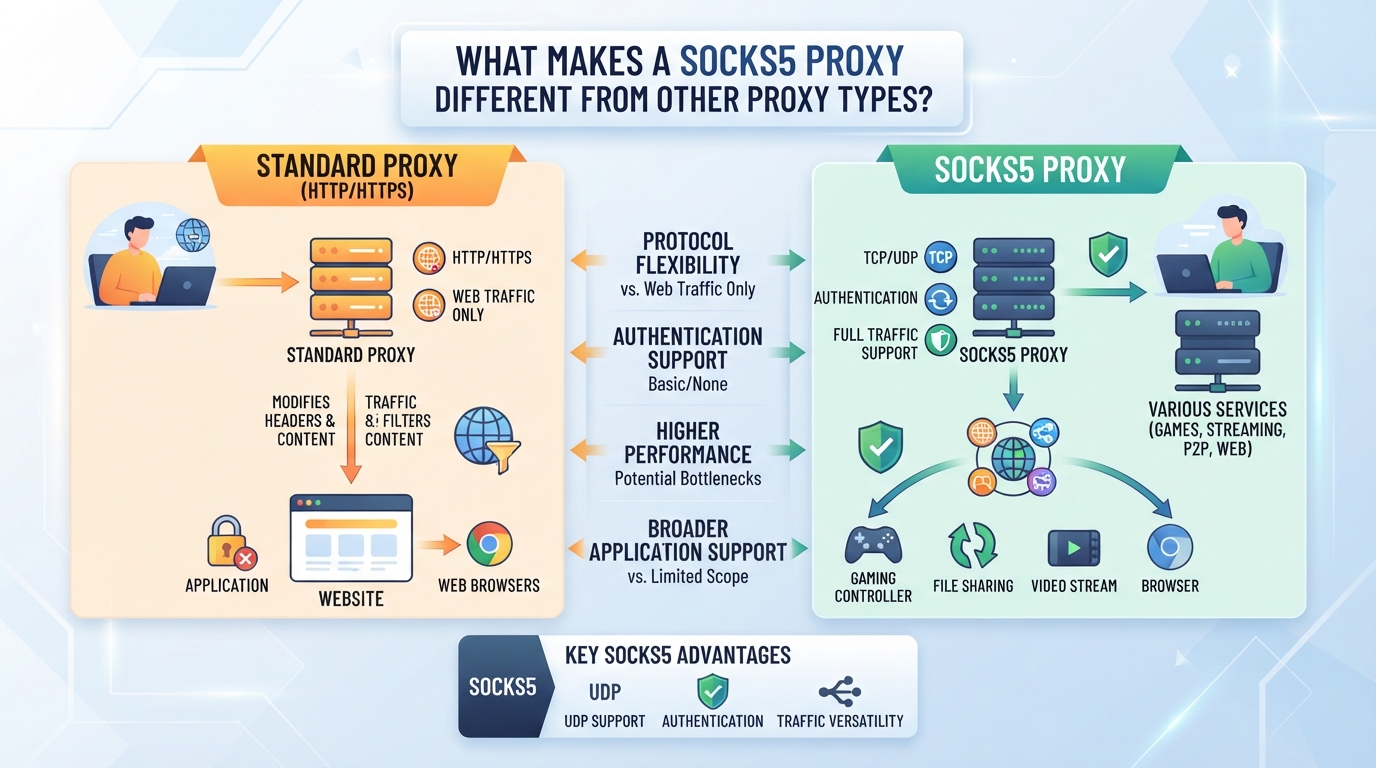
If you’ve ever been stuck wondering why your automation tool or app won’t connect, the difference usually comes down to how the proxy handles traffic, not just which IP it uses.
How SOCKS5 Handles Traffic Compared to HTTP(S) Proxies
Here’s where SOCKS5 stands apart: it doesn’t care what type of data you send. HTTP(S) proxies only handle web requests (like browsers), and they often rewrite or add headers. SOCKS5 proxies sit lower in the network stack, so they can forward almost any protocol, web or not, without modifying the payload.
| Proxy Type | Protocols Supported | Typical Use Cases | Key Limitations |
|---|---|---|---|
| SOCKS5 | TCP & UDP (all protocols) | Apps, scripts, games | No encryption, no caching |
| HTTP(S) | HTTP/HTTPS (web only) | Browsers, web scraping | Can’t handle non-web traffic |
| SOCKS4 | TCP only | Legacy apps | No UDP, no authentication |
Caption: SOCKS5 vs HTTP(S) vs SOCKS4 proxies by protocol and use case
The practical effect: SOCKS5 can handle web, FTP, even some P2P or VoIP traffic, while HTTP(S) proxies are limited to web content.
When Does SOCKS5 Offer a Real Advantage?
If you need to proxy something besides web pages, say, an email client, a game, or anything using UDP, SOCKS5 is often the only choice. It also supports authentication, which matters for multi-user setups.
What SOCKS5 Cannot Do That Other Proxies Might
You don’t get built-in encryption with SOCKS5, your traffic isn’t hidden unless the app uses TLS/SSL itself. Also, SOCKS5 doesn’t filter content or cache responses, so you can’t use it for access control or speeding up web browsing.
SOCKS4 vs SOCKS5: What Changed?
SOCKS5 adds two big features: it supports authentication (so you can require a username and password), and it handles UDP as well as TCP. SOCKS4 only works with TCP and can’t check credentials.
If you’re choosing between proxy types, the real question is whether you need to handle non-web protocols or advanced session control, if so, SOCKS5 is worth a close look. Next, we’ll cut through the hype and show exactly which workflows actually need it.
Which Workflows Actually Need a SOCKS5 Proxy?
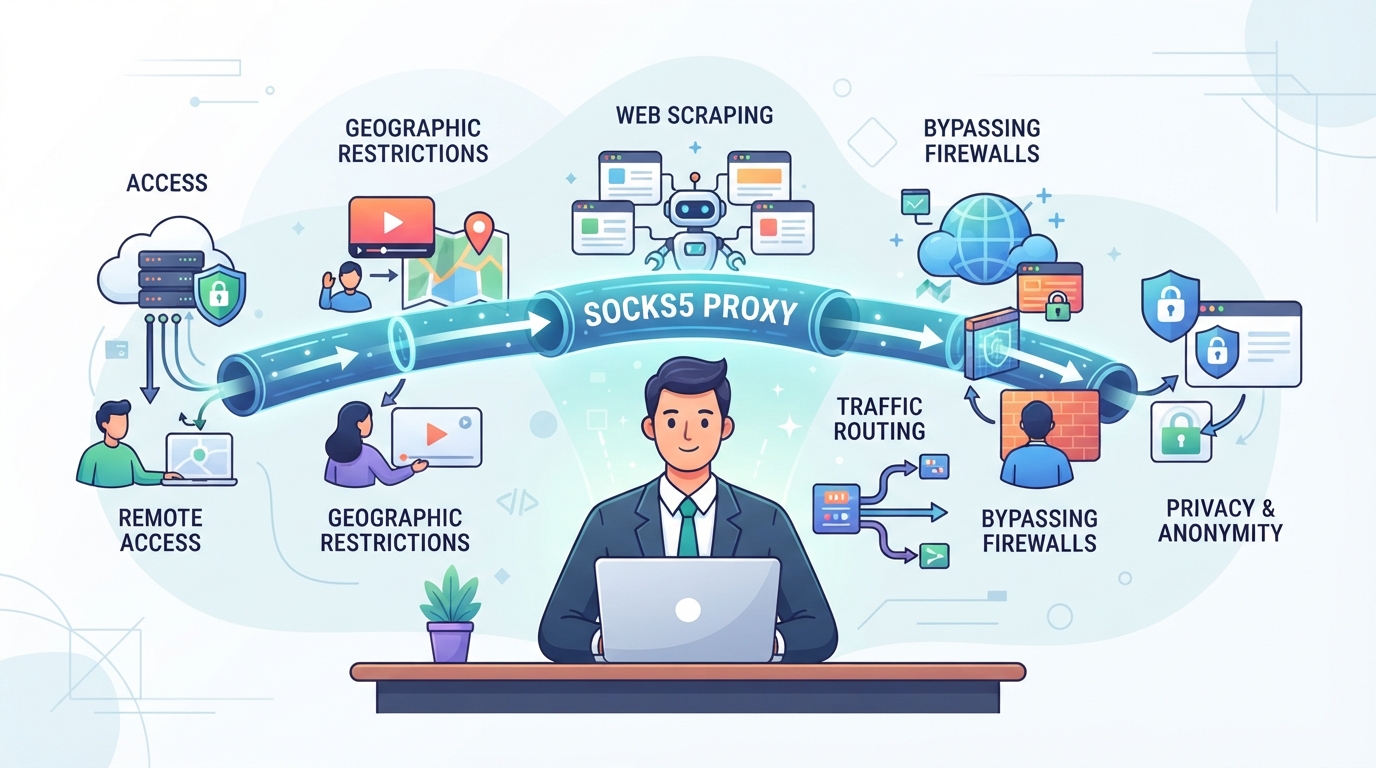
Choosing SOCKS5 isn’t about ticking a box, it’s about knowing when HTTP(S) proxies won’t do the job. If your app or workflow needs to send more than just web traffic, or you’re running into walls with standard proxies, SOCKS5 might be the only way forward.
When Is SOCKS5 Required for UDP or Non-Web Traffic?
If your workflow involves streaming, VoIP, some games, or automation tools that send UDP packets, you need SOCKS5. HTTP(S) proxies only handle web traffic (TCP), so they’ll fail on these protocols, file transfers, video calls, and real-time data all break without SOCKS5 support.
What Applications and Tools Support SOCKS5?
Most browsers can work with SOCKS5, but the real value shows up in automation tools, headless browsers, or apps that need to tunnel more than just HTTP. For example, a trading bot might use SOCKS5 to route both API and market data feeds over the same connection, while some business proxy clients let you pipe all app traffic through a SOCKS5 proxy server for testing. The catch: not every tool supports SOCKS5 out of the box. Some apps only accept HTTP proxies or require extra configuration. If you try to force SOCKS5 where it isn’t supported, connections just hang or throw errors, no warning, just dead air.
Risks of Using SOCKS5 Where HTTP(S) Is Expected
If you point a website or API that expects HTTP headers at a SOCKS5 proxy, the handshake fails. Some sites drop the connection; others give cryptic error codes. There’s also no built-in encryption, if your app relies on proxy-level security, SOCKS5 alone won’t cover you.
How Session and IP Behavior Affect SOCKS5 Use
- Check if your SOCKS5 connection rotates IPs mid-session, some tools can’t handle that.
- For workflows needing consistent identity, static SOCKS5 IPs are safer.
- Short-lived tasks can use rotating proxies, but monitor for dropped sessions or forced logins.
Next, you’ll want to see how SOCKS5 connections are actually set up and managed, especially if you’re juggling multiple tools or need to automate the process.
How to Set Up and Manage SOCKS5 Proxy Connections With PuraRoute
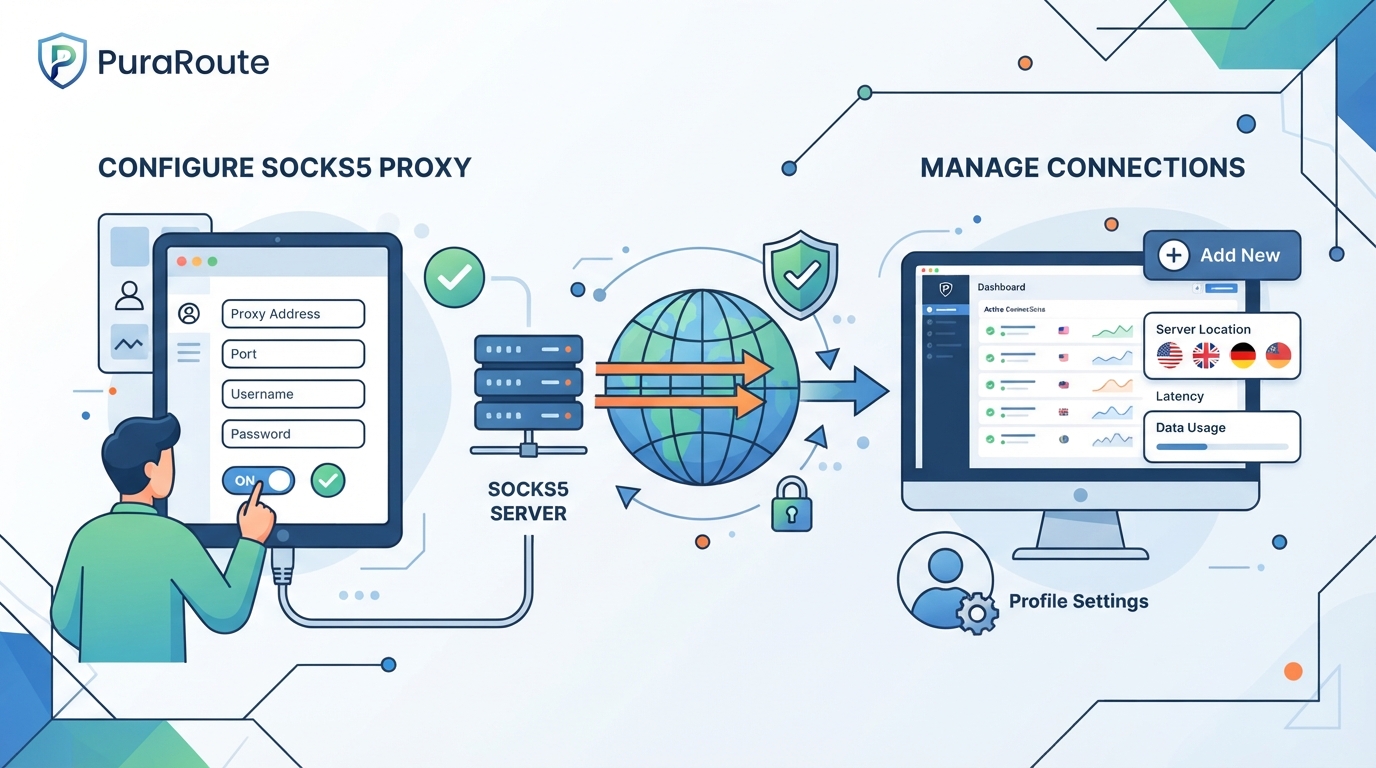
If you need a proxy that handles more than just browser traffic, SOCKS5 is usually the go-to. But the real challenge is matching your proxy type and session behavior to your task. Get this wrong, and you’ll spend more time troubleshooting than working. Here’s how PuraRoute fits into the SOCKS5 equation for business users who care about control and uptime.
How to Choose Between Rotating, Sticky, and Static SOCKS5 Proxies
The move between rotating, sticky, and static proxies isn’t just about IP churn, it’s about session length and how often you need to switch locations. Rotating Residential Proxies in PuraRoute are the play for workflows needing frequent IP changes and high concurrency. If you need the same IP for a series of requests, think scraping or multi-step login, sticky sessions offer temporary exit-IP consistency within the session window. For tasks that demand a fixed IP, such as whitelisting or long-term logins, Static Residential and Static Native Proxies are built for that, with unlimited traffic during the plan’s duration. The catch: sticky sessions aren’t permanent, and static proxies depend on real-time inventory, so always confirm your resources before starting a critical run.
Which PuraRoute Proxy Types Support SOCKS5 Connections?
PuraRoute’s Rotating Residential, Static Residential, and Static Native proxies all support SOCKS5 connections. You pick the protocol, SOCKS5 or HTTP(S), when configuring each proxy. This means you can match the proxy’s behavior to your tool, script, or application without being locked to HTTP-only traffic.
How to Configure and Use SOCKS5 Credentials in PuraRoute
Once you’ve purchased or assigned your resource, PuraRoute’s console gives you the Host, Port, Username, and Password for your SOCKS5 proxy. Plug these into your browser, automation tool, or script. Track usage or check resource status directly in the console for traffic-based or static deployments.
What to Check About Location and Inventory for SOCKS5 Proxies
Before launching a connection, check if the target location is available. With Rotating Residential proxies, you can set country, state, or city targeting. For static proxies, location and available inventory are confirmed in real time in the console, if the spot isn’t open, you’ll see it right away.
The next step is making sure you understand protocol and location limits, so you’re not stuck chasing errors that a pre-check could have prevented.
What Protocol and Location Limits Should You Check Before Using SOCKS5?
Missing the right protocol or location can break your workflow before it starts, the biggest risk is finding out too late that your app or provider doesn’t support SOCKS5 where you need it. If you want to avoid wasted setup, check these points before you buy or deploy.
How to Confirm SOCKS5 Support in Your Application
Check your tool’s docs or settings for explicit SOCKS5 support. If it’s not listed, you’re risking hours of troubleshooting. Run a small test with a trial proxy first, if the app connects and handles requests through SOCKS5, you’re good. If not, stop and try a different protocol or tool.
Why Location Inventory Matters for SOCKS5 Proxies
- Check if your target country or city is listed for SOCKS5, not just HTTP(S).
- Confirm static proxy inventory is available for your needed region and plan duration.
- Review any time-based restrictions, some locations may disappear or rotate during peak hours.
Protocol Pitfalls: What Can Go Wrong With SOCKS5 Connections
Firewall blocks on SOCKS5 ports are common, if your network doesn’t allow outbound 1080 or similar, the connection fails. Misconfigured credentials or unsupported authentication types can lead to silent drops or looping timeout errors. Always test with the real credentials, not demo values.
How to Test a SOCKS5 Proxy Before Running a Large Task
Verify with a small batch, watch for connection stability and IP consistency. If you see weird location jumps or dropped sessions, dig in before scaling up.
- Run a single request and check the resolved IP and location.
- Monitor logs for connection drops or authentication failures.
- Test at different times to catch inventory or session quirks.
If you can’t clear these checks, wait before committing to a long-term plan. Next up: how SOCKS5 proxies handle pricing, traffic versus per-IP, and which fits your workflow.
How Traffic-Based and Per-IP Pricing Work for SOCKS5 Proxies
Pricing for SOCKS5 proxies follows two main models: traffic-based (per GB) and per-IP with set duration. Which one fits your workflow depends on how often you change IPs, how much bandwidth you need, and whether you want a fixed address. Skipping this step leads to wasted budget or the wrong proxy behavior.
How Per-GB Pricing Applies to Rotating SOCKS5 Proxies
Rotating SOCKS5 proxies are billed by traffic, pay for the gigabytes you use. Large-volume tasks often stick with per-GB because you can scale up or down as needed. Packages with more bandwidth lower the price per GB, but if you need the same exit IP for long stretches, this model isn’t a match. Here’s how the main tradeoffs look:
| Proxy Type | How You Pay | Typical Use Case | Traffic Limit |
|---|---|---|---|
| Rotating Residential | By GB | High-volume, rotating IP workflows | Yes (package size) |
| Static Residential/Native | By IP+Time | Fixed IP, steady connection | Unlimited |
If you run many short sessions or often switch IPs, per-GB pricing is usually more cost-effective.
How Per-IP and Duration Pricing Works for Static SOCKS5 Proxies
Static SOCKS5 proxies are billed by the number of fixed IPs and the time you reserve them. Unlimited traffic is included, so you don’t watch every gigabyte, but you’re locked to one exit IP per purchase.
This model works best for always-on connections or systems that need consistent identity.
Estimating Costs for Different SOCKS5 Proxy Workflows
To budget for SOCKS5 proxy use, estimate the total bandwidth if you’re buying rotating proxies, or count how many fixed IPs you need for static. Don’t forget to check protocol support and location targeting before committing, changing plans mid-project can be messy.
When to Recheck Pricing and Inventory Before Purchase
Proxy inventory and final pricing can change by location, provider, and even time of day. Always double-check available resources and calculated charges in the provider’s console before you pay. Missing this step is a common source of budget surprises.
Ready to start monitoring your SOCKS5 workflow? Next, focus on connection quality and usage patterns for long-term reliability.
What to Test and Monitor When Running Long-Term SOCKS5 Proxy Workflows
Most long-term SOCKS5 proxy failures aren’t caused by the proxy protocol itself, they come from missed steps in setup, monitoring, or reacting to edge cases. Here’s what to check, track, and troubleshoot if you want your sessions to last.
How to Validate SOCKS5 Proxy Functionality Upfront
- Connect your real application through the proxy and confirm it completes at least one full workflow, don’t rely on a simple “connection successful” banner.
- Check your public IP and location using a trusted checker site. If you see the wrong country or city, your targeting isn’t working.
- Verify protocol support by sending both TCP and, if needed, UDP traffic. If either fails, you’ll need a different setup.
- Confirm credentials (host, port, username, password) match the provider’s latest details. A mismatch here breaks everything.
What to Monitor During Ongoing Use
- Track connection drop rates over time. A rising number usually means network instability or session limits.
- Watch for unexpected IP changes mid-session. This can kill app logins or multi-step workflows that depend on IP consistency.
- Log error codes and disconnects. Patterns here point to blocked ports, throttling, or region-specific issues.
- Monitor response time, slowdowns often signal upstream bottlenecks or proxy pool congestion.
How to Troubleshoot Common SOCKS5 Proxy Issues
- If you see credential errors, regenerate or double-check your proxy username and password, expired or rotated credentials are a top cause of failed connections.
- For persistent connection timeouts, test alternate ports or check for firewall blocks.
- If only some protocols fail, confirm your app actually supports SOCKS5 and isn’t defaulting to HTTP(S).
- When sessions drop at regular intervals, check if your provider enforces maximum session length or rotation policies.
When to Switch Between Rotating and Static SOCKS5 Proxies
- For flows that require the same IP across multiple hours or days, use static proxies, rotating options can’t guarantee continuity.
- If you need to spread requests across hundreds of IPs or swap locations often, rotating is safer and reduces ban risk.
- For batch automation, test both modes: sometimes a mix of rotating for scraping and static for logins gives the best results.
The fastest way to spot SOCKS5 proxy issues is to script daily connection and workflow checks, manual testing misses the slow failures that break business-critical tasks.
When a SOCKS5 Proxy Is Not the Right Solution
Sometimes, a SOCKS5 proxy adds work instead of solving your problem. Here’s where it falls short, and what to do instead.
When Encryption or Content Filtering Is Required
SOCKS5 does not itself provide transport encryption, although applications can use end-to-end TLS through it. A TLS connection to an HTTPS proxy protects a different segment from the application’s connection to the destination. Content filtering and caching depend on the intermediary’s implementation and access to traffic; they are not inherent VPN features. Keep encryption, routing, and content inspection as separate requirements.
When Your Application Only Supports HTTP(S) Proxies
Certain applications and browsers expect HTTP(S) proxy headers or need explicit support for authentication in the HTTP(S) format. If your tool only understands HTTP(S) proxies, trying to force a SOCKS5 proxy into the mix wastes time and creates frustrating connection errors. Always check your software’s supported proxy types before setting up.
When Location or Inventory Is Not Available for SOCKS5
Not all proxy providers support SOCKS5 in every location or on all proxy products. For example, you might find city-level targeting for HTTP(S) but only country-level for SOCKS5, or a specific region could be out of stock for SOCKS5 entirely. Always confirm current inventory before committing to a plan.
Alternatives to Consider for Unsupported Scenarios
- Switch to an HTTP(S) proxy if your app or site requires it
- Treat network tunneling, application TLS, and proxy transport security as separate capabilities; an ordinary SOCKS5 proxy does not automatically provide an encrypted whole-device tunnel
- Direct-connect when proxies add more friction than value
Frequently Asked Questions About socks5 proxy
Can I use a socks5 proxy with both browsers and automation scripts?
Yes, you can use a socks5 proxy in both browsers and scripts, as long as your tool can set up SOCKS5 proxy settings and handle authentication. Most modern browsers, Python scripts (like with requests or Selenium), and automation tools support SOCKS5. Always check your software’s help guides to confirm setup steps.
Does a SOCKS5 proxy encrypt my traffic?
SOCKS5 itself does not encrypt the connection. An application can still use HTTPS or another end-to-end encrypted protocol through a SOCKS5 proxy. TLS to a proxy and TLS to the final destination protect different connection segments. Do not assume that changing the proxy type encrypts every application’s traffic.
How do I know if a SOCKS5 proxy supports my target country or city?
Check the provider’s live inventory or dashboard for current available locations before you buy. Rotating residential SOCKS5 proxies often let you pick by country, state, or city. Static proxy servers depend on what’s available at that moment, so always confirm coverage matches your needs.
What happens if my SOCKS5 proxy session drops or changes IP unexpectedly?
If your session disconnects or your IP changes without warning, it could be due to the proxy’s session settings, limits from the provider, or network instability. For tasks where you need the same IP to last longer, look for static proxy options instead of rotating ones.
Are SOCKS5 proxies suitable for all types of web scraping or automation?
Not always. Some sites or tools require HTTP(S) proxies or specific headers that SOCKS5 does not support. Before choosing a SOCKS5 proxy for automation or scraping, check your workflow’s requirements and test with your target website to avoid connection issues.
If your workflow relies on applications or scripts that support SOCKS5, the next step is to match your proxy resources to your actual connection and location requirements. Take the time to check the session, protocol, and region options that best fit your use case before updating your connection details.
