
Seeing an overseas IP in your browser can make it easy to assume that the proxy has taken over the entire device. In practice, webpages, domain name resolution, real-time communication and download clients may follow different paths. A correct result at one entry point does not mean the others have changed with it.
This is where IPLeak adds value. It puts the ordinary exit address, WebRTC, DNS, Torrent and location information on one page, giving users a chance to spot situations where only some traffic follows expectations. Its emphasis is closer to a connection checklist than to a purchasing tool that labels IP resources.
My assessment is that it is useful for verifying connection coverage, particularly for people combining proxies, VPNs, split routing and multiple clients. However, it does not automatically run every test. If you overlook pending results, activation requirements and permission states, a page that looks fine may simply be a page whose checks are unfinished.
Multiple Modules on One Page: Convenient, but Easy to Misread
Open IPLeak and the first information you see concerns addresses associated with the current browser. Below are WebRTC and DNS, followed by Torrent and browser geolocation, which require separate activation. Further down are IP location, network background, system information and request headers.
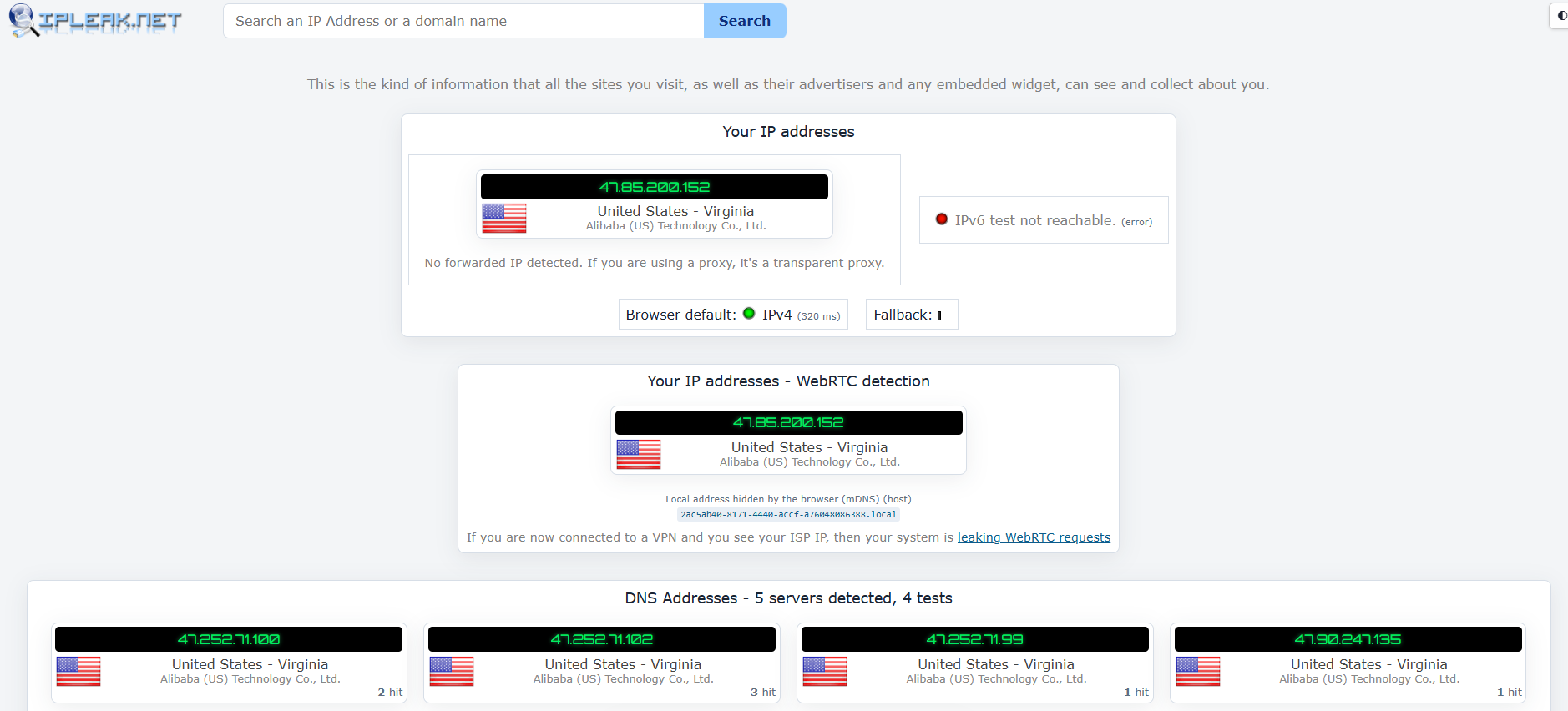
The benefit of this layout is that you do not have to move between several tools. You can look for changes along the same page before and after connecting, and tell someone which module to inspect during remote troubleshooting. For people unfamiliar with networking, the feature names at least divide the problem into several actionable parts.
The easiest detail to miss is whether a check has started or finished. During the page observation on October 21, 2026, the states included:
- Pending: DNS was still waiting for results.
- Activate: Torrent or browser geolocation still needed to be started.
- A displayed result: it concerned only that particular check.
One page is convenient, but a clearer completion indicator would help. The absence of a local address alone would not make me count the whole page as passed.
I do not think adding an overall score would solve this problem. A more useful improvement would be for each module to show more clearly whether it is complete, failed, not authorized or not started. Users should record those states too, rather than only look for whether a local address appears.
Define the Scope First: Which Programs Should Use Which Paths?
Before checking, one question matters more than refreshing the page: where is the proxy configured? A browser extension, an application's own proxy setting, a system proxy and a VPN may have different scopes. Even if they all use the same service address, that does not mean every program handles connections and resolution in the same way.
For example, if only the browser has a proxy configured and a download client continues to connect directly, the proxy service has not necessarily failed. The client may simply never have used that setting. Conversely, if the entire device is supposed to use a tunnel but an application still shows the local public exit address, coverage or split-routing rules deserve investigation.
A “leak” therefore requires a clear expectation first. Two different addresses do not automatically establish one; the issue is a public path appearing where it should not. Without that premise, legitimate split routing can also be mistaken for a fault.
Four Things I Suggest Writing Down First
- Which browser or client you are verifying, and whether it has an independent proxy configuration.
- Which paths ordinary webpages, DNS, real-time communication, IPv4 and IPv6 should each use.
- Whether some applications or domains are allowed to connect directly, and the scope of that allowance.
- Which tests actually relate to the task, and which can be left inactive.
These few lines make IPLeak's results easier to interpret. They also make subsequent communication specific: the issue becomes a particular type of request from a particular application failing to take the expected path, rather than an abstract claim that “the test failed.”
The Ordinary Exit Module: A Useful First Step with a Limited Scope
The addresses at the top of the page are observations the website makes from the relevant connections. They help establish which public address the detection service sees when this browser accesses it. This is a useful first check after changing a configuration: if the exit has not changed, there is little reason to rush into finer fingerprint details.
However, this does not represent the proxy status of every program on the device. A browser reaching IPLeak does not prove that a command-line tool, email client or download application uses the same configuration. Nor does the site recognizing one country establish that every business website will recognize the same one.
IPv4 and IPv6 Both Need Confirmation
A device may support both address families. If a proxy or tunnel covers only one, the other path may differ from expectations. IPLeak provides entry points for the respective address families, making it useful for narrowing the problem.
An absent address family also needs an explanation. The device may lack that connectivity, a request may have failed, or the page may not have finished executing. Verify it against the device and client configuration rather than automatically describing “not displayed” as “safely blocked.”
I would first establish the actual exit for ordinary browser requests, then move on to the other modules. That way, if a problem later appears, its connection category is clearer, instead of repeatedly changing addresses and refreshing without a diagnostic direction.
WebRTC: Which Addresses Appear Matters More Than How Many
WebRTC supports real-time communication in the browser. Through candidate addresses and network probing, it may establish connection conditions different from ordinary webpage requests. Checking only the webpage exit is therefore insufficient to represent this module.
Giving it a separate section is a practical design choice by IPLeak. Users can compare the ordinary exit with public addresses exposed through real-time communication. If the latter reveals a local public path that the remote party clearly should not see, there is a basis for further investigation.
Private addresses, .local names and public addresses need to be distinguished, however. Private addresses are normally used within a local network, while mDNS names may conceal directly displayed local-network addresses. They should not all be treated as public IP leaks merely because they differ from the proxy exit.
How Should You Follow Up on a Difference?
First identify the nature of the address, then examine how the browser, client and current proxy handle real-time communication. If the current configuration cannot support the expected path, the connection arrangement needs adjustment. Replacing the address with one that has a better reputation should not be assumed to solve it.
Whether to disable WebRTC depends on the need for calls, meetings and other real-time features. Disabling it may disrupt normal functions, and installing an extension does not automatically solve every combination of versions and clients. A more reliable approach is to validate the configuration in the current environment and retain the results.
IPLeak's help gives directions for some browsers and explicitly marks the old WebRTC Network Limiter extension as obsolete. This deserves credit: it at least warns readers against treating a fix from years ago as a universal current solution. Specific settings should still be checked against current browser documentation.
DNS: Testing Resolution Requests, Not Listing Everything You Access
Accessing a domain usually begins by converting its name to an address. IPLeak's DNS module uses specific queries to observe which resolution services respond to the probes. It helps answer which services actually handle this type of name lookup and whether that matches expectations.
The DNS addresses listed on the page should not simply be read as your own exit addresses. Nor should a resolver's country be treated directly as the device's country. Public resolution services, forwarding and different deployment arrangements can all make them differ.
My view is that this module is useful for finding unexpected resolution paths, but interpretation needs configuration context. When an unfamiliar resolver appears, asking whether it comes from the system, the browser's secure DNS, the router or application settings is more productive than immediately declaring a leak.
| What the page shows | Conditions to verify first | A reasonable next step |
|---|---|---|
| DNS keeps waiting | Whether the network, scripts and probes have completed | Record the incomplete state and check again if necessary |
| An unexpected resolution service appears | Browser, system, VPN and split-routing settings | Identify which layer selected the resolution path |
| Multiple resolution services appear | Whether forwarding, parallel handling or different application configurations are involved | Assess against expectations, rather than assigning risk by count |
| The address is in a different country from the exit | Service deployment and routing context | Check the path requirements rather than mechanically requiring the same city or country |
Secure DNS and System DNS May Be Separate Settings
Modern browsers may have their own encrypted resolution configuration, while the system and VPN may also set resolution services. Changing system DNS does not establish that the browser uses it. A normal browser result likewise does not represent other applications.
This explains why I would recommend IPLeak for actual troubleshooting: it places the problem in an inspectable module. A complete demonstration that all resolution traffic passes through a particular tunnel may still require client logs and more detailed network observation. A webpage result is only part of that evidence.
Torrent Detection: A Distinction from Ordinary IP Lookup Sites
After a proxy is configured only for the browser, download software may continue to use a different path. IPLeak's separate Torrent test addresses exactly this difference between applications.
The Torrent test earns its place because the download client actually takes part. The test magnet link makes the client contact a tracker—a server coordinating connections—controlled by IPLeak, which can then see that request’s exit. It does not merely reuse the browser’s result for the download program. That is why it can reveal a browser using the proxy while the client connects directly.
The advantage is clear: it can reveal a situation where the webpage uses the proxy but the client does not. Users gain a specific point of observation without first analyzing every network packet. For people who actually use such clients, it is closer to the task than checking a webpage exit alone.
How Far Does One Observation Extend?
It describes the client and tracker connection involved in that test. It does not automatically cover every protocol, connection or future session of the client. Whether other requests use the same path needs further verification against client settings and the specific task.
This review did not activate the Torrent test and therefore provides no pass result for any client. Whether readers start it depends on its relevance to their tasks. Those who do not use this type of client can leave it untested, without activating every feature merely to make the page look complete.
I think this module illustrates IPLeak's most valuable approach: moving from an overly broad question such as “is the whole device safe?” to “which address did this type of request from this program use?” The latter is easier to test and easier to fix.
Two Maps May Differ Because They Use Different Forms of Geolocation
IPLeak has both a location derived from IP databases and a browser geolocation module requiring activation. Their proximity on the page can make readers think both are checking the same IP.
The easiest mistake is treating the two maps as the same test. The IP map uses a database; browser geolocation needs location permission and may use the device’s location capabilities. It is not another IP lookup. Showing both helps comparison, but unclear labeling can make device location look like a proxy failure.
Moving the proxy to another region therefore does not mean device location data automatically moves with it. Two maps disagreeing cannot be attributed directly to an incorrect proxy region; first establish the source of each map. Denying location permission also does not mean the test has completed and established an absence of location information.
Do Not Overlook the Accuracy Radius When Reading Coordinates
IPLeak's address details include Accuracy Radius. The site also explains that some data comes from MaxMind and may be cached. Coordinates and city names should be interpreted alongside their radius, source and time, rather than read as the device's street location.
If the task requires only a country, differences in city points may not affect acceptance. If it requires a specific city, stronger evidence and an explicit tolerance are needed. The more precise a map looks, the more important it is to ask how precise a conclusion its data actually supports.
I appreciate the inclusion of a radius in the details: it is more candid than a map pin alone. For nontechnical users, however, the two geolocation entry points still need a more prominent explanation. Otherwise, the more complete feature set can make it easier to mix results from different sources.
How Can You Make Checks Comparable After Reconnecting?
After switching a VPN or proxy, I would not recommend simply watching an old page that is already open. Connections and page state may retain earlier information, and IPLeak's help also advises checking in a newly opened tab. Rechecking needs a clear starting point for the new configuration.
I would arrange a small comparison around the task:
- Record the current browser, client version, connection method and permitted split routing.
- Once connected, open a new test page and confirm the ordinary exit.
- Wait for the relevant automatic modules to complete, preserving failed or pending states.
- Activate only modules relevant to the task for which you are willing to grant permission.
- After changing one relevant setting, repeat the same steps.
- Save the actual exit, time and specific differences, then return to the actual task for validation.
The point of this procedure is to reduce variables. If DNS is changed, WebRTC disabled, the exit switched and the browser replaced at once, even an improved result offers little clarity about what worked. A “complete optimization” without a causal direction often makes the next round of troubleshooting harder.
Confirm Protocol Support and Scope Before Connecting
After setting up PuraRoute, I would check once in the browser and again in the application actually used. Consult the setup method for the chosen resource and client to confirm the protocol and which traffic it covers. This is particularly useful when using both a browser and download software: configuring one program does not configure the other.
This also makes product selection more specific. Establish first whether you need browser access, application access or broader connection management, then choose the appropriate resource and configuration. Residential status and path coverage are separate questions: satisfying the former cannot replace the latter, and they should be tested separately.
Three Cases of Different Addresses That Call for Different Fixes
The following scenarios illustrate the troubleshooting approach; they are not three commercial proxy tests. They show how differences on the same page need the context of intended use before they can guide action.
The Browser Is Correct, but the Download Client Still Uses the Local Exit
If the proxy was configured only in the browser, this result may fully match the current configuration. The next step is to check whether the client supports and has enabled the relevant connection method, along with how it handles different requests. Replacing the address that already works correctly in the browser should not come first.
After a fix, involve the relevant client in the test again and confirm whether the observation changes. If the actual task includes other connection types, continue checking the corresponding settings. IPLeak helps narrow the application scope here; it does not guarantee on the client's behalf that every connection uses the same path.
The Webpage Exit Matches Expectations, but the Resolver Is Unfamiliar
First check whether it is a public resolution service you enabled, the browser's secure DNS or an enterprise network configuration. If it is part of the intended design, unfamiliar does not mean faulty. If the task explicitly requires resolution to follow a designated path and the result conflicts with that requirement, identify the layer selecting the resolution service.
When contacting a supplier, “DNS is wrong” is still too broad. Recording the service in the module, browser and system configuration, and your expectation helps locate the problem more than sending a country name alone. Rechecking under the same conditions after a change is how you establish whether the adjustment took effect.
The IP Map Is Overseas, but Device Geolocation Still Shows the Real Location
First check location permission and the source of the page's location information. A proxy changes the network exit; it does not mean the device's location capabilities have changed. If you do not want a webpage to obtain device location, manage the relevant permissions rather than buy a more “accurately located” exit.
Conversely, if location features need to work normally, simply disabling all geolocation may also affect the task. Choose the scope of authorization according to the specific need, then check the results. This scenario makes the point particularly clearly: calling every difference a leak can lead users to fix the wrong problem.
Address APIs Save Steps, but Do Not Run Every Browser Test
IPLeak also offers output such as JSON and service entry points for different address families. These are convenient for recording addresses and related information, reducing manual copying. However, the presence of an API does not mean one request executes every test available in the browser.
Manually querying an address primarily retrieves information about that address. Having the current client access an endpoint can reveal the exit for that type of request. Neither replaces browser scripting capabilities, permission-based location or actual participation by another client. Before automating, write down exactly what the endpoint observes.
I would recommend understanding the manual procedure first, then automatically saving stable fields. If waiting and not started are not even distinguished, automation will merely generate a batch of hard-to-explain “normal reports” more quickly. For occasional users, one complete, clear record is already enough to support many troubleshooting conversations.
Who Is IPLeak Best Suited To Compared with BrowserLeaks and Whoer?
Whoer offers a more prominent summary for a quick environment overview. BrowserLeaks has richer modules and raw information for investigating specific mechanisms further. IPLeak's advantage is connecting several practical types of connection on one page, particularly including a test requiring another client's participation.
I would prioritize it for people who need to check split routing, IPv4/IPv6, DNS or download clients. Those focused only on residential origin, abuse history or geolocation databases should add the corresponding tools. An absence of risk labels in IPLeak does not mean the resource has received a reputation certification.
The site has clear ties to AirVPN's support and community. That does not prevent use of the test modules, but readers should know the tool's background rather than imagine it as a laboratory that has independently completed comparative experiments on all VPN and proxy products. This review also makes no assessment of any service's leak rate on that basis.
Final Assessment: Making “the Proxy Is Connected” Something You Can Verify
IPLeak is not the most score-driven tool, and it does not explain every result for ordinary users. Pending states, multiple sources of location and manually activated modules still take effort to interpret. Some deeper questions also require checking the client and system.
Its features do, however, center on a real need: establishing whether different requests follow the expected paths. For anyone who has encountered a webpage working normally while another program connects directly, that check is more useful than another IP label.
My recommendation is to use it as a verification page after configuring a connection, choose modules according to the task, and preserve incomplete states and those where permission has not been granted. The test becomes useful to your work when you can explain which program sent which type of request along which path, under which configuration.
FAQ about IPLeak
If IPLeak shows the correct webpage exit, does the whole device use the proxy?
No. Other applications, resolution requests and real-time communication may use different settings and need to be checked within their actual scope.
Does Pending in DNS mean there is no leak?
No. It indicates waiting and an incomplete result. Preserve that state and investigate the conditions needed for the test to run.
Does a .local name in WebRTC expose the local public address?
That conclusion cannot be drawn from the name. It may be an mDNS name, which should be distinguished from private and public addresses.
Does the Torrent test run automatically?
Simply viewing the webpage does not mean it has completed. It requires the relevant activation and client participation. This review did not actually start it.
Does a difference between browser geolocation and the IP map mean the proxy is faulty?
Not necessarily. They have different sources: device geolocation involves permissions and available location capabilities, while the IP map depends on database inference.
How should I check again after changing the proxy?
Once connected, open a new page, confirm the relevant modules' states, compare under the same conditions, and record the actual exit and time.
Can IPLeak test residential status or target-platform success rates?
It cannot replace the corresponding acceptance checks. It mainly helps examine connection and exposure paths; actual task performance still needs validation in use.
