
A second ad account goes live inside the same Business Manager, on the same endpoint as the first. Ten days later the first one is restricted. The second follows the week after, having run nothing of its own.
That is where a proxy for Facebook earns its keep, and it is also where most setups go wrong. The address is one input among four, and on Facebook it is wired to more things than on most platforms: a profile, a Page, an ad account, and the card that pays for it.
So this guide spends as much time on the parts a proxy does not touch as on the parts it does. That is where the fixes usually are.
Why a Proxy for Facebook Behaves Differently From Other Platforms
Instagram, Reddit and TikTok judge a session by where it lands and what it does once it is there. Facebook adds machinery that sits outside the session: the ad account, the payment method behind it, and the review history attached to both.
What Meta Weighs When a Session Signs In
Four inputs decide how a sign-in is treated. The address the request leaves from. The history that address carries. The device the session appears to run on. And what the account has been doing lately.
A proxy touches the first and, over time, nudges the second. The other two do not move at all. That is a narrow remit for something people buy expecting invisibility.
Nothing gets encrypted twice, either. The TLS connection still terminates at Meta, the password still goes through the same form, and rate limits and review queues behave exactly as they did before. The same confusion shows up with Gmail over a proxy, where buyers expect a second layer of protection and get an exit address instead.
Where Proxy Setups Break on Facebook
Four failure points account for almost every complaint, and only one of them is really about the proxy.
| Where it breaks | What it looks like | What the proxy governs |
|---|---|---|
| Sign-in and checkpoints | A code to a phone, or a request to confirm identity | The address and its history |
| Ad account review | The account is restricted and spending stops | The address only |
| Page or Marketplace display | A listing reads as foreign to local buyers | The address only |
| Payment checks | A card is declined, or the method is questioned | Nothing |
Read the last three rows again. An ad account can be restricted while the proxy tests perfectly clean, because review looks at the Page, the creative, the landing page and the account's own record. A payment method issued in one country and used from another draws its own scrutiny. No proxy setting reaches any of that.

What a Proxy Cannot Change
Action rate, device signals, payment details and published content sit outside the address, and Meta weighs each of them on its own. A proxy changes none of them.
Worth stating once and moving on, because the opposite belief is what causes the damage described further down.
Why One Address Behind Several Accounts Links Them
When two accounts leave from one address, the platform does not have to guess whether they are related. The shared exit is the evidence, and a restriction placed on one becomes a fact about the other.
None of this is specific to Facebook. Account linking on Reddit works from the same raw material.
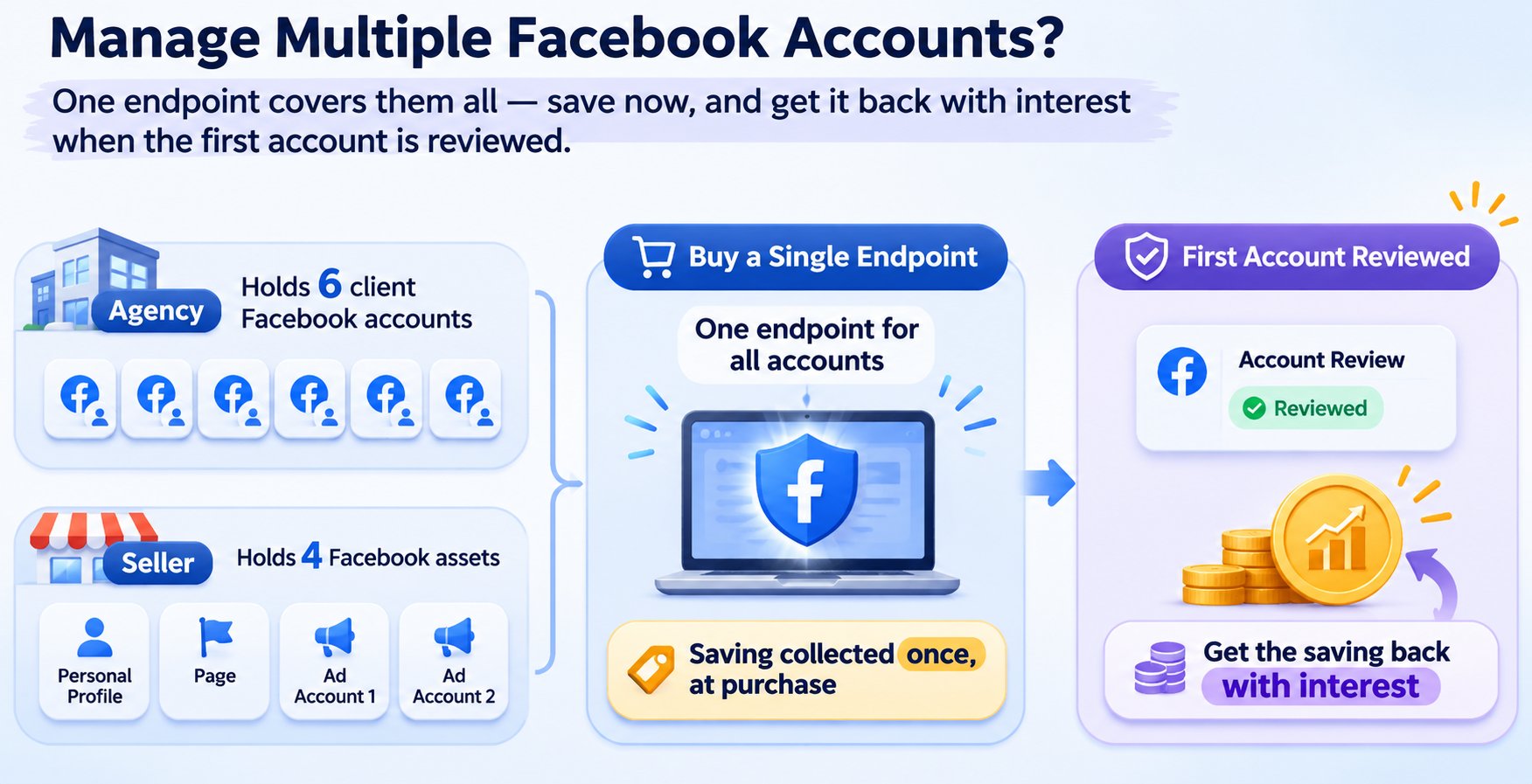
What makes it sharper here is that Facebook accounts rarely get operated one at a time. An agency holds six client accounts. A seller holds a personal profile, a Page and two ad accounts. Buy a single endpoint for all of them and the saving is collected once, at purchase, then paid back with interest the first time one account is reviewed.
What Triggers a Check on a Proxy for Facebook Session
Two different failures get described with the same words: the connection that stops working, and the account that starts being questioned. They have separate causes, and telling them apart saves a day of changing settings that were never the problem. Most reports of a broken proxy for Facebook turn out to be the second kind.
A New Country, A New Checkpoint
Every account accumulates a location history. Months of sign-ins from one city make that city unremarkable, and a sign-in from it passes without comment. A sign-in from a country the account has never been used in lands somewhere else entirely.
The prompt that follows is familiar: a code to a backup phone, a request to confirm the account belongs to you, or a temporary limit on some actions.
What surprises people is the timing. Trouble usually arrives days after the change, not during it, because a pattern needs repetition before it reads as wrong. Day one on a new address often passes quietly. Day four does not.
The Ad Account Layer
An ad account is judged on more than the session that opens it. The payment method on file, the Page the ads run under, the landing page a click reaches, and the account's own history of reviews all feed the decision. A proxy reaches the first hop and stops there.
Marketplace carries a version of the same problem in reverse. Listings are served by area, so an exit in another country makes a genuine local listing read as foreign to the people who see it.
Where a proxy does help is testing: open the Page, the ad preview and the listing from the market you are selling into, and you see what a buyer there sees. That is a real capability, and it is a much smaller claim than the one most proxy vendors make.
Sessions Started on a Phone
Mobile deserves its own heading because it fails in a way that produces no error message.
On iOS and Android alike, a proxy is configured per Wi-Fi network. The setting lives inside the network details, not inside the Facebook app. Three consequences follow:
- The proxy applies only while the phone stays on that network.
- Switching to cellular drops it silently, and the account reappears from a carrier address.
- Whether the Facebook app follows the setting at all depends on its own networking stack, not on the system toggle.
The Android Wi-Fi dialog also has no fields for a username and password, which leaves an IP allowlist as the only authentication option at that level.
A session that starts on Wi-Fi and continues on cellular is two addresses, and both are visible to the platform. This is the quietest way a setup stops being what you configured.

How to Choose a Proxy for Facebook
Once the failure points are mapped, the choice of a proxy for Facebook comes down to two questions: which kind of address, and how long it stays yours.
Residential, Datacenter and Mobile
Three families cover nearly every case, and they differ in where the address comes from rather than in how fast the connection is.
Residential addresses belong to home internet connections on consumer ISP networks. Most genuine logins originate there, which is why they sit closest to what the platform expects to see.
Datacenter addresses belong to cloud and hosting providers. They are cheap and fast, and their network registration says what they are before you send a request. Their record on social platforms is poor for that reason.
Mobile addresses belong to cellular carriers, where carrier-grade NAT puts a great many subscribers behind one public address. Platforms are used to the crowd, which is what the premium buys. Note that a carrier-native address is a fixed address on a carrier network, not a rotating mobile pool; the two get sold under similar names and behave nothing alike.
| Type | Where the address comes from | Billing | Fit for signed-in work |
|---|---|---|---|
| Rotating residential | Home ISP networks, large pool | Per GB | With sticky sessions |
| Static residential | Home ISP, exclusive to one customer | Per address | Yes |
| Mobile or carrier native | Cellular carriers | Per address, highest | Yes, budget permitting |
| Datacenter | Hosting providers | Cheapest | Poor |
How the two residential formats differ is the next decision down, and it matters more for Facebook than for one-off tasks.
Sticky or Rotating
Rotation exists for requests that do not need to be remembered. A login is the opposite of that.
When the address changes between the moment a session token is issued and the next request, the platform is handed two facts that contradict each other and settles the conflict by asking you to sign in again. If that happens inside a Business Manager session, the interruption lands in the middle of whatever you were doing.
Sticky sessions hold one address for a window you set. Match the window to the length of a real working session rather than to a default, because a quick check of one ad and a two-hour moderation pass need different numbers. Static addresses take the simpler route: the address is yours for the term, so there is no window to tune.
What to Confirm Before You Pay
Six things are worth settling before a card is entered:
- Where the addresses come from. Residential, ISP or carrier networks, stated plainly rather than implied.
- Whether the address is exclusive or shared with other customers.
- How authentication works. Username and password, IP allowlist, or both.
- Location granularity. Country at minimum, city and ASN when you are matching an existing pattern.
- Session control. Sticky windows you can set, or rotation you cannot turn off.
- Inventory before payment. Whether the country and city can be confirmed ahead of checkout.
How to Set Up a Proxy for Facebook
Configuration is the shortest part of a proxy for Facebook setup and the source of most of the frustration, because a mistake here looks exactly like a mistake at the provider.
Desktop Configuration
The browser route is the simplest. An extension or a dedicated browser profile keeps the proxy scoped to the profile you use for Facebook work and leaves the rest of the machine alone. Steps for that route are in how to use residential proxies in Chrome.
An operating-system proxy works too, with two limits worth knowing in advance. Windows settings handle HTTP and HTTPS only, so a SOCKS5 endpoint has to be configured inside the application. The same dialog has no field for a username and a password, which is why providers offer an IP allowlist instead. That is where the 407 error comes from, and it is not a wrong password.
A separate browser profile pays for itself beyond the proxy. Two profiles keep two accounts from sharing cookies and local storage, which is a device-level signal the address does not touch.
Verifying the Exit Before You Sign In
Run the checks in this order, because each one rules out a different layer:
- Load a neutral site. If it fails, the proxy is not passing traffic at all.
- Check the exit address on an IP lookup page and compare country and city against the order.
- Open Facebook without signing in. If the login page loads, the connection reaches Meta.
- Only then sign in, and keep that session on the same address until it ends.
The second step is worth doing twice. Proxy test results from different databases can disagree about the same address, and the country field is usually where they part ways.
Starting at step four is the mistake to skip. Signing in first to discover the proxy is dead puts a failed attempt on the account for no reason.
Troubleshooting the Common Failures
| What you see | Likely cause | First thing to check |
|---|---|---|
| 407 Proxy Authentication Required | Credentials missing or rejected | Whether the endpoint needs an allowlist instead |
| Connection timeout | Wrong port, or a protocol mismatch | Port and protocol against the provider's connection details |
| Login page loads, then a checkpoint | Proxy works, the address is unfamiliar | Whether the address sits in the account's usual region |
| Works for a day, then stops | Plan expired or traffic used up | Remaining balance in the console |
Two of those four are proxy faults. The other two are account and billing questions wearing a proxy costume.
What a Proxy for Facebook Costs in 2026
A cheap proxy for Facebook is usually cheap in a specific way, and that way tends to show up within a month.
What Moves the Price
Four variables decide the number:
- Billing unit. Per gigabyte suits short, occasional sessions. Per address suits work that holds one exit for weeks.
- Address family. Datacenter is cheapest and least useful for signed-in work. Mobile and carrier addresses are dearest because the supply is thin.
- Location granularity. Country-level allocation is standard. City and ASN selection adds cost.
- Exclusivity. A dedicated address costs more than a share of a pool, and that gap is the entire point.
Free Proxies and the Records They Carry
Free lists are shared by design, usually unauthenticated, and almost never documented. The addresses have been used by a lot of people for a lot of purposes, and that history is public — abuse databases keep entries tied to individual addresses, and an IP fraud score is one way to read what those entries say.
On Facebook a well-used address rarely produces an outright block. It produces friction instead: the login page loads, a checkpoint appears, and another one appears a few days later. That pattern is expensive in a way the price tag does not show.
Matching the Plan to the Workload
| Workload | Billing that fits | Why |
|---|---|---|
| One profile, opened daily | One dedicated address per term | The address stays fixed for the term |
| Several accounts, kept apart | One address per account | No shared exit to link them |
| Ad checks across markets | Per GB, rotating | Many locations, brief visits |
Cost, rather than capability, is what usually decides which proxy for Facebook plan a team ends up with. The recurring mistake is buying rotation for an account that stays signed in. It looks cheaper per unit and it is the wrong tool.
Proxies for Facebook Ad Management
Ad work adds a second layer of decisions on top of the session, and it is the layer where a proxy for Facebook either fits the job or quietly stops helping.
One Address per Ad Account
Inside a single Business Manager, ad accounts are already linked by the organisation that owns them. Adding a shared proxy endpoint on top of that removes the last thing that kept them apart at network level.
The practical rule is one address per ad account, held for as long as the account exists. It costs more than pooling, and it changes what a single restriction takes down from everything to one thing.
Checking Ads From the Market They Target
A campaign that looks correct in your own feed can show a different landing page, a different price and a different currency to the audience it was built for. Ad previews help; a connection from that market helps more.
For this task the requirement is breadth, not permanence: many countries, short visits, no need to stay signed in. It is the one job in this article where rotation is the right answer rather than the mistake.
Where the Proxy Stops and the Account Starts
Rejections, restrictions and spending limits are decisions about the ad, the Page, the landing page and the payment method. A proxy has no vote in any of them.
Teams lose days on this. The endpoint tests clean, so the proxy is blamed, replaced and reconfigured, while the actual cause sits in a rejected creative or a card that no longer matches the account's country.
Common Mistakes When Using a Proxy for Facebook
Everything above points at a short list of decisions, and nearly all of the failures trace back to one of them being made at purchase.
Buying Rotation for Logged-In Admin Work
Rotating pools are built for requests nobody needs to remember. Admin work is the reverse: a Business Manager session, a Page inbox, a moderation queue, all of it opened once and used for an hour.
A rotating endpoint breaks that continuity on purpose. Static and rotating proxies differ in one respect that matters here: how long an address stays yours.
Sharing One Exit Across Ad Accounts
It saves one line item on an invoice and puts every account on the same evidence trail. When one is reviewed, the address carries the outcome to the rest.
Separating them costs one address per account. Not separating them costs several accounts at once, and usually at the worst possible moment.
Assuming a Proxy Covers Compliance
A proxy makes where an account connects from consistent. It does not make what the account does acceptable, and it does not settle whether an ad, a Page or a listing meets policy.
Worth saying plainly because the belief is widespread: if an action would be a problem from a home connection, it is a problem from a proxy. The difference is that the proxy makes the aftermath tidier to investigate, not less likely.
PuraRoute for Facebook Account Work
Almost every decision above reduces to one question a buyer faces at checkout: is this one address that has to stay, or many that do not have to? PuraRoute sells both from a single account, which is the only reason it belongs in this article at all.
Fixed Addresses for Accounts You Open Daily
Static residential is the line for work that signs in every morning. The address is allocated to you for the term you buy, on 7-day or 30-day cycles, and traffic is unmetered, so leaving a Business Manager tab open costs nothing extra. Inventory for the country and city can be checked before you order rather than after. One address on the 7-day term comes to $2.25 as a reference total; the 30-day figure is quoted in the console before payment.
Above it sits carrier native, aimed at platforms with strict risk controls and sold on 7, 30 and 90-day terms. It exists for the accounts where a standard residential address keeps drawing checks. One endpoint on the 7-day term shows $9.00 as a reference total.
Rotating Residential for Market and Ad Checks
The other half of the work does not stay signed in: checking a landing page in three markets before launch, confirming which creative a local audience actually sees, or reviewing a Page as a visitor from that country. That runs on residential traffic billed by the gigabyte, drawn from 195+ countries and regions, with sessions that can rotate or hold and targeting that narrows to state, city or ASN.
Both lines accept an IP allowlist, generate credentials in the console, and speak HTTP(S) and SOCKS5 — which matters on Windows and Android, where the system dialog offers no field for a password.
One boundary, and then this section is done: a proxy changes the exit address and nothing else. It does not alter what an account does, what device it appears to run on, or how Meta weighs either. Those stay with you, and no plan includes them.
Frequently Asked Questions About Proxy For Facebook
Is a Proxy for Facebook Against the Rules?
Routing a connection through a proxy is not prohibited in itself, and a fair amount of ordinary work depends on it: agencies running client accounts, teams checking regional content, sellers confirming what an ad looks like in the market they paid for. What platforms act on is behaviour — coordinated accounts, automated engagement, content that breaks policy. A proxy is a network setting, not a permission slip.
Can One Proxy Cover Several Facebook Accounts?
Technically it can, and it is the configuration that fails most often. A shared address gives the platform a reason to treat the accounts as related, so a restriction on one transfers to the others. If the accounts are meant to stay separate, the addresses have to be as well.
Why Does Facebook Ask for a Code After I Change Proxies?
Because the sign-in now arrives from somewhere the account has no history with. The checkpoint is a question about that change, and it tends to appear a few days after the switch rather than immediately. Keeping one address for the life of the account is what stops the question from recurring.
Do Proxies Slow Facebook Down?
They add a hop. Requests reach the proxy first, then Meta, and responses come back the same way, so round-trip time grows with distance to the exit. A nearby, well-maintained endpoint is hard to notice. A distant or overloaded one is obvious, and image-heavy feeds show it first.
Can I Use a Proxy With the Facebook App?
On a phone, the platform-level setting is tied to a Wi-Fi network, so it stops applying the moment the phone switches to cellular. Whether the app follows the setting depends on the app's own networking stack. Test with an IP lookup page inside the app's browser before relying on it for anything that matters.
Conclusion
The question to settle first is what the account needs: one address that stays put, or many that do not. Nothing you configure afterwards fixes the wrong answer to that.
If it is one, buy a fixed address for a term and keep every session on it, including the ones that start on a phone. If it is several, buy traffic and set a window long enough for each task to finish.
Configuration comes second. Desktop and mobile settings are reversible, a wrong port is a five-minute fix, and none of it helps an account being questioned for what it does rather than where it connects from.
